web
You’re offline. This is a read only version of the page.
close
Skip to main content

Announcements

No record found.

News and Announcements icon
Community site session details

Community site session details

Session Id :
Supply chain | Supply Chain Management, Commerce
Answered

Purchase Order Lines

(0) ShareShare
ReportReport
Posted on by 20

Hi Community,

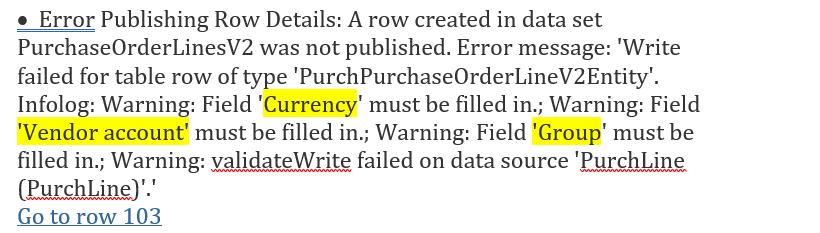
I want to import purchase order lines using excel add-in and I am getting the below error. Currency, Vendor Account, and Group must be filled in.
pastedimage1584691196388v2.png

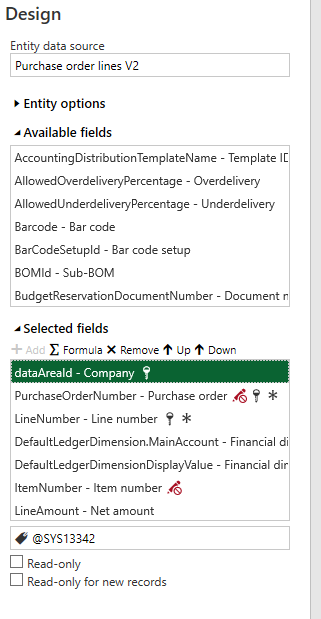
When I try to add the fields highlighted in yellow on the above screenshot, the fields are not available on the data entity - purchase order lines v2. How can I add these fields on excel add-in?

I am using design mode in excel-add in to add the required fields but these fields are not there.
pastedimage1584691612380v3.png

Thank You,

I have the same question (0)
  • Verified answer
    nmaenpaa Profile Picture
    101,172 Moderator on at

    You must first create a purchase order header. The header contains information about vendor account, currency and such.

    Then, use PurchId of the header on the lines.

  • Verified answer
    qianwang Profile Picture
    7,168 on at

    Hi Rendani,

    As the error message shows, did you add the new purchase orders in the excel? The purchase order lines v2 entity are used to update the order lines information, of which the POs have been created in the system.

    Regards,

    QianQW

  • Verified answer
    SouravDam Profile Picture
    11,732 on at

    Hello Rendani.Maphaha@immix.co.za,

    2 ways you can upload PO lines. Through "Excel add-ins" and through "Data management".

    In case if you have manually created a new PO first; then upload the lines in that PO by using Purchase order lines V2 data entity.

    Else; if you do not create any new PO in ERP yet; then first use Purchase order headers V2 data entity to create a new PO first. And then use Purchase order lines V2 data entity to upload lines in that newly created PO.

    Both you can try either by using "Excel add-ins" or "Data management".

    Kindly check and provide your feedback.

    Best regards,
    Sourav Dam

    Kindly mark this thread 'Yes' if this is answered your query which may help other community members in this forum.

  • Verified answer
    Rahul Mohta Profile Picture
    21,046 on at

    sequence of import is key

    first import header and then lines

    if header is imported with currency then lines would carry them

    you could also export one of the PO and use it as a template to import

  • Verified answer
    SouravDam Profile Picture
    11,732 on at

    Hello Rendani.Maphaha@immix.co.za,

    Is this sorted out?

    Appreciate if you kindly go through the suggestions and update us on this thread.

    Best regards,
    Sourav Dam

    Kindly mark this thread 'Yes' if this is answered your query which may help other community members in this forum.

  • Rendani.Maphaha@immix.co.za Profile Picture
    20 on at

    Hello Sourav Dam,

    The suggestions helped, I just forgot to update everyone.

    Thanks again for your continuous help.

    Best Regards,

    Rendani

Under review

Thank you for your reply! To ensure a great experience for everyone, your content is awaiting approval by our Community Managers. Please check back later.

Helpful resources

Quick Links

Introducing the 2026 Season 1 community Super Users

Congratulations to our 2026 Super Stars!

Meet the Microsoft Dynamics 365 Contact Center Champions

We are thrilled to have these Champions in our Community!

Congratulations to the April Top 10 Community Leaders

These are the community rock stars!

Leaderboard > Supply chain | Supply Chain Management, Commerce

#1
André Arnaud de Calavon Profile Picture

André Arnaud de Cal... 155 Super User 2026 Season 1

#2
Laurens vd Tang Profile Picture

Laurens vd Tang 101 Super User 2026 Season 1

#3
Zain Mehmood Profile Picture

Zain Mehmood 89 Most Valuable Professional

Last 30 days Overall leaderboard

Product updates

Dynamics 365 release plans
