web
You’re offline. This is a read only version of the page.
close
Skip to main content

Announcements

No record found.

News and Announcements icon
Community site session details

Community site session details

Session Id :
Microsoft Dynamics CRM (Archived)

Creating a Grid to Show the Relationship Between two Sets of Entities

(0) ShareShare
ReportReport
Posted on by

Hi there,

We have a situation where we need to view the relationships between two connected entities in a concise and information dense manner.  An ideal solution would be a grid that would show all the active elements of one entity on the rows and all the active elements of the other entity in the columns.  Color coding might be used to show important information, such as the strength of the relationship between the two entities.  

Unfortunately, Dynamics CRM does not support matrix style grids for viewing and reporting on entity relationships out of the box.

In specific, we have been tracking proposed features and functionality for our products in our CRM database with a new entity type called, "Ideas".  This entity is related to Sales Opportunities by way of a third, joining entity called "Idea Opportunity Links".  This allows many opportunities to be related to one Idea and conversely, many Ideas to be related to one Opportunity.

Our issue comes in when we want to view the intersections of these items in an information dense matrix grid view.  There are no functions in CRM to allow for this to be done out of the box.  Ideally, this grid view could be applicable to other relationships, such as Opportunities to Sales Team Members, etc.

Here is a diagram of what we'd like things to look like:  1346.Report-Example.png
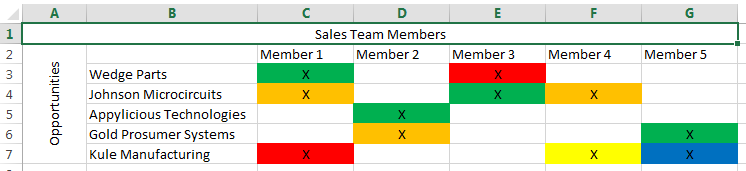
If you have any suggestions as to an affordable add-on that could accomplish this task, I would greatly appreciate it.  If not, any pointers on how to use the APIs to accomplish this would also be appreciated.

Thank you very much for your help and guidance!

Best Regards,

Eric

*This post is locked for comments

I have the same question (0)
  • FallingThroughTheCracks Profile Picture
    452 on at

    I am definitely the newby around here, but I plan to do something similar eventually.

    My strategy will be to connect to the CRM data source and any other necessary tables and display this and a few other management reports in Power BI.

  • Eric Vasbinder Profile Picture
    on at

    Agreed - PowerBI is an amazing tool.  But its support for on premise versions of Dynamics is sorely lacking.  We don't use CRM in the cloud.

    Best of luck to you!

  • FallingThroughTheCracks Profile Picture
    452 on at

    If your database is on prem then would you not have even more control by hitting the database directly?

  • Eric Vasbinder Profile Picture
    on at

    We could, but that's a risky proposition due to Microsoft not supporting that method.  Custom API development is our best bet if there are no affordable add-ons.  We found one that might have worked, but the minimum cost was $4000.  That's crazy high for one matrix grid.

  • Community Member Profile Picture
    on at

    Eric - Did you find any solutions?  Have a similar requirement

Under review

Thank you for your reply! To ensure a great experience for everyone, your content is awaiting approval by our Community Managers. Please check back later.

Helpful resources

Quick Links

Introducing the 2026 Season 1 community Super Users

Congratulations to our 2026 Super Stars!

Meet the Microsoft Dynamics 365 Contact Center Champions

We are thrilled to have these Champions in our Community!

Congratulations to the March Top 10 Community Leaders

These are the community rock stars!

Leaderboard > 🔒一 Microsoft Dynamics CRM (Archived)

#1
JS-09031509-0 Profile Picture

JS-09031509-0 3

#2
AS-17030037-0 Profile Picture

AS-17030037-0 2

#2
Mark Eckert Profile Picture

Mark Eckert 2

Last 30 days Overall leaderboard

Featured topics

Product updates

Dynamics 365 release plans
