web
You’re offline. This is a read only version of the page.
close
Skip to main content

Announcements

No record found.

News and Announcements icon
Community site session details

Community site session details

Session Id :
Microsoft Dynamics CRM (Archived)

Getting Control of an Entity Level List View in Customer Service Hub App

(0) ShareShare
ReportReport
Posted on by

Hi Community,

How can I get the control of this Grid?
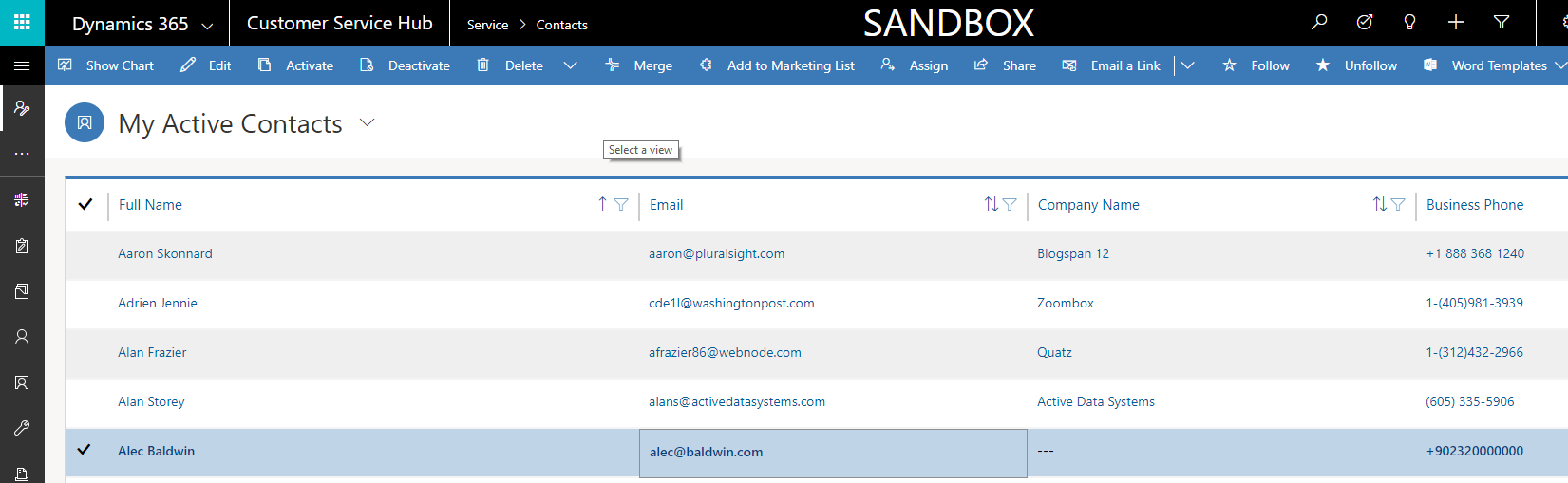
hub.png

Normally, I was using the following code to get control of the Grid in normal CRM applications.

document.getElementById("crmGrid").controls

However, in Customer Service Hub, there is no such a thing.

Thanks a lot in advance,

*This post is locked for comments

I have the same question (0)
  • a33ik Profile Picture
    84,331 Most Valuable Professional on at

    Hello,

    1. document.geElementById looks for me like a DOM manipulations that are considered as unsupported. I'm curious - why do you need that and how do you plan to use it?

    2. Generally speaking following articles describe what's possible with grids in supported way:

    docs.microsoft.com/.../grids

    docs.microsoft.com/.../clientapi-grid-context

  • Community Member Profile Picture
    on at

    Thanks for the response,

    I was trying to get the items in the grid but it is not possible via the Customer Service Hub application. Xrm.Page.GetControl("anyting") just returns null. Customer Service Hub application does not allow you to get any control. Even for normal fields on forms.

  • Suggested answer
    a33ik Profile Picture
    84,331 Most Valuable Professional on at

    I'm pretty sure it's possible. Check following changes came to application in 9.0 release - docs.microsoft.com/.../clientapi-form-context

  • Community Member Profile Picture
    on at

    Looks like I need to do something like that

    function doSomething(executionContext) {

      var formContext = executionContext.getFormContext(); // get the form Context

      var gridContext = formContext.getControl("Contacts"); // get the grid context

      // Perform operations on the subgrid

    }

    But how can I get the executionContext. Because I am not registering any javascript code for an onchange or onload pipeline. I need to do this from the console (Chrome Console F12 for instance). I am able to reach Xrm.Page but not able to reach to executionContext

  • Suggested answer
    a33ik Profile Picture
    84,331 Most Valuable Professional on at

    I'm afraid you will have to do that.

    Alternatively what you can try is to look how it's implemented in levelup chrome extension - github.com/.../Levelup-for-Dynamics-CRM

  • Community Member Profile Picture
    on at

    Thanks a lot. I will definitely look into that.

Under review

Thank you for your reply! To ensure a great experience for everyone, your content is awaiting approval by our Community Managers. Please check back later.

Helpful resources

Quick Links

Introducing the 2026 Season 1 community Super Users

Congratulations to our 2026 Super Stars!

Meet the Microsoft Dynamics 365 Contact Center Champions

We are thrilled to have these Champions in our Community!

Congratulations to the April Top 10 Community Leaders

These are the community rock stars!

Leaderboard > 🔒一 Microsoft Dynamics CRM (Archived)

Last 30 days Overall leaderboard

Featured topics

Product updates

Dynamics 365 release plans
