web
You’re offline. This is a read only version of the page.
close
Skip to main content

Announcements

No record found.

News and Announcements icon
Community site session details

Community site session details

Session Id :
Microsoft Dynamics CRM (Archived)

Removing the lookup value during the lookup search.

(0) ShareShare
ReportReport
Posted on by

Hi, 

We have a situation where we no longer need the lookup value while performing the search in the lookup search.  Is there any javascript/customization that we can make to remove this text in the lookup search. Please have a look at the snapshot for more details.

Any help on this is appreciated. Thanks in advance.
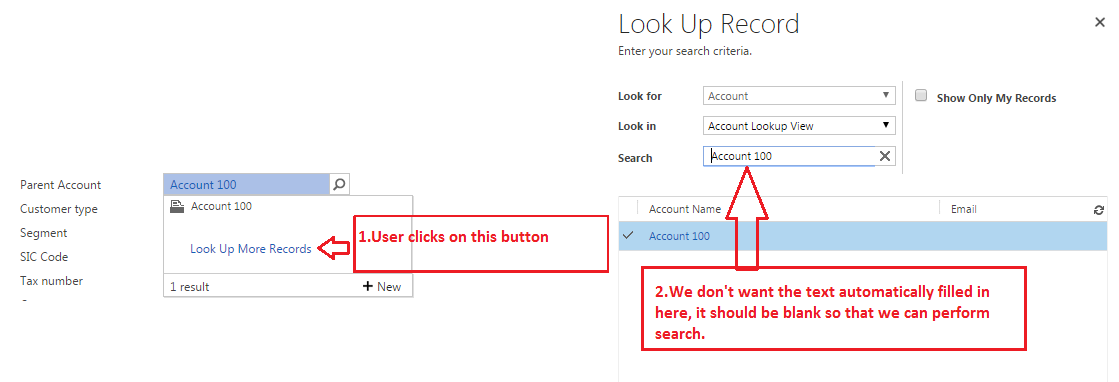
Lookup-issue.PNG

*This post is locked for comments

I have the same question (0)
  • Verified answer
    Community Member Profile Picture
    on at

    Hi Dathatreya,

    Their is no any customization that you can do for this ,

    The best I can suggest you that when you want to lookup more record you should either not select any value or remove the value before lookup more record.

  • Verified answer
    ansrikanth Profile Picture
    3,115 on at

    No, at least there is no supported way of doing it. If you want to go for some unsupported customization, you might have to push some javascript on load of the aspx page.

  • Suggested answer
    Community Member Profile Picture
    on at

    Hi,

    Its due to only one available result of that lookup. 

    8875.Screenshot-_2800_6_2900_.png

    8875.Screenshot-_2800_6_2900_.png

    Thanks..

  • Verified answer
    Nithya Gopinath Profile Picture
    17,078 on at

    Hi Dathatreya,

    In the lookup field, if you  just click on lookup icon, then the field "Search" will be empty.

    3276.4.PNG2210.2.PNG

    In the lookup field, if you search something (for example, ad), then the field "Search" will show value 'ad'.

    0552.3.png3276.4.PNG

    No customisation can be done. You should either leave the field empty or if you search something, it will appear in the lookup. So you should erase it before lookind up more records.

    Hope this helps.

    Thanks

  • Suggested answer
    PS Profile Picture
    23,577 on at

    Before clicking on lookup for more records, delete parent account value; later click on lookup more record

  • Suggested answer
    AbiRami Profile Picture
    516 on at

    Hi Dathatreya,

    Below link will help you to solve your problem

    crmbusiness.wordpress.com/.../crm-2013-javascript-null-setting-oddity

    Thanks

Under review

Thank you for your reply! To ensure a great experience for everyone, your content is awaiting approval by our Community Managers. Please check back later.

Helpful resources

Quick Links

Introducing the 2026 Season 1 community Super Users

Congratulations to our 2026 Super Stars!

Congratulations to our 2025 Community Spotlights

Thanks to all of our 2025 Community Spotlight stars!

Leaderboard > 🔒一 Microsoft Dynamics CRM (Archived)

#1
JS-09031509-0 Profile Picture

JS-09031509-0 3

#2
AS-17030037-0 Profile Picture

AS-17030037-0 2

#2
Mark Eckert Profile Picture

Mark Eckert 2

Last 30 days Overall leaderboard

Featured topics

Product updates

Dynamics 365 release plans
