web
You’re offline. This is a read only version of the page.
close
Skip to main content

Announcements

No record found.

News and Announcements icon
Community site session details

Community site session details

Session Id :
Microsoft Dynamics CRM (Archived)

Hide Ribbon Buttons, Ribbon Workbench

(0) ShareShare
ReportReport
Posted on by

I don't know, if it is any possible to hide Out of the box system ribbon buttons to all users:

Scenario: 

I have a requirement to hide "ADD TO MARKETING LIST"  to all users of the system:

This is a list of steps I took with Ribbon Work-bench

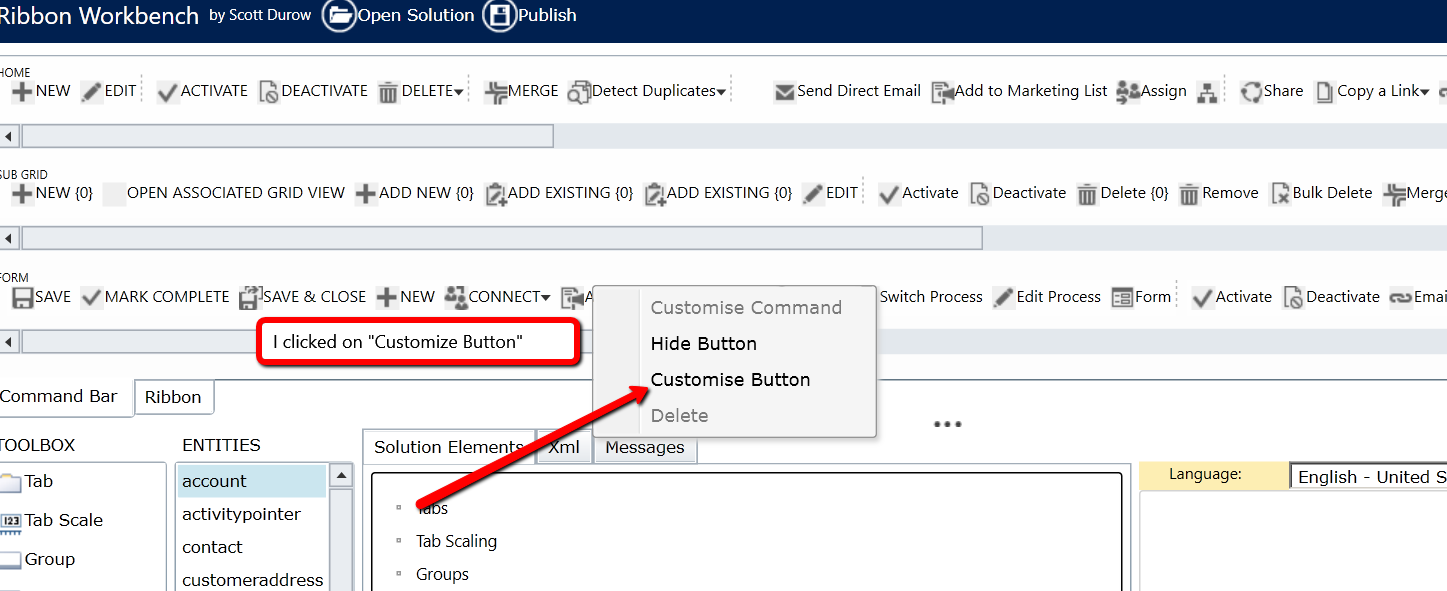
  1. Right-clicked on the button to customize itCustomize_5F00_button.png
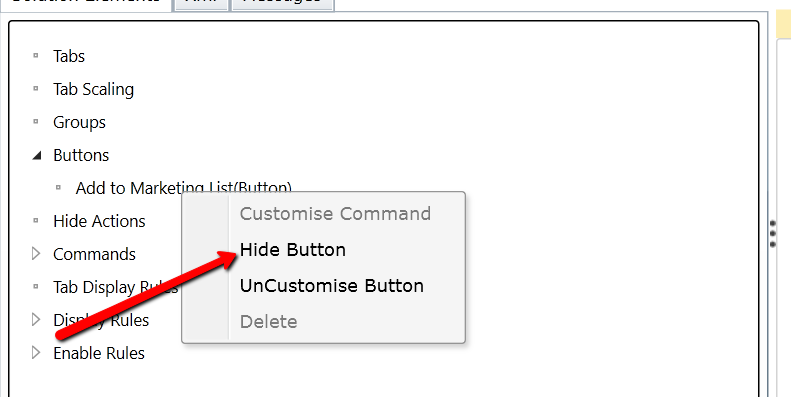
  2. Click on the Hide-Button commandHide_5F00_Button.png
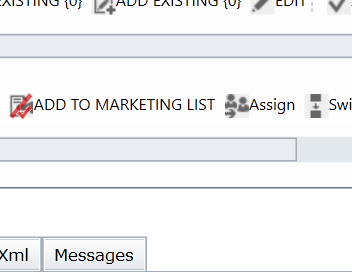
  3. After taking this two steps, this was my resultAfterMath.png
  4. Then I clicked the "UnCustomise Button" then click on Publish..

After, taking all this steps the button was still visible in the solution. Then, started all the steps again without clicking "UnCustomise Button", but still same result.

Am I missing any steps? Any suggestion or help would be appreciated.

*This post is locked for comments

I have the same question (0)
  • Verified answer
    Aiden Kaskela Profile Picture
    19,696 on at

    Hi,

    You followed the correct steps in steps 1 through 3 - make the button customizable and hit the Hide option. If you select Uncustomize, it'll undo your change (source: ribbonworkbench.uservoice.com/.../102796-5-hiding-unhiding-ribbon-elements).

    Make sure your button is marked as hidden, then publish the customizations in the ribbon tool. I've seen other suggestions that say to hit Publish twice because it doesn't always go through the first time. The ribbon itself may be cached with the old values too, so you'll want to close your browser if it isn't refreshing. This should take care of it though.

    Hope this helps! I'd appreciate if you'd mark this as a Verified answer.

    Thanks,

     Aiden

  • Suggested answer
    ScottDurow Profile Picture
    21 on at

    Hi,

    You don't need to customise the button - you simply need to use 'Hide Button'.

    If you have the button in the solution then this will take precedence over the Hide Action.

    I suggest that you 'UnCustomise Button' and delete the hide action. Publish, then re-load and simply select 'Hide Button' from the command bar.

    Hope this answers your question

  • Community Member Profile Picture
    on at

    Thank you, very much Aiden Kaskela & Scott Durow. Both solutions above, worked perfect. Scott Durow route was faster and easier for me.

  • Community Member Profile Picture
    on at

    What if you want the button visible to a certain security role?  

  • Arslan Ahson Profile Picture
    70 on at

    You can control visibility of the button based on security role using "Entity Privilege Rule" in Ribbon Workbench. For more detail please see

    www.powerobjects.com/.../solving-security-headaches-display-rules-based-on-security-roles

  • Arslan Ahson Profile Picture
    70 on at

    You can control visibility of the button based on security role using "Entity Privilege Rule" in Ribbon Workbench. For more detail please see

    www.powerobjects.com/.../solving-security-headaches-display-rules-based-on-security-roles

Under review

Thank you for your reply! To ensure a great experience for everyone, your content is awaiting approval by our Community Managers. Please check back later.

Helpful resources

Quick Links

Introducing the 2026 Season 1 community Super Users

Congratulations to our 2026 Super Stars!

Meet the Microsoft Dynamics 365 Contact Center Champions

We are thrilled to have these Champions in our Community!

Congratulations to the March Top 10 Community Leaders

These are the community rock stars!

Leaderboard > 🔒一 Microsoft Dynamics CRM (Archived)

Last 30 days Overall leaderboard

Featured topics

Product updates

Dynamics 365 release plans