web
You’re offline. This is a read only version of the page.
close
Skip to main content

Notifications

Announcements

No record found.

Community site session details

Community site session details

Session Id :
Microsoft Dynamics 365 | Integration, Dataverse...
Answered

Missing "New activity" option

(0) ShareShare
ReportReport
Posted on by

Hello, 

I have recently created several new apps and they are all missing the new activity option from the "NEW" menu.

I see all entities except the activities:
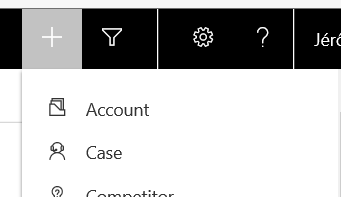
pastedimage1570723166520v1.png

I have created them by using the default site map.

I don't see a setting  to control this menu. Is it based on the create rights in security roles?

Why is is displayed on apps created by Microsoft and not on mine ?

I have the same question (0)
  • Suggested answer
    Henry J. Profile Picture
    5,237 on at

    Hello,

    I have custom apps that show activities in the Quick Create menu.

    Can you make sure that your activity entities and their Quick Create forms are part of your apps?

    Henry

  • Verified answer
    RaviKashyap Profile Picture
    55,410 Moderator on at

    I have tried this and found that (as suggested above), if the entities are not added to entity view in the app then it does not appear in the quick create global options.

    app.png

    Hope this helps

  • Community Member Profile Picture
    on at

    Hi Ravi and Henry,

    Thank you both. You had the right answer. I have added the entities and they are now available on the NEW button.

    Strangely, when you create a new app based on the default sitemap, some entities are not automatically added: email, appointment, phone call, task,..

    But the timeline was present and I could add activities like appointment, task,...

    It doesn't seem logical for me. If the entities are not in the app they shouldn't be available in the timeline...

  • Suggested answer
    Henry J. Profile Picture
    5,237 on at

    To provide more flexibility you can also filter the list of available entities at the timeline level.

Under review

Thank you for your reply! To ensure a great experience for everyone, your content is awaiting approval by our Community Managers. Please check back later.

Helpful resources

Quick Links

Responsible AI policies

As AI tools become more common, we’re introducing a Responsible AI Use…

Neeraj Kumar – Community Spotlight

We are honored to recognize Neeraj Kumar as our Community Spotlight honoree for…

Leaderboard > Microsoft Dynamics 365 | Integration, Dataverse, and general topics

#1
Martin Dráb Profile Picture

Martin Dráb 45 Most Valuable Professional

#2
iampranjal Profile Picture

iampranjal 36

#3
Satyam Prakash Profile Picture

Satyam Prakash 31

Last 30 days Overall leaderboard

Product updates

Dynamics 365 release plans
