web
You’re offline. This is a read only version of the page.
close
Skip to main content

Announcements

No record found.

News and Announcements icon
Community site session details

Community site session details

Session Id :
Small and medium business | Business Central, N...
Suggested Answer

Adjust Cost - Item Entries

(0) ShareShare
ReportReport
Posted on by 5

Hi,

We would like to ask you to answer the following questions:

  1. We have set the Average cost calculation type as Item & Location & Variant, and then we have updated the Unit Cost.

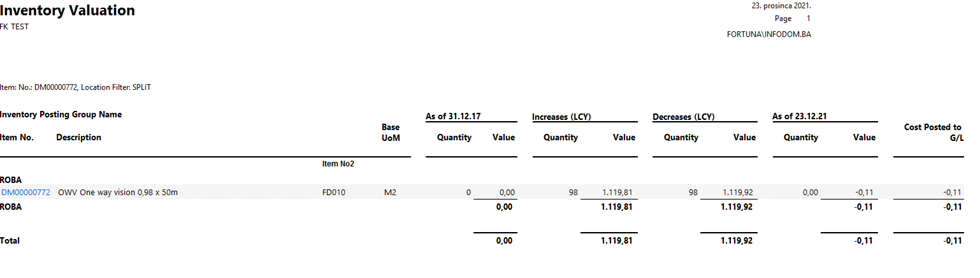
Now, when we use the report "Inventory Valuation" with the Location filter (example below), the report displays a value of -0.11, even if the quantity value is zero (0).
 pastedimage1640291188455v1.png

Since we have set the Average Cost calculation type as Item & Location & Variant, how is it possible to have a negative value if the quantity value is zero?

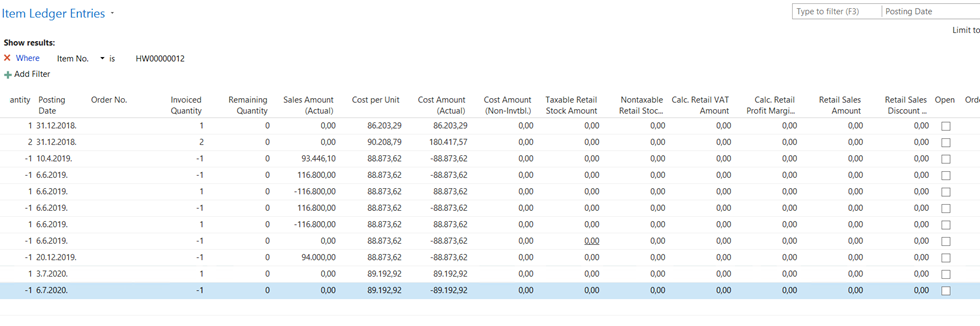
  1. Also, is it possible to update the Item unit cost for previous years, where the fiscal year is closed or where the item ledger entries are closed?                  As we checked the "Adjust Cost - Item Entries" batch job, the system only updates data for the open accounting period.

Example below:

Item Ledger Entries (Open - No,  and fiscal years for 2018, 2019 and 2020 are closed) :
 pastedimage1640291200817v2.png

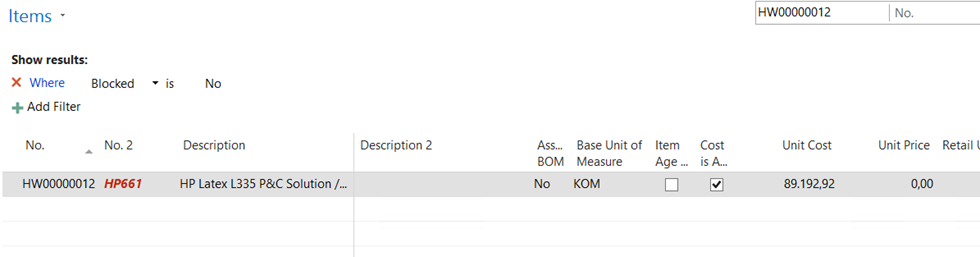
Unit cost with Average cost calculation type – Item (89.192,92)
pastedimage1640291214233v3.png

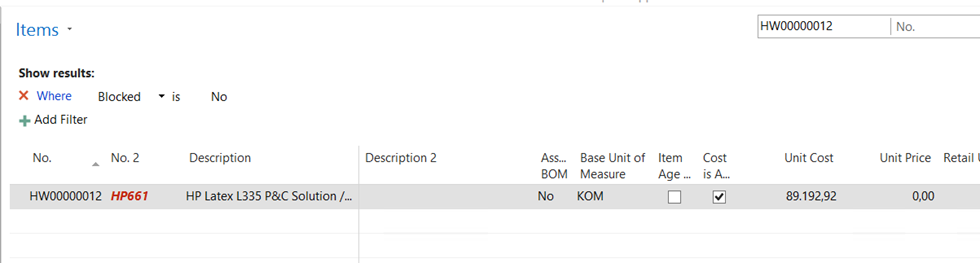
The same value is calculated when we use Average cost calculation type -  Item & Location & Variant.
 pastedimage1640291220503v4.png

Best regards,

I have the same question (0)
  • Suggested answer
    YUN ZHU Profile Picture
    100,214 Super User 2026 Season 1 on at

    Hi, This is a historical problem, if you search it in Google, you will find a lot.

    pastedimage1640302932367v1.png

    Hope the following will help.


    Thanks.

    ZHU

  • Suggested answer
    Community Member Profile Picture
    on at

    Teneo,

    Adding to Yun's reply... This has been a known issue for decades. In my experience then this is typically caused by either wrongly applied credit memos or allowing negative inventory (selling before the purchase invoice has been posted). Using manufacturing would will only complicate it. Microsoft created an item application tool to help you correct most of the issues.

    Once you have found the reason(s), then you may be able to use the item application tool to fix most the the problems. You find it here: docs.microsoft.com/.../design-details-item-application 13

    Hope this helps.

    Thanks,

    Steve

Under review

Thank you for your reply! To ensure a great experience for everyone, your content is awaiting approval by our Community Managers. Please check back later.

Helpful resources

Quick Links

Introducing the 2026 Season 1 community Super Users

Congratulations to our 2026 Super Stars!

Meet the Microsoft Dynamics 365 Contact Center Champions

We are thrilled to have these Champions in our Community!

Congratulations to the April Top 10 Community Leaders

These are the community rock stars!

Leaderboard > Small and medium business | Business Central, NAV, RMS

#1
OussamaSabbouh Profile Picture

OussamaSabbouh 1,948 Super User 2026 Season 1

#2
YUN ZHU Profile Picture

YUN ZHU 936 Super User 2026 Season 1

#3
Teagen Boll Profile Picture

Teagen Boll 616 Super User 2026 Season 1

Last 30 days Overall leaderboard

Featured topics

Product updates

Dynamics 365 release plans
