web
You’re offline. This is a read only version of the page.
close
Skip to main content

Announcements

No record found.

News and Announcements icon
Community site session details

Community site session details

Session Id :
Supply chain | Supply Chain Management, Commerce
Suggested Answer

Automatic calculation of sales order "confirmed receipt date"

(5) ShareShare
ReportReport
Posted on by 30
Hello all,
 
We use ATP as delivery date control in our D365FO.
On the sales orders for a specific customer, we need to have the order lines' "confirmed receipt date" calculated automatically, possibly based on the same line's already known "confirmed ship date" that ATP will have already calculated beforehand. Specifically, we need the system to take this "confirmed ship date" and add a pre-set and fixed number of days (=estimated transit days from our warehouse to customer's delivery address), and then populate the line's "confirmed receipt date" with the result.

Is this possible, and if so, how?
And where in FO should it be done - on the specific customer account, on the warehouse, in the item "default order settings", or somewhere else? (If it is only possible to do globally, so that this calculation is done for all customers in a legal entity, then this might also be fine - please let me know if this more global calculation is possible too)


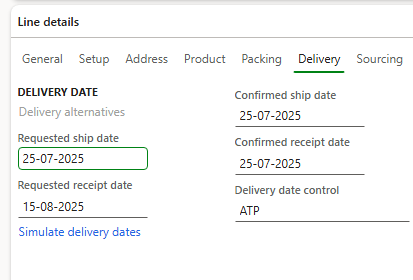
Below is an example of how it looks right now - ATP has determined that this order line should be released-to-warehouse and shipped on July 25th (25-07-2025) as seen in "confirmed ship date". As can be seen, this same date is copied in the field "confirmed receipt date" below - it is here that I request to see an automatic addition of extra transport days, instead of simply a copy of "confirmed ship date".
I have the same question (0)
  • Suggested answer
    Laurens vd Tang Profile Picture
    4,758 Super User 2026 Season 1 on at
    Hello Jesper,
     
    I believe that's not possible in standard Dynamics 365 SCM. You might consider a customization and/or raise an idea on the ideas portal. Link to the ideas portal: https://experience.dynamics.com/ideas/
     
    Best regards,
    Laurens van der Tang
  • Guy Terry Profile Picture
    28,977 Moderator on at
    I don't think I've used it in combination with ATP, but have you tried configuring Transport days (Inventory management > Setup > Distribution).
     
    Set the Receiving Point Type to Address and click New.
     
    Set the from Warehouse, the number of Transport days and the Customer's address including ZipCode. You can even have different Transport days for different Modes of Delivery.

Under review

Thank you for your reply! To ensure a great experience for everyone, your content is awaiting approval by our Community Managers. Please check back later.

Helpful resources

Quick Links

Introducing the 2026 Season 1 community Super Users

Congratulations to our 2026 Super Stars!

Meet the Microsoft Dynamics 365 Contact Center Champions

We are thrilled to have these Champions in our Community!

Congratulations to the April Top 10 Community Leaders

These are the community rock stars!

Leaderboard > Supply chain | Supply Chain Management, Commerce

#1
André Arnaud de Calavon Profile Picture

André Arnaud de Cal... 155 Super User 2026 Season 1

#2
Laurens vd Tang Profile Picture

Laurens vd Tang 101 Super User 2026 Season 1

#3
Zain Mehmood Profile Picture

Zain Mehmood 89 Most Valuable Professional

Last 30 days Overall leaderboard

Product updates

Dynamics 365 release plans
