web
You’re offline. This is a read only version of the page.
close
Skip to main content

Announcements

No record found.

News and Announcements icon
Community site session details

Community site session details

Session Id :
Microsoft Dynamics CRM (Archived)

Remove tooltip from CRM fields using javascript

(0) ShareShare
ReportReport
Posted on by

Hello,

I want to remove title (tooltip) from the CRM fields using javascript but I'm unable to do it please suggest me any solution.

I have field name description in account form so i want to remove opened long tooltip while mouse hovering on it, I've attached the screenshot for the same.
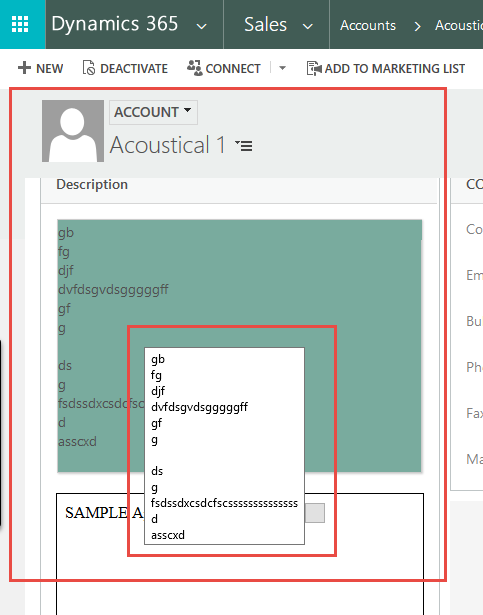
Description_5F00_Tooltip.png

Any help would be appreciated.

*This post is locked for comments

I have the same question (0)
  • Dynamics365 Rocker Profile Picture
    7,755 on at

    Below post may help you:

    community.dynamics.com/.../135714

  • Community Member Profile Picture
    on at

    Hello,

    Thank for the reply , I've tried this but it didn't worked for me, please suggest me any other solution.

    Regards,

    Disha Patel 

  • Suggested answer
    gdas Profile Picture
    50,091 Moderator on at

    May I know why you want to remove tooltip ? Is there any business impact  due to this ?

    There is no supported way to remove tooltip , please ignore this type of requirement and convince your customer accordingly  if this is not impacting any business.

    You can create html web resource with text box  and show description text there if you wish not to show OOB description field , but this is definitely  extra  work.

  • Suggested answer
    CRM Develope Profile Picture
    894 on at

    Hi,

    Please check below link:

    community.dynamics.com/.../135714

    Thanks

  • Community Member Profile Picture
    on at

    Hello Goutam,

    It is necessary to do that for our client , and we have to do it using javascript , do you have any other way for the same, please suggest.

  • Community Member Profile Picture
    on at

    Hello CRMDeveloper,

    I've tried that already but it didn't work please give me any other way to do it.

    Regards

Under review

Thank you for your reply! To ensure a great experience for everyone, your content is awaiting approval by our Community Managers. Please check back later.

Helpful resources

Quick Links

Introducing the 2026 Season 1 community Super Users

Congratulations to our 2026 Super Stars!

Congratulations to our 2025 Community Spotlights

Thanks to all of our 2025 Community Spotlight stars!

Leaderboard > 🔒一 Microsoft Dynamics CRM (Archived)

#1
Varsha deshpande Profile Picture

Varsha deshpande 5

#2
JS-09031509-0 Profile Picture

JS-09031509-0 3

#3
Mark Eckert Profile Picture

Mark Eckert 2

Last 30 days Overall leaderboard

Featured topics

Product updates

Dynamics 365 release plans
