web
You’re offline. This is a read only version of the page.
close
Skip to main content

Announcements

No record found.

News and Announcements icon
Community site session details

Community site session details

Session Id :
Supply chain | Supply Chain Management, Commerce
Answered

Shipping label not printing on ZPL printer

(5) ShareShare
ReportReport
Posted on by 39
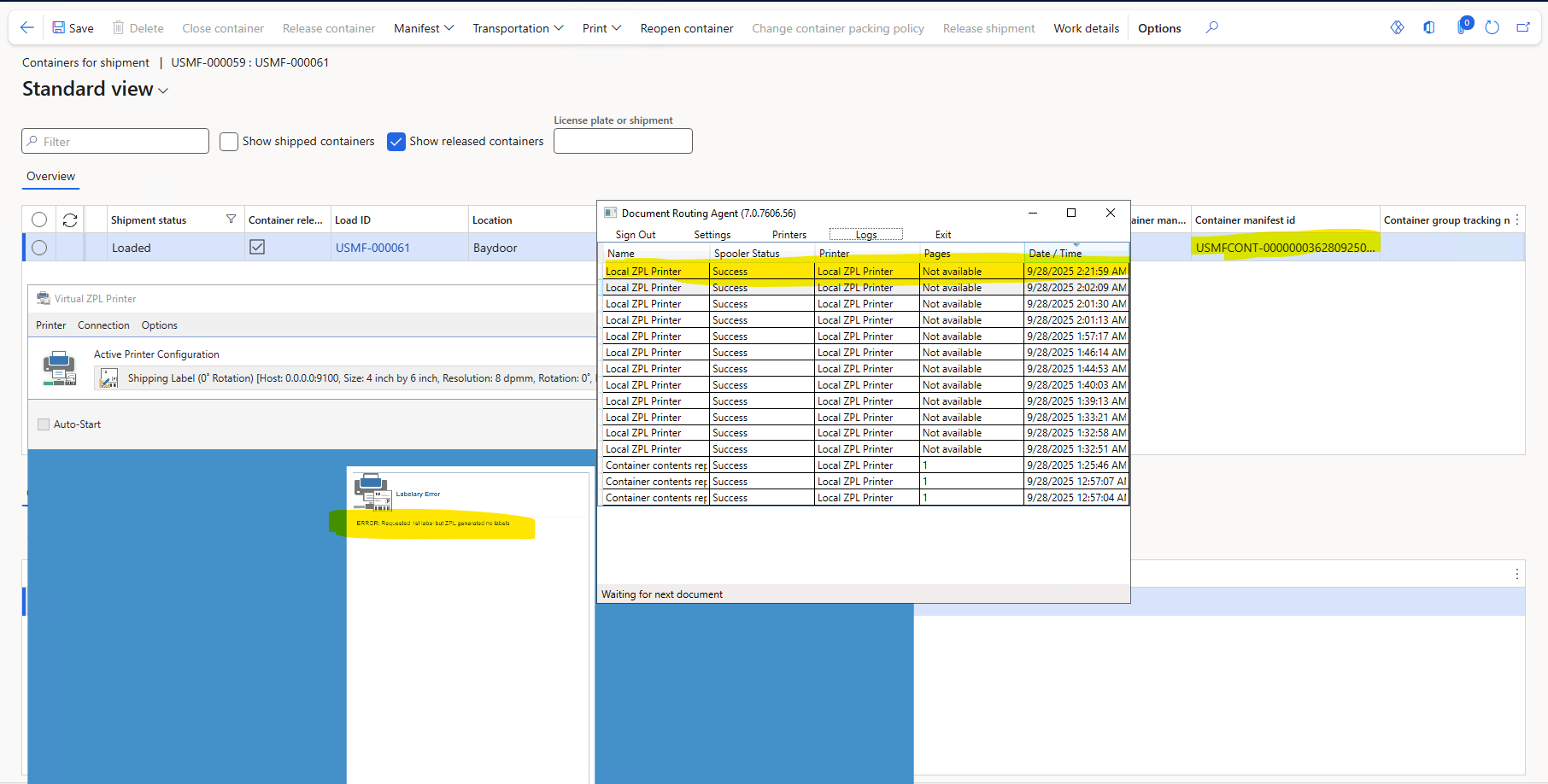
Hi, I am following Small Parcel Shipping, but stuck at printing the shipment label. I have a Document Routing Agent(DRA) and a Virtual ZPL printer installed and connected. Although I am receiving a print command in my DRA and ZPL printer, the actual label is not getting printed. I get "Not Available" in the pages column in DRA.

I have decoded the base64 string and tested it in https://labelary.com; the label data is correct. I have also debugged the code, and it's correctly retrieving the label data from the response XML. I am not sure what is missing. I shall be very thankful for any help.
I have the same question (0)
  • André Arnaud de Calavon Profile Picture
    303,730 Super User 2026 Season 1 on at
    Hi,
     
    Can you check if you can print to the ZPL printer from the DRA server locally? Have you checked if the printer and connection settings are correct? 
    In a particular case, on of my clients didn't open Acrobat reader and it was pending the acceptance of the terms and conditions. However, I doubt if that would also be the culprit when printing ZPL.
    Maybe you can find some details in the Windows event viewer that can be related to not printing the labels?
  • Suggested answer
    Sagar Suman Profile Picture
    6,707 Super User 2026 Season 1 on at
    Hi 
     
    Can you please share your ZPL code for label? 
     
    Where in D365 you have pasted the ZPL code? Which label layout is your ZPL using 
     
    What trigger point you are using in D365 to generate label?
     
  • DB-02092211-0 Profile Picture
    39 on at
    @Andre, thank you for your response. The settings seem fine, as I am receiving a print message from F&O to DRA and the printer. The problem is that nothing is getting printed. I tried opening Adobe, but it didn't help. Below is the message in the event logs of Microsoft-Dynamics-AX-DocumentRouting 
     
    The description for Event ID 53 from source Microsoft-Dynamics-AX-DocumentRouting cannot be found. Either the component that raises this event is not installed on your local computer or the installation is corrupted. You can install or repair the component on the local computer.
    If the event originated on another computer, the display information had to be saved with the event.
    The following information was included with the event: 
    Print test page 0 of 1 copies to [Local ZPL Printer].
    SendTestPageToPrinter
    PrintersViewModel
    The publisher has been disabled and its resource is not available. This usually occurs when the publisher is in the process of being uninstalled or upgraded
     
  • DB-02092211-0 Profile Picture
    39 on at
    Hi Sagar,  thank you for your response.

    I am getting an encoded base64 string from the shipping carrier. It is already a ZPL printable format, so I don't think we need to set up any layout. The trigger point is "Print shipment label" on the Pack form after I create the container, pack, and close the container. This process is specific to the small parcel shipping feature.
    Here the the label string that I am getting.

    ICAgICAgIA0KICAgICAgICAgICAgXlhBXkxSTl5NTlleTUZOLE5eTEgxMCwxMl5NQ1leUE9JXlBXODEyXkNJMjcNCg0KICAgICAgICAgICAgXkZPNjIwLDExNDANCiAgICAgICAgICAgIF5GVDIwLDYzMF5DVlleQkQyXkZIX15GRF5GUw0KDQogICAgICAgICAgICBeRlQxNSw2MV5BME4sMjAsMjReRlZTSElQIEZST00gQUREUkVTU15GUw0KICAgICAgICAgICAgXkZUMTUsODFeQTBOLDIwLDI0XkZWNTY3IEJpa2UgVHJhaWxeRlMNCiAgICAgICAgICAgIF5GVDE1LDEwMF5BME4sMjAsMjReRlZSZWRtb25kIFdBXkZTDQogICAgICAgICAgICBeRlQxNSwyMzZeQTBOLDI2LDMwXkZWU0hJUCBUTyBBRERSRVNTXkZTDQogICAgICAgICAgICBeRlQxNSwyNjNeQTBOLDI2LDMwXkZWMTIzIE1haW4gU3RyZWV0XkZTDQogICAgICAgICAgICBeRlQxNSwzMDdeQTBOLDQ1LDQ0XkZWQ2xldmVsYW5kIEFMXkZTDQogICAgICAgICAgICBeRlQyNTAsMzBeQTBOLDMwLDMwXkZWV2VpZ2h0XkZTDQogICAgICAgICAgICBeRlQzODAsMzBeQTBOLDMwLDM0XkZWOS4wMF5GUw0KICAgICAgICAgICAgXkZUNjczLDM0XkEwTiwyOCwzMl5GViAxIE9GIDFeRlMNCiAgICAgICAgICAgIF5GVDYyMCw3MzZeQTBOLDEwMCw3Nl5GViAgIF5GUw0KDQogICAgICAgICAgICBeRlQyOTAsNjE4XkJZM15CQ04sMTAwLE4sTiwsQV5GVlVTTUYtRGVtbyBDYXJyaWVyIFNlcnZpY2VeRlMNCg0KICAgICAgICAgICAgXkZUMjkwLDQ5MF5BME4sNTIsNTJeRlZVU01GLURlbW8gQ2FycmllciBTZXJ2aWNlXkZTDQogICAgICAgICAgICBeRlQxMCw3MzdeQTBOLDI0LDI0XkZWVFJBQ0tJTkcgIzogVVNNRkNPTlQtMDAwMDAwMDMzMjgwOTI1MTI0NTI5XkZTDQogICAgICAgICAgICBeRk8wLDc2Ml5HQjgwMCw0LDReRlMNCg0KICAgICAgICAgICAgXkZUNzkwLDEwMzleQTBOLDIyLDI2XkZWIF5GUw0KICAgICAgICAgICAgXkZUMTAsMTAzNV5BME4sMjIsMjZeRlZCSUxMSU5HOiBeRlMNCiAgICAgICAgICAgIF5GVDEyNiwxMDM1XkEwTiwyMiwyNl5GVlAvUCBeRlMNCiAgICAgICAgICAgIF5GVDEwLDExNTFeQTBOLDIyLDI2XkZWUmVmZXJlbmNlIE5vLjE6IENPTlQtMDAwMDAwMDMzXkZTDQoNCiAgICAgICAgICAgIF5GTzAsOTk3XkdCODAwLDE0LDE0XkZTDQoNCiAgICAgICAgICAgIF5GTzAsNDE2XkdCODAwLDQsNF5GUw0KDQogICAgICAgICAgICBeRk8yNDAsNDE2XkdCMywyMjEsM15GUw0KDQogICAgICAgICAgICBeRlQxOTAsMTE4OF5BME4sMTQsMjBeRlZEYXRlOjA5LzI4LzI1ICAgICAgICAgIE5WNDUgMjguMEEgMDQvMjAyMF5GUw0KICAgICAgICAgICAgXkZUMCw5ODJeQlkzXkJDTiwxODAsTixOLCxBXkZWVVNNRkNPTlQtMDAwMDAwMDMzMjgwOTI1MTI0NTI5XkZTDQoNCiAgICAgICAgICAgIF5YWl5YWg0KICAgICAgICAgICAg
  • Verified answer
    DB-02092211-0 Profile Picture
    39 on at

    I have found the root cause:

    The problem is with the TMSPrintContainerShippingLabel class in the createInstance() method.

    It takes the labelType parameter, which is set from the TMSRouteSegmentContainer table. An entry in this table is created while closing the container. The response XML from the carrier contains the type ZPL and is sent as base64-encoded.

    The implementation of the abstract method printLabel(), where the base64 is converted to ZPL, is never executed. To trigger the conversion implementation, the type should be Base64EncodedZPL.


    Solution:
    pass Base64EncodedZPL instead of ZPL to  createInstance()

Under review

Thank you for your reply! To ensure a great experience for everyone, your content is awaiting approval by our Community Managers. Please check back later.

Helpful resources

Quick Links

Introducing the 2026 Season 1 community Super Users

Congratulations to our 2026 Super Stars!

Meet the Microsoft Dynamics 365 Contact Center Champions

We are thrilled to have these Champions in our Community!

Congratulations to the March Top 10 Community Leaders

These are the community rock stars!

Leaderboard > Supply chain | Supply Chain Management, Commerce

#1
Mallesh Deshapaga Profile Picture

Mallesh Deshapaga 287

#2
Laurens vd Tang Profile Picture

Laurens vd Tang 212 Super User 2026 Season 1

#3
Syed Haris Shah Profile Picture

Syed Haris Shah 145 Super User 2026 Season 1

Last 30 days Overall leaderboard

Product updates

Dynamics 365 release plans
