web
You’re offline. This is a read only version of the page.
close
Skip to main content

Notifications

Announcements

No record found.

Community site session details

Community site session details

Session Id :
Supply chain | Supply Chain Management, Commerce
Suggested Answer

Different Stocking/Sales Units per Site

(0) ShareShare
ReportReport
Posted on by

Hi All,

I have a scenario with a customer where they purchase stock into one warehouse in a "Pack" unit, and within that warehouse they both store and sell the item in that pack unit.  However, they transfer the item to another warehouse where they wish to store and sell the item in "Eaches".  Currently they handle this by having two different released products, one for each unit, then write off and write on stock in the relevant places to convert the units.  I'm hoping for a more elegant, less clunky solution.

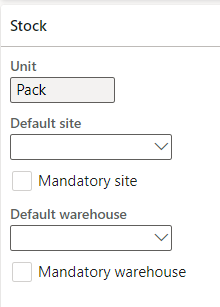
I've set up unit conversions and was hoping that I could manage this using Default/Site Specific Order settings to specify different stocking/sales units in the 2nd site/warehouse.  However the field for "unit" in the Default Order Settings screen is disabled. 
pastedimage1651057250595v1.png

Any other ideas from the Hive Mind on how to handle this scenario?

Thanks,

Ben

I have the same question (0)
  • Suggested answer
    saurabh bharti Profile Picture
    15,039 Moderator on at

    In Dynamics you can't have multiple stock units. You can have only one.

    You can have multiple Purchase/sale units but not stock unit (This you can change at the time of transaction , on product you can map one as default)

    You in you case you can still store as Pack in other warehouse but while selling you can sell in Each (Change on transaction) , just have conversion from pack to each

  • Sally X Profile Picture
    252 on at

    Hi BNeal,

    The "Units" field in the default order settings is disabled probably because of the existence of a transaction, if the transaction cannot be deleted, a new item number with a new inventory unit will need to be used.

    If you want to use released products in warehouse work processes, a unit sequence group must be assigned to them. If the unit sequence group that you use contains multiple lines (and therefore multiple units), you must set up a unit conversion between the units. You complete this setup on the Unit conversions page.

    The smallest unit in a sequence group that you associate with a released product must match the inventory unit that is defined for the corresponding product. The inventory unit is the unit that is used for base calculations of the on-hand inventory. You can also set up unit of measure conversions for product variants of product masters by using the Enable unit of measure conversions option.

    To configure a product master to support unit conversion per variant, follow these steps.

    1. Go to Product information management > Products > Product masters.
    2. Create or open a product master to go to its Product details page.
    3. Set the Enable unit of measure conversions option to Yes.
    4. On the Action Pane, on the Product tab, in the Set up group, select Unit conversions.
    5. The Unit conversions page opens. Select one of the following tabs:
    • Intra-class conversions – Select this tab to convert between units that belong to the same unit class.
    • Inter-class conversions – Select this tab to convert between units that belong to different unit classes.
    1. Select New to add a new unit conversion.
    2. Set the Create conversion for field to one of the following values:
    • Product – If you select this value, you can set up a unit conversion for the product master. That unit conversion will be used as a fallback for all product variants that no unit conversion is defined for.
    • Product variant – If you select this value, you can set up a unit conversion for a specific product variant. Use the Product variant field to select the variant.
    1. Use the other fields that are provided to set up your unit conversion.
    2. Select OK to save the new unit conversion.

    pastedimage1651133782214v1.png

    Hope my answer can help you.

    Regards,

    Charlotte Xu

Under review

Thank you for your reply! To ensure a great experience for everyone, your content is awaiting approval by our Community Managers. Please check back later.

Helpful resources

Quick Links

Responsible AI policies

As AI tools become more common, we’re introducing a Responsible AI Use…

Neeraj Kumar – Community Spotlight

We are honored to recognize Neeraj Kumar as our Community Spotlight honoree for…

Leaderboard > Supply chain | Supply Chain Management, Commerce

#1
Siv Sagar Profile Picture

Siv Sagar 266 Super User 2025 Season 2

#2
Laurens vd Tang Profile Picture

Laurens vd Tang 213 Super User 2025 Season 2

#3
André Arnaud de Calavon Profile Picture

André Arnaud de Cal... 140 Super User 2025 Season 2

Last 30 days Overall leaderboard

Featured topics

Product updates

Dynamics 365 release plans
