web
You’re offline. This is a read only version of the page.
close
Skip to main content

Announcements

No record found.

News and Announcements icon
Community site session details

Community site session details

Session Id :
Microsoft Dynamics CRM (Archived)

Output parameter in workflow step

(0) ShareShare
ReportReport
Posted on by

hi ,  i have workflow step in crm 2015  that use output parameter and when i want to register it show me this below message , could you please help me 
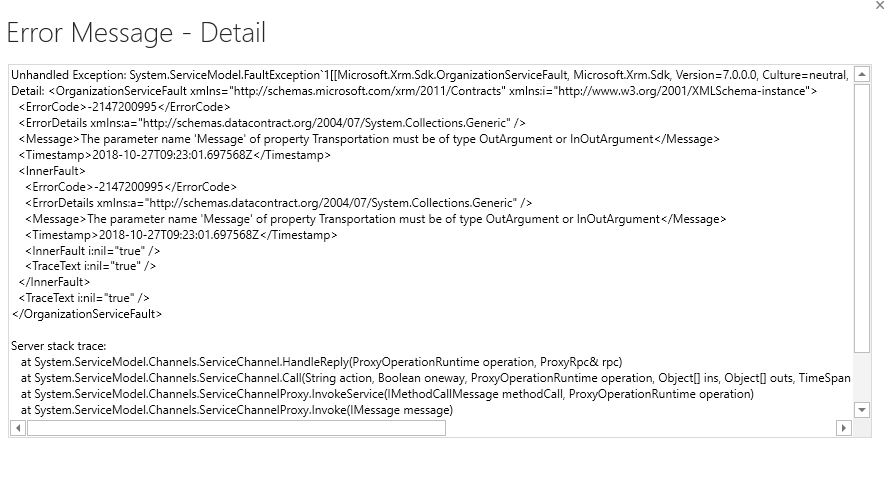
4682.error.JPG

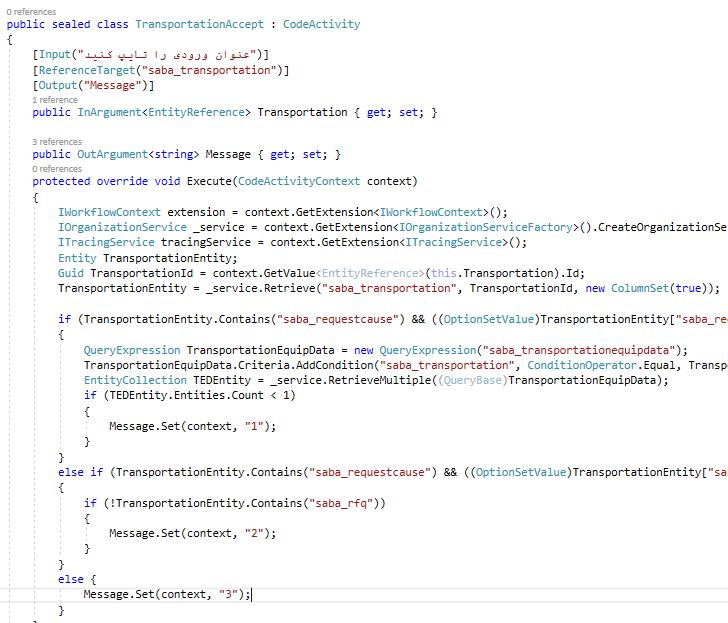
and this is my code , i just send email and assign record to their manager if user completed the form successfully .and how can i after return parameter show some alert in  other steps
0116.code.JPG

*This post is locked for comments

I have the same question (0)
  • Suggested answer
    gdas Profile Picture
    50,091 Moderator on at

    Hi Somayeh,

    You need to define output parameter with ReferenceTarget and OutArgument. Please check sample code-

    mscrmtechie.blogspot.com/.../custom-workflow-input-and-output.html

  • Community Member Profile Picture
    on at

    do you see my code ? its true ? i dont know how can i use this out parameter in workflow step after register it

  • Suggested answer
    gdas Profile Picture
    50,091 Moderator on at

    Hi Somayeh,

    The output parameter type should be entity reference.

    Please check below article how to use output parameter.

    [View:https://www.inogic.com/blog/2017/03/using-entity-reference-output-parameter-in-workflow-assembly/]

    [View:https://www.c-sharpcorner.com/article/creating-word-counter-custom-workflow-activity-in-dynamics-365/]

  • Suggested answer
    Alex Fun Wei Jie Profile Picture
    33,628 on at

    Hi,

    Refer below article on how to organize input and output parameter. You cant mix them up, make sure you organize them well.

    columbuscrm.blogspot.com/.../workflow-activity-input-and-output.html

  • Suggested answer
    RaviKashyap Profile Picture
    55,410 Moderator on at

    Hi Somayeh,

    You have added the attribute "[Output("Message")]" on top of you input parameter. This needs to be on top of your output parameter "Message". Something like this-

    argument.png

    Hope this helps.

  • Community Member Profile Picture
    on at

    Hi thanks goutam, i want my activity workflow return some  string value  ( message) to my process and with that returned message decided  for some condition of my bussines could i do it with workflow? I could develop workfolw step with output but i couldn't use the message (my output parameter)

  • Community Member Profile Picture
    on at

    Hi ravi , could i have string output parameter or just have entity refrence i canfuse , i can 't undrstand !!

  • Suggested answer
    RaviKashyap Profile Picture
    55,410 Moderator on at

    Hi Somayeh,

    It depends upon your requirement. Based on the name of your output parameter (i.e. Message), I assume you want to return some text message so this should be a string type.

    Hope this helps.

Under review

Thank you for your reply! To ensure a great experience for everyone, your content is awaiting approval by our Community Managers. Please check back later.

Helpful resources

Quick Links

Introducing the 2026 Season 1 community Super Users

Congratulations to our 2026 Super Stars!

Meet the Microsoft Dynamics 365 Contact Center Champions

We are thrilled to have these Champions in our Community!

Congratulations to the April Top 10 Community Leaders

These are the community rock stars!

Leaderboard > 🔒一 Microsoft Dynamics CRM (Archived)

Last 30 days Overall leaderboard

Featured topics

Product updates

Dynamics 365 release plans
