web
You’re offline. This is a read only version of the page.
close
Skip to main content

Announcements

No record found.

News and Announcements icon
Community site session details

Community site session details

Session Id :
Small and medium business | Business Central, N...
Answered

Tax Setup Errors

(0) ShareShare
ReportReport
Posted on by

Hi:


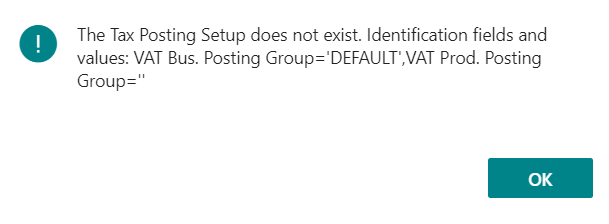
In Microsoft Dynamics NAV/Business Central, I have done everything mentioned online to combat the attached error but no success.  


It seems like I'm always getting a VAT error, a sales tax error, or a "this or that" tax error every time I try to set something up in a demo company and test it. 


This time, it's with Service Management.


Is there not a way of getting rid of these tax errors in a demo company, once and for all?


John
pastedimage1596469430955v1.png

I have the same question (0)
  • Suggested answer
    JAngle Profile Picture
    152 on at

    Your tax posting setup is more than likely correct. It is the data that uses it which needs the work. Items, resources, g/l accounts and charge items will all need that setup. If they don't have the right data then you'll get that type of error.

  • Community Member Profile Picture
    on at

    Hi Josh:

    Yes, those are good points!  In fact, right after I posted this, I determined that it must be an issue at the Customer level.

    I determined this by noticing, afterward, that I cannot even post any Sales Invoice - service or otherwise - without getting this error.  And, this is true of any customer - not just one.

    I thought that I had looked over everything customer related but apparently not.

    Do you know what I could be overlooking?

    John

  • Suggested answer
    JAngle Profile Picture
    152 on at

    For sales tax it could be customer related in terms of regional data. But given your error states it has a business posting group of DEFAULT I think you're covered. Whether it is tax or general posting setup it's all about combinations. You deal with a business - customer or vendor cover those. You deal with a product or service - anything at line level covers that. You error has a blank for the product aspect of the combination.

  • Community Member Profile Picture
    on at

    Hi Josh:

    Wow.  I have gone over everything, now.  I'm just not seeing what I'm missing.  

    Any other thoughts?

    Thanks!

    John

  • Community Member Profile Picture
    on at

    Hi:

    In the Sales Invoice, I simply had to go to the VAT Bus. Posting Group field for the customer underneath the line item and change it to "DEFAULT".  Posting was successful!

    But, I still cannot get a successful creation of a sales invoice upon signing the contract in Service Management.  Any thoughts?

    Thanks!

    John

  • Suggested answer
    Marco Mels Profile Picture
    Microsoft Employee on at

    Hello,

    For this possible new issue, you may want to repost this issue to get more traction or raise a support ticket with Microsoft via your CSP / partner.

    Thanks.

Under review

Thank you for your reply! To ensure a great experience for everyone, your content is awaiting approval by our Community Managers. Please check back later.

Helpful resources

Quick Links

Introducing the 2026 Season 1 community Super Users

Congratulations to our 2026 Super Stars!

Meet the Microsoft Dynamics 365 Contact Center Champions

We are thrilled to have these Champions in our Community!

Congratulations to the March Top 10 Community Leaders

These are the community rock stars!

Leaderboard > Small and medium business | Business Central, NAV, RMS

#1
OussamaSabbouh Profile Picture

OussamaSabbouh 2,005 Super User 2026 Season 1

#2
YUN ZHU Profile Picture

YUN ZHU 1,148 Super User 2026 Season 1

#3
Khushbu Rajvi. Profile Picture

Khushbu Rajvi. 557 Super User 2026 Season 1

Last 30 days Overall leaderboard

Featured topics

Product updates

Dynamics 365 release plans
