web
You’re offline. This is a read only version of the page.
close
Skip to main content

Announcements

No record found.

News and Announcements icon
Community site session details

Community site session details

Session Id :
Microsoft Dynamics CRM (Archived)

PreFiltering FetchXML not working/only returning all records

(0) ShareShare
ReportReport
Posted on by

Hey guys,

I've created a copy of a report in FetchXML as the SQL version seemed to be missing data...a story for another day. Now, I've enabled prefiltering at the top of the 3 datasets in the report:

<fetch version="1.0" output-format="xml-platform" mapping="logical" distinct="true" enable-prefiltering="true">

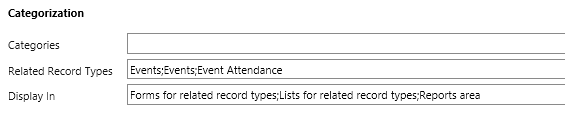
I've also set the report to be available in Reports Area, Forms for related Records and Lists for related records in the Categorization section of the report. 
Screen-Shot-2018_2D00_06_2D00_14-at-15.35.06.png

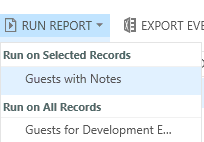
Now, when I go to our events attendee (a custom entity), I see the old SQL report (Guests with notes) available for the selected records, but the new fetchxml report (Guests for Development events) is only available for all records.
Screen-Shot-2018_2D00_06_2D00_14-at-15.37.16.png

I know with the SQL report I had to alias attributes as CRMAX_columnname, but apparently I don't need to anything like that for fetch? I'm obviously missing something but any help would be greatly appreciated!

*This post is locked for comments

I have the same question (0)
  • Suggested answer
    a33ik Profile Picture
    84,331 Most Valuable Professional on at

    Hello,

    Prefiltering doesn't work for you because it should be added to entity and not to fetch like:

    <fetch version="1.0" output-format="xml-platform" mapping="logical" distinct="false">
      <entity name="account" enableprefiltering="1">
        <attribute name="name" />
        <attribute name="accountid" />
        <order attribute="name" descending="false" />
      </entity>
    </fetch>


  • Community Member Profile Picture
    on at

    Thank you so much!

    Do I need to do this on Link-entities also?

  • Community Member Profile Picture
    on at

    Hey Andrew,

    Thanks so much, I've updated my fetch on my three datasets to now reflect pre-filtering only in the Entity node, however it's still only showing the option to run on all records - any other thoughts?

  • Suggested answer
    a33ik Profile Picture
    84,331 Most Valuable Professional on at

    Here is a trick - don't update report that you already uploaded to CRM. Delete it in CRM and create again.

  • Community Member Profile Picture
    on at

    Great tip! I have tried that now but it still only giving me the option to the run on all records, if it helps, here's the three datasets:

    ----

    <fetch version="1.0" output-format="xml-platform" mapping="logical" distinct="true">

     <entity name="new_eventattendee" enable-prefiltering="1" >

       <attribute name="new_eventattendeeid" />

       <attribute name="new_status" />

       <attribute name="new_contactid" />

       <attribute name= "new_eventid" />

       <order attribute="new_contactid" descending="false" />

       <link-entity name="contact" from="contactid" to="new_contactid" alias="contact" enable-prefiltering="1" >

         <attribute name="parentcustomerid" />

         <attribute name="jobtitle" />

         <attribute name="contactid" />

       </link-entity>

     </entity>

    </fetch>

    ---

    <fetch version="1.0" output-format="xml-platform" mapping="logical" distinct="true"  >

     <entity name="new_relationshipnotes" enable-prefiltering="1">

       <attribute name="new_contact" />

       <attribute name="new_type" />

       <attribute name="new_notes" />

       <attribute name="new_contactname" />

       <filter>

         <condition attribute="new_type" operator="eq" value="100000001" />

       </filter>

     </entity>

    </fetch>

  • Verified answer
    a33ik Profile Picture
    84,331 Most Valuable Professional on at

    Replace "enable-prefiltering" with "enableprefiltering" like I posted in my reply without dash.

  • Community Member Profile Picture
    on at

    I'll have to buy you a beer sometime, you are a lifesaver, thanks so much!

  • RajatSharmaRaj Profile Picture
    on at

    So did you buy him a beer yet? {Wondering..} :-)

Under review

Thank you for your reply! To ensure a great experience for everyone, your content is awaiting approval by our Community Managers. Please check back later.

Helpful resources

Quick Links

Introducing the 2026 Season 1 community Super Users

Congratulations to our 2026 Super Stars!

Congratulations to our 2025 Community Spotlights

Thanks to all of our 2025 Community Spotlight stars!

Leaderboard > 🔒一 Microsoft Dynamics CRM (Archived)

#1
JS-09031509-0 Profile Picture

JS-09031509-0 3

#2
AS-17030037-0 Profile Picture

AS-17030037-0 2

#2
Mark Eckert Profile Picture

Mark Eckert 2

Last 30 days Overall leaderboard

Featured topics

Product updates

Dynamics 365 release plans
