web
You’re offline. This is a read only version of the page.
close
Skip to main content

Notifications

Announcements

No record found.

Community site session details

Community site session details

Session Id :
Small and medium business | Business Central, N...
Suggested Answer

Want to be closed / invoiced status of purchase orders

(0) ShareShare
ReportReport
Posted on by

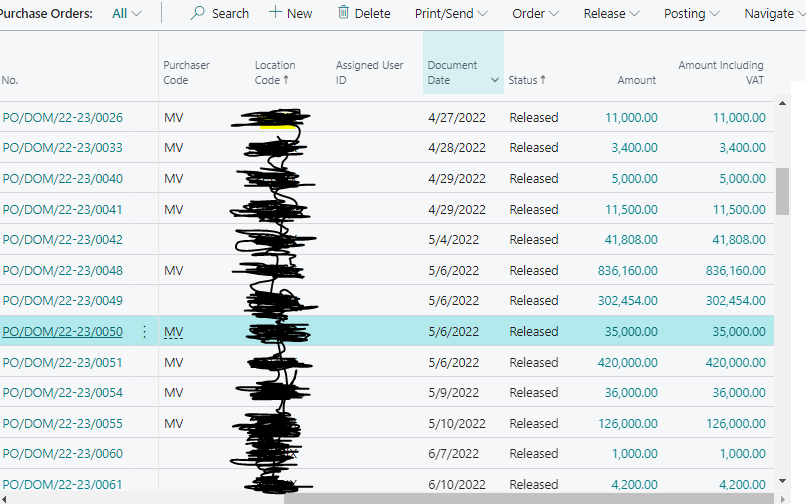
Once GRN gets done for  the PO, Purchase order still shows us in released state in purchase order list not going automatically in archive or closed.

We want that to be closed / invoiced status so that we can have a clarity that the particular purchase order need not to be worked again this creates a huge list of open PO’s that becomes difficult to differentiate that which one is closed and which one is open.
pastedimage1657523226586v1.png

I have the same question (0)
  • Suggested answer
    JAngle Profile Picture
    133 on at

    This feature is helpful: usedynamics.com/.../

    You can also personalise the purchase order list page to include columns for amount received and amount invoiced. This would allow users to create filtered views of PO’s that are really left for processing

  • Community Member Profile Picture
    on at

    Actually issue is not related to the view, Issue is related to the process of PO. Purchase order  page showing released state even after the GRN and invoicing, If there is any process to automate  so that it can update status automatically after GRN and Invoicing from released state to Closed/Archived

  • Suggested answer
    Vaishnavi J Profile Picture
    3,062 on at

    Hi  ,

    Do you invoice the PO from Purchase Order itself or you create a new Purchase Invoice separately ?

    If my answer was helpful to you, please verify it so that other users know it worked. Thank you very much

  • Lubenheimer Profile Picture
    105 on at

    Hello,

    do you invoice on the PO or do you create a new Purchase Invoice and get receipt shipment (lines)?

    If you create separate purchase invoice, purchase orders don't get deleted automatically.

    There is a function called "delete invoiced purchase orders" which does the job for you. If you also have activated the purchase order archive, purchase orders will be archived, otherwise not.

    Does that help you? If yes please verify the answer.

    Thanks!

  • Community Member Profile Picture
    on at

    Can you tell me the process to  activate the purchase order archive.

  • Lubenheimer Profile Picture
    105 on at

    Open the page "purchases & payables setup" and look for the tab "archive".

    Here you can activate the documents you want to archive automatically for e.g. in the delete process.

  • Suggested answer
    Dallefeld Profile Picture
    211 User Group Leader on at

    If you invoice from Purchase Invoices, using the Get Receipts option. You need to run Deleted Invoiced Purchase Orders, you can run as often as desired.

    If you invoice from the Purchase Order itself, the Purchase Order will stay open until Quantity, Quantity Received and Quantity Invoiced all match exactly.

Under review

Thank you for your reply! To ensure a great experience for everyone, your content is awaiting approval by our Community Managers. Please check back later.

Helpful resources

Quick Links

Responsible AI policies

As AI tools become more common, we’re introducing a Responsible AI Use…

Neeraj Kumar – Community Spotlight

We are honored to recognize Neeraj Kumar as our Community Spotlight honoree for…

Leaderboard > Small and medium business | Business Central, NAV, RMS

#1
OussamaSabbouh Profile Picture

OussamaSabbouh 3,226

#2
Jainam M. Kothari Profile Picture

Jainam M. Kothari 2,047 Super User 2025 Season 2

#3
YUN ZHU Profile Picture

YUN ZHU 1,257 Super User 2025 Season 2

Last 30 days Overall leaderboard

Featured topics

Product updates

Dynamics 365 release plans
