web
You’re offline. This is a read only version of the page.
close
Skip to main content

Announcements

No record found.

News and Announcements icon
Community site session details

Community site session details

Session Id :
Microsoft Dynamics CRM (Archived)

Showing wrong values on Y axis in Chart

(1) ShareShare
ReportReport
Posted on by

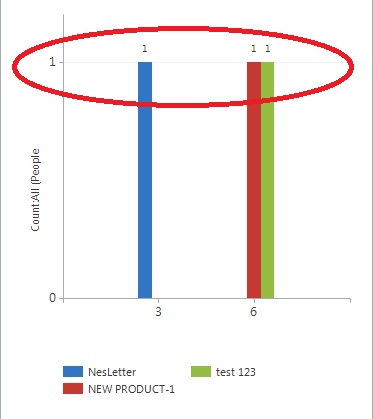
 Hi all, i am getting wrong values in the chart. As shown in the image (Red high lightened)  
graph1.jpg

As its showing 1 in Y-axis (People), but in real 1 for Nesletter, 2 for test 123 and 3 for NEW PRODUCT-1. I have also associate the chart with the view. In that specific View - columns are showing correctly but in the chart, it shows 1 for all. I don't know why..

Can anyone help me out of this?

Thanks

*This post is locked for comments

I have the same question (0)
  • Verified answer
    Abdul Wahab Profile Picture
    12,119 Moderator on at

    Hi Tim Joe

    I think you are not using number field. Please used number instead of text field.

    Thank You

  • Suggested answer
    Alagunellaikumar Profile Picture
    6,212 on at

    Hi

    Did you mention count aggregate in the chart?

Under review

Thank you for your reply! To ensure a great experience for everyone, your content is awaiting approval by our Community Managers. Please check back later.

Helpful resources

Quick Links

Introducing the 2026 Season 1 community Super Users

Congratulations to our 2026 Super Stars!

Meet the Microsoft Dynamics 365 Contact Center Champions

We are thrilled to have these Champions in our Community!

Congratulations to the April Top 10 Community Leaders

These are the community rock stars!

Leaderboard > 🔒一 Microsoft Dynamics CRM (Archived)

Last 30 days Overall leaderboard

Featured topics

Product updates

Dynamics 365 release plans
