web
You’re offline. This is a read only version of the page.
close
Skip to main content

Notifications

Announcements

No record found.

Community site session details

Community site session details

Session Id :
Microsoft Dynamics CRM (Archived)

Fields are still displaying on mobile after I have made them unavalible on phone.

(0) ShareShare
ReportReport
Posted on by 34

Hello!

I am relatively new to Dynamics trying to understand what I am missing.

I am trying to configure our lead form to be more user-friendly on mobile. I do not want to see all of the header and footer fields first thing on the Dynamics 365 app. However after I have changed the visibility on the field to hide from mobile. 
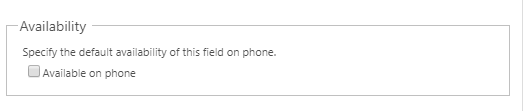
pastedimage1563386034372v1.png

I am still seeing the field. I have waited 24 hours and reconfigured the organization on my app. Trying to ensure no metadata is lingering. 

If someone could help me out that would be great! 

Thanks

*This post is locked for comments

I have the same question (0)
  • gdas Profile Picture
    50,091 Moderator on at

    Hi Sean,

    Make sure you are checking in correct form where you are doing the changes. Also do publish all customization , clean temp file and  rrlogin with same or different user.

  • Sean McEvoy Profile Picture
    34 on at

    Hi Goutam,

    Thanks for your reply. However, I was able to ensure that the changes were made to the correct form because I can see other changes I have made.  This morning I published all customizations and then reconfigured the app and was still not able to see my changes.

    Can you think of any other possible solutions?

    Thanks

  • Suggested answer
    Sean McEvoy Profile Picture
    34 on at

    I did uncover the solution, it was because the header and footer sections were still checked visible on phone. Once I unchecked the box for the section the fields were no longer visible on mobile.

Under review

Thank you for your reply! To ensure a great experience for everyone, your content is awaiting approval by our Community Managers. Please check back later.

Helpful resources

Quick Links

Responsible AI policies

As AI tools become more common, we’re introducing a Responsible AI Use…

Neeraj Kumar – Community Spotlight

We are honored to recognize Neeraj Kumar as our Community Spotlight honoree for…

Leaderboard > 🔒一 Microsoft Dynamics CRM (Archived)

#1
SA-08121319-0 Profile Picture

SA-08121319-0 4

#1
Calum MacFarlane Profile Picture

Calum MacFarlane 4

#3
Alex Fun Wei Jie Profile Picture

Alex Fun Wei Jie 2

Last 30 days Overall leaderboard

Featured topics

Product updates

Dynamics 365 release plans
