web
You’re offline. This is a read only version of the page.
close
Skip to main content

Announcements

No record found.

News and Announcements icon
Community site session details

Community site session details

Session Id :
Small and medium business | Business Central, N...
Suggested Answer

Add Custom actions to row on List page

(0) ShareShare
ReportReport
Posted on by 7

Hey Everyone!

I have a extension I am building for a client and they would like additional actions to be added when you click on the blue highlighted three dots row.  I have talked to them about adding an action to the page that will just use your selected row but they like the idea of being able to click that button on the row.

Here is what I am talking about and where I would like to add the action:
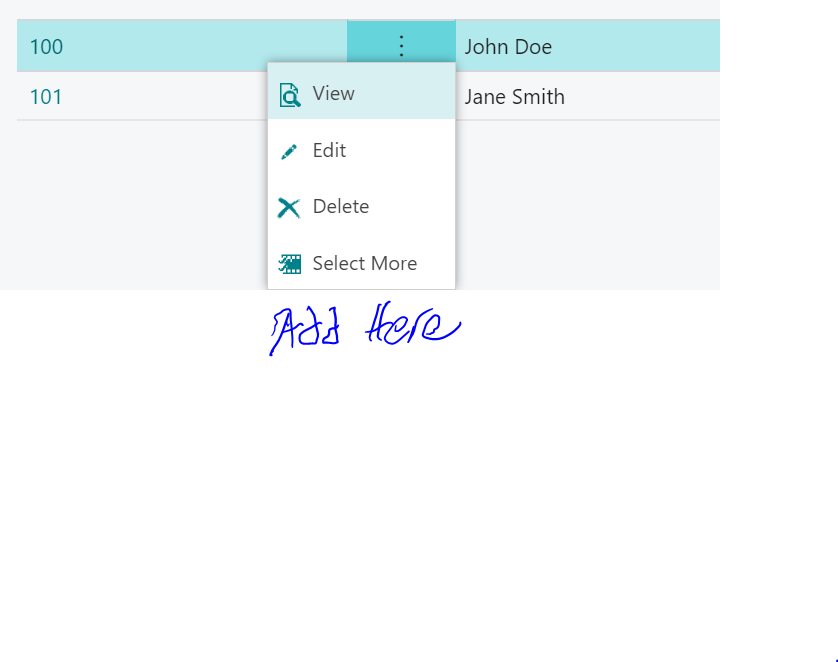
pastedimage1574186015260v1.png

I have the same question (0)
  • Suggested answer
    srttel Profile Picture
    Microsoft Employee on at

    Hi,

    please have a look in the Scope property of the page. docs.microsoft.com/.../scope-property

    You can as well take a look in the item list page where we added the Cross Reference action.

    Hope this helps.

    Sebastian

  • Suggested answer
    Ryan Whiteleather Profile Picture
    7 on at

    Thanks that was what I was looking for!  To others my code for the action looks like this to get what I needed:

       actions

       {

           area(Processing)

           {

               group("&Line")

               {

                   Caption = '&Line';

                   Image = Line;

                   action(DoWork)

                   {

                       ApplicationArea = Basic, Suite;

                       Caption = 'Do Work';

                       Image = Document;

                       Promoted = true;

                       Scope = Repeater;

                       trigger OnAction()

                       begin

                           Message('Did Work!');

                       end;

                   }

               }

           }

       }

Under review

Thank you for your reply! To ensure a great experience for everyone, your content is awaiting approval by our Community Managers. Please check back later.

Helpful resources

Quick Links

Introducing the 2026 Season 1 community Super Users

Congratulations to our 2026 Super Stars!

Meet the Microsoft Dynamics 365 Contact Center Champions

We are thrilled to have these Champions in our Community!

Congratulations to the April Top 10 Community Leaders

These are the community rock stars!

Leaderboard > Small and medium business | Business Central, NAV, RMS

#1
OussamaSabbouh Profile Picture

OussamaSabbouh 2,184 Super User 2026 Season 1

#2
YUN ZHU Profile Picture

YUN ZHU 1,148 Super User 2026 Season 1

#3
AndrewThomas81 Profile Picture

AndrewThomas81 677

Last 30 days Overall leaderboard

Featured topics

Product updates

Dynamics 365 release plans
