web
You’re offline. This is a read only version of the page.
close
Skip to main content

Announcements

No record found.

News and Announcements icon
Community site session details

Community site session details

Session Id :
Small and medium business | Business Central, N...
Suggested Answer

One "aggregated" G/L entry on accounts receivable when FX revaluation on customers

(0) ShareShare
ReportReport
Posted on by 10

Hi all,

We recently started to use Business Central 365. We use the G/L entry ODATA query to feed our reporting tool. To (within this reporting tool) identify intercompany Accounts Receivable and Accounts Payable positions, we look at the Source Type & Source No. of the G/L entries on specific ledgers..

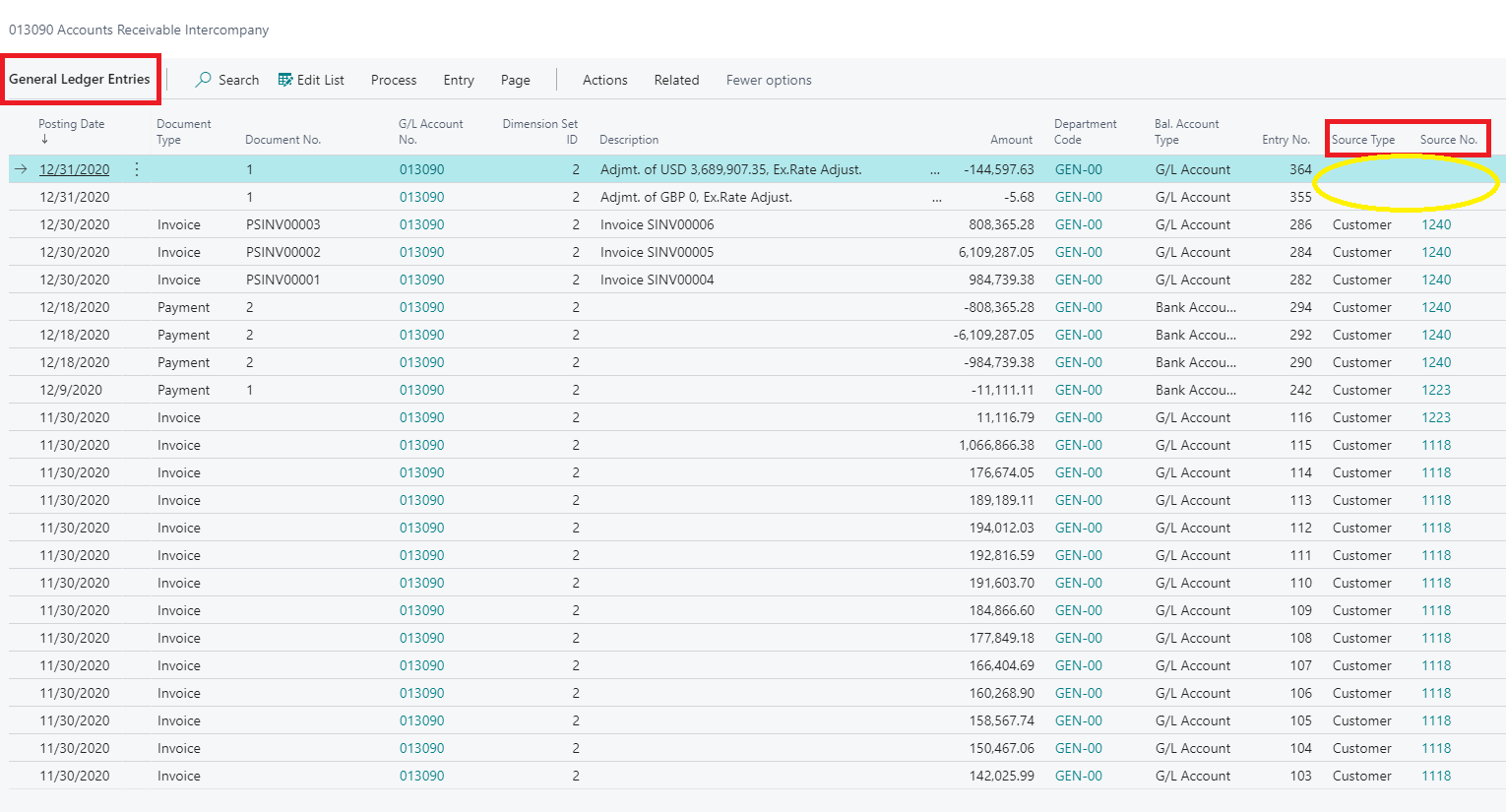
We've run into the following issue. A lot of intercompany positions are in foreign currency. When we "Adjust Exchange Rates", limited to "Adjust Customer, Vendor and Bank Accounts". Only a few G/L entries are made and hundreds of Detailed Customer Ledger Entries.

The issue with the G/L entries is that these lack information, the Source Type & Source No. is blank (see snap attached), because it's an aggregated total of the Detailed Customer Ledger Entries. 

Preferable we'd like to see all individual Detailed Customer Ledger Entries as G/L entries. However, we've been told that the above is standard BC365 functionality and can not be adjusted.

Do you have any recommendations on this?

Thanks a lot!
Bart
pastedimage1611652675455v1.png

I have the same question (0)
  • Suggested answer
    Dirk Profile Picture
    Microsoft Employee on at

    Hello Bart,

    I agree that this is above is standard BC365 functionality and can not be adjusted with settings.
    This can only be done with a customizations.

    Kind regards
      Dirk

  • Suggested answer
    Community Member Profile Picture
    on at

    Bart,

    Adding to what Dirk wrote...  You might consider looking at the Detailed Customer Ledger Entries table, filtered by Date lets' say, you will see the Customer No., Amount and Source Code, which you can filter by and the Entry Type. Here is a snapshot of mine...

    pastedimage1611694396002v1.png

    Hope this helps.

    Thanks,

    Steve

Under review

Thank you for your reply! To ensure a great experience for everyone, your content is awaiting approval by our Community Managers. Please check back later.

Helpful resources

Quick Links

Introducing the 2026 Season 1 community Super Users

Congratulations to our 2026 Super Stars!

Meet the Microsoft Dynamics 365 Contact Center Champions

We are thrilled to have these Champions in our Community!

Congratulations to the April Top 10 Community Leaders

These are the community rock stars!

Leaderboard > Small and medium business | Business Central, NAV, RMS

#1
OussamaSabbouh Profile Picture

OussamaSabbouh 2,086 Super User 2026 Season 1

#2
YUN ZHU Profile Picture

YUN ZHU 1,290 Super User 2026 Season 1

#3
AndrewThomas81 Profile Picture

AndrewThomas81 1,218

Last 30 days Overall leaderboard

Featured topics

Product updates

Dynamics 365 release plans
