web
You’re offline. This is a read only version of the page.
close
Skip to main content

Announcements

No record found.

News and Announcements icon
Community site session details

Community site session details

Session Id :
Microsoft Dynamics CRM (Archived)

9.0 Configuration Migration Failing

(0) ShareShare
ReportReport
Posted on by

I'm trying to import data into a 9.0 instance that was just minimally copied from our production instance.  After I enter my credentials and select the organization to connect to, the tool gets stuck at "Initializing 1 of 5 connection threads".  Has anyone else seen this and know how to fix it?

I'm running the latest tools as downloaded from nuget this morning, following the instructions outlined here.
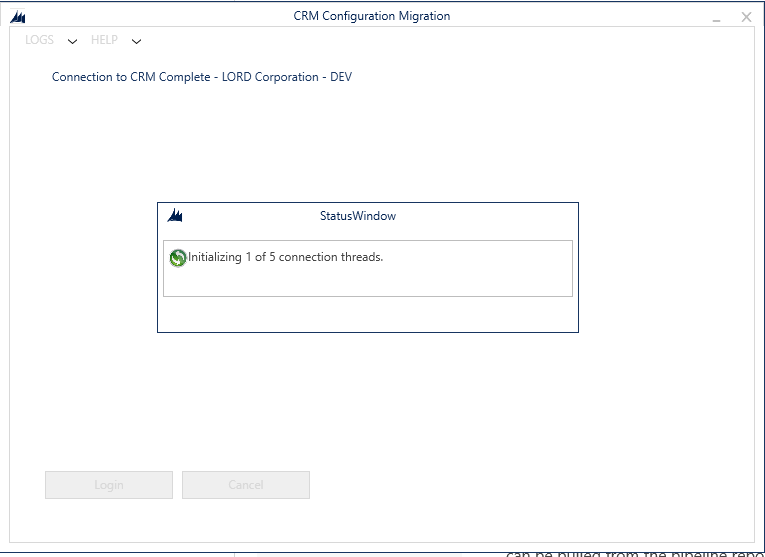
ThreadInitialization.PNG

Thanks!

*This post is locked for comments

I have the same question (0)
  • Suggested answer
    Ben Thompson Profile Picture
    6,350 on at

    That screen is the point that the configuration migration tool will always end up at if the tool has a problem.

    The 2 immediate fixes are to run the tool as administrator (right click and select run as administrator) and ensuring that you have both read and write privileges to the folder the configuration migration tool is running from.

  • steveplatz Profile Picture
    on at

    Thanks for the suggestion.  I've got the tool running out of my user folder, so permissions shouldn't be an issue.  Regardless, I tried running as administrator and it still cannot connect.  FWIW, I'm able to create a schema and export without issue.  It's only the import that has a problem.

  • steveplatz Profile Picture
    on at

    Looking at Fiddler, it looks like the utility is getting hung up on looking for instances.  This call returns a 401 and another call is never executed.

    GET globaldisco.crm.dynamics.com/.../Instances HTTP/1.1

    Connection: Keep-Alive

    Authorization: Bearer

    User-Agent: DataMigrationUtility.exe

    x-ms-client-request-id: XXX

    Host: globaldisco.crm.dynamics.com

  • Verified answer
    steveplatz Profile Picture
    on at

    I was able to finally connect by providing the credentials using the advanced option and bypassing the web login method.  It seems there may be a bug or something else when the other method is used.

  • Vipin J Profile Picture
    1,603 on at

    using utility more effective way if you failing to import records.

    try the follow approach.

    https://vjcity.blogspot.com/2019/02/effectively-using-crm.html

  • thartsell Profile Picture
    50 on at

    This worked for me as I was having the same problem. Thank you for posting the workaround.

Under review

Thank you for your reply! To ensure a great experience for everyone, your content is awaiting approval by our Community Managers. Please check back later.

Helpful resources

Quick Links

Introducing the 2026 Season 1 community Super Users

Congratulations to our 2026 Super Stars!

Meet the Microsoft Dynamics 365 Contact Center Champions

We are thrilled to have these Champions in our Community!

Congratulations to the March Top 10 Community Leaders

These are the community rock stars!

Leaderboard > 🔒一 Microsoft Dynamics CRM (Archived)

#1
JS-09031509-0 Profile Picture

JS-09031509-0 3

#2
AS-17030037-0 Profile Picture

AS-17030037-0 2

#2
Mark Eckert Profile Picture

Mark Eckert 2

Last 30 days Overall leaderboard

Featured topics

Product updates

Dynamics 365 release plans
