web
You’re offline. This is a read only version of the page.
close
Skip to main content

Announcements

No record found.

News and Announcements icon
Community site session details

Community site session details

Session Id :
Small and medium business | Business Central, N...
Suggested Answer

Barcode is not Showing While Running Report in Web Client.

(0) ShareShare
ReportReport
Posted on by 245

Hello Experts.

I am Currently Developing an Application in Business Central Wave 2(On Premises) , in that I am facing an issue while working with Reports in Business central Web Client.

Problem : When I am Running Report in Web Client ,the Barcodes are not Showing in Report.

I Designed Report Layout Like below. Please Consider Below Screenshot.
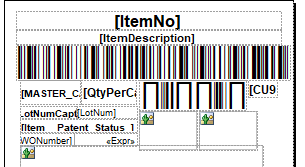
ADCS-Layout.PNG

And I am getting Result in Business Central Web Client as Like below.

Please Consider below Screenshot, the Report is looks like below while running Report in Business Central Web Client.
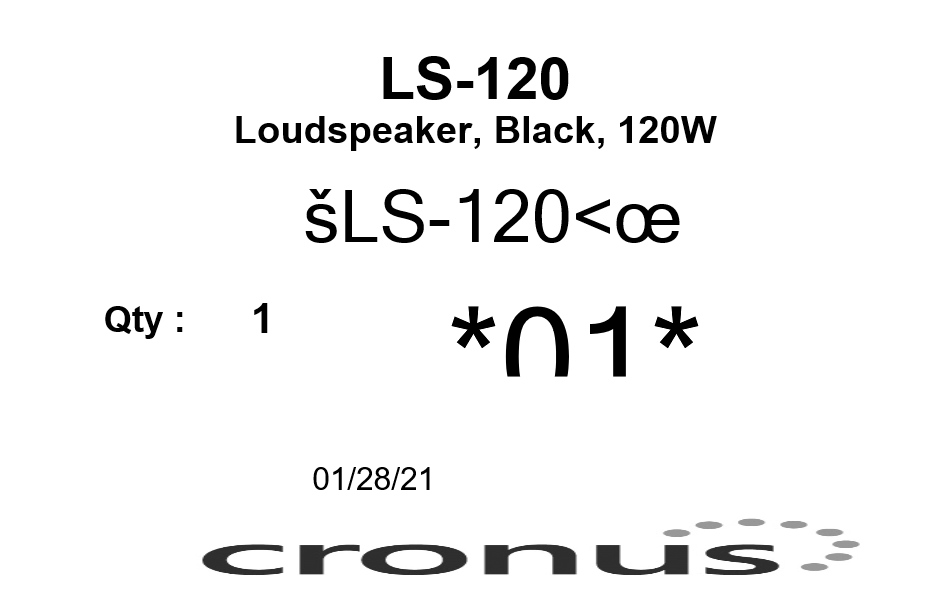
ADCS-Q.PNG

Can any one Suggest me solution for this Problem.

Thanks in Advance.

I have the same question (0)
  • Suggested answer
    Olister Rumao Profile Picture
    4,009 on at

    Hi,

    Kindly install Barcode Font in the machine where you are using the WebClient.

    I think this should resolve your issue .

    Also check the visibility of the report field once just to be sure they it's not set to hidden or check if the report is formatted in some other way.

  • Manikanta_501 Profile Picture
    245 on at

    Thanks for your Reply.

    I installed Barcode fonts in my PC but Still it's not showing any Barcodes in Report While running through Web client.

    Note : I tried Multiple Reports in Multiple systems but Barcode is not showing in any Web Client, but Barcode is showing in Business Central Windows Client.

Under review

Thank you for your reply! To ensure a great experience for everyone, your content is awaiting approval by our Community Managers. Please check back later.

Helpful resources

Quick Links

Introducing the 2026 Season 1 community Super Users

Congratulations to our 2026 Super Stars!

Meet the Microsoft Dynamics 365 Contact Center Champions

We are thrilled to have these Champions in our Community!

Congratulations to the April Top 10 Community Leaders

These are the community rock stars!

Leaderboard > Small and medium business | Business Central, NAV, RMS

#1
OussamaSabbouh Profile Picture

OussamaSabbouh 2,233 Super User 2026 Season 1

#2
YUN ZHU Profile Picture

YUN ZHU 1,360 Super User 2026 Season 1

#3
AndrewThomas81 Profile Picture

AndrewThomas81 1,216

Last 30 days Overall leaderboard

Featured topics

Product updates

Dynamics 365 release plans
