web
You’re offline. This is a read only version of the page.
close
Skip to main content

Notifications

Announcements

No record found.

Community site session details

Community site session details

Session Id :
Microsoft Dynamics 365 | Integration, Dataverse...
Suggested Answer

Timeline and view in lead entity

(0) ShareShare
ReportReport
Posted on by 1,085

Hello community experts,
There is an urgent requirement where I have get the latest activity from the timeline for lead entity and it should display in view

Can you please tell me how to get the latest activity record?

Please guide it's urgent requirement

Thanks in advance

I have the same question (0)
  • Suggested answer
    Wahaj Rashid Profile Picture
    11,321 on at

    Hi,

    Thank you for your query.

    You cannot show a single activity in a view. This means, we do not have TOP 1 kind of operations available.

    If you wish to show a particular activity on Account or Lead, you can build an SSRS report (user TOP 1 in the fetch xml).

    But if your requirement to list leads along with 1 latest activity (each), you cannot do this in a view or report.

    If you are on an on-premise environment, you can use SQL Query to build report (Partition BY), else, you have to export this data for reporting purposes.

  • Akanksha Srivastava Profile Picture
    100 on at

    Hi Sumaira,

    Can you please provide more information on the requirement? Do you need the activity displayed in Lead view or just form? Also, would it be any activity type or some specific ones only?

  • Sumaira Noor Profile Picture
    1,085 on at

    @Akanksha Srivastava  and @Wahaj Rashid, thanks a lot for your response

    For Example: I have a lead record with name "John Doe", when i open "John Doe" record, his activities such as task or email etc will be displayed in timeline. But i want to get the most recent task from that particular record's timeline and may be we can fetch that in a textfield and once it comes to textfield  we can make it display in view is what i understand, but how to get that latest activity record from timeline to the textfield is what i dont know. Can somebody please guide me?

    Thanks!

  • Suggested answer
    Wahaj Rashid Profile Picture
    11,321 on at

    Hi,

    What do you want to show in the Text field? They Subject of the Activity? The type of the Activity?

    Assuming, you need both, I would recommend creating a process or flow for this purpose. However, both the process or flow won't trigger on Activity table (entity), you have to create multiple processes/flows for each Activity Type. 

    Here are steps to follow:

    • Create 2 text fields in the Lead table (entity):
      • Recent Activity
      • Recent Activity Type (you can also create this as an option set and select existing optionset named "Activity Type")
    • Add these fields to the form and Publish changes.
    • Then create a real-time workflow which triggers on create of Task table (entity):

    pastedimage1616392777602v1.png 

    • Add a Check Condition to verify if regarding object is lead.

    pastedimage1616393000444v2.png

    • Add an Update step to update the Regarding Lead to set Activity Subject and Activity Type:

    pastedimage1616393662324v4.png

    • Activate the workflow.
    • Test it by creating a Task.

    pastedimage1616393781891v5.png

    • Now, you have to repeat these steps for all Activity Types (Phone Call, Email, etc.) or at least for the ones you use.

    Once you have this data, you can use these in a view.

    pastedimage1616394035092v1.png

    If you can afford to wait for these fields to be updated, you can use Microsoft Flow to do the same as well.

  • Suggested answer
    LuHao Profile Picture
    40,892 on at

    Hi Sumaira,

    You would like to create a field for Lead and this field shows the latest Task of the Lead, and the field also display as a column on the view, right?

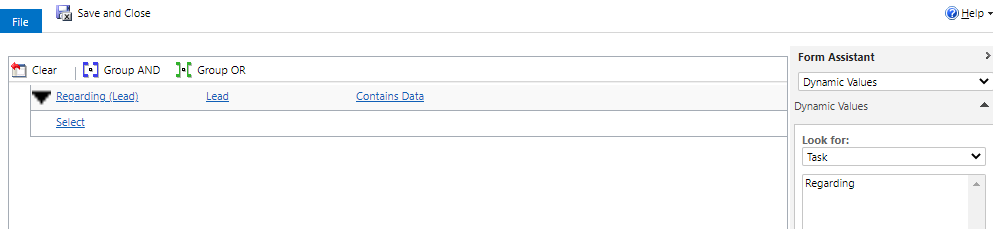
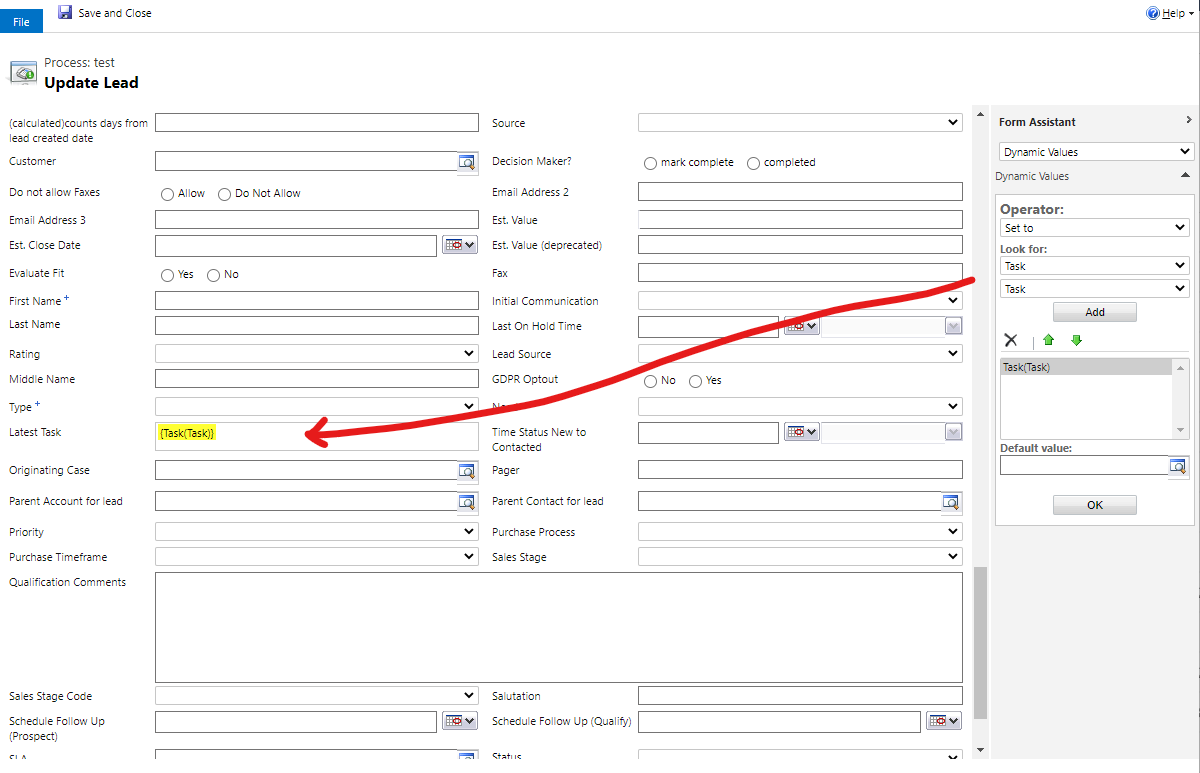
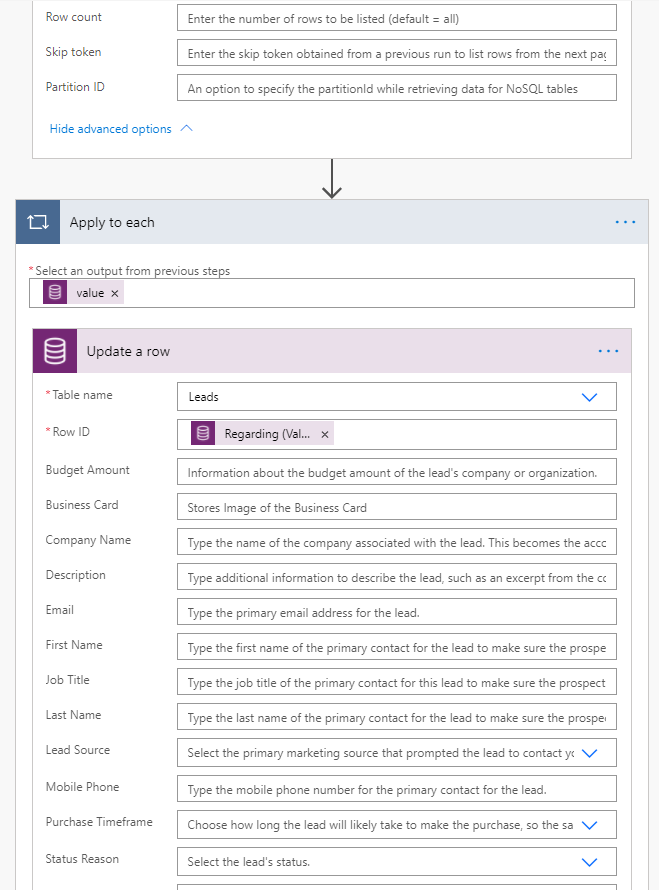
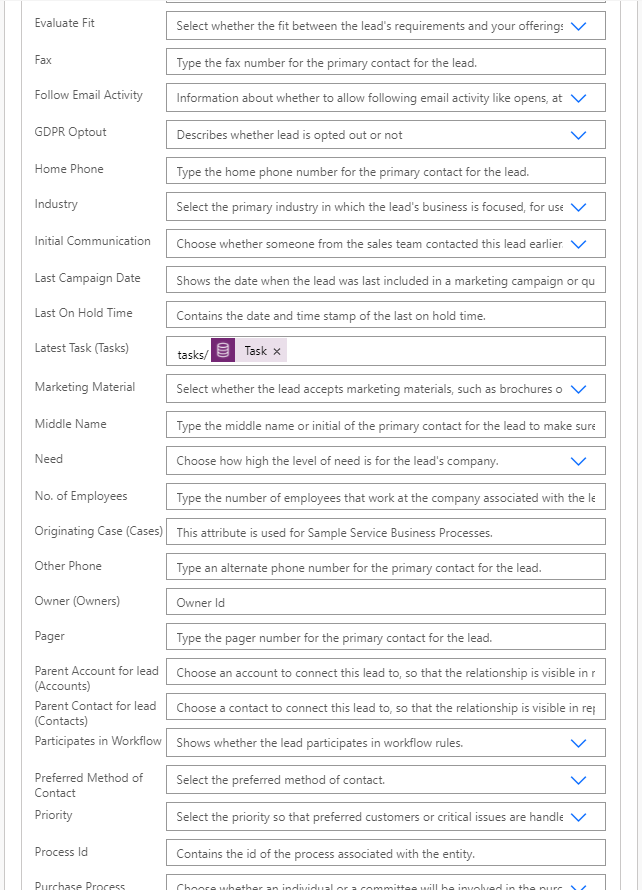
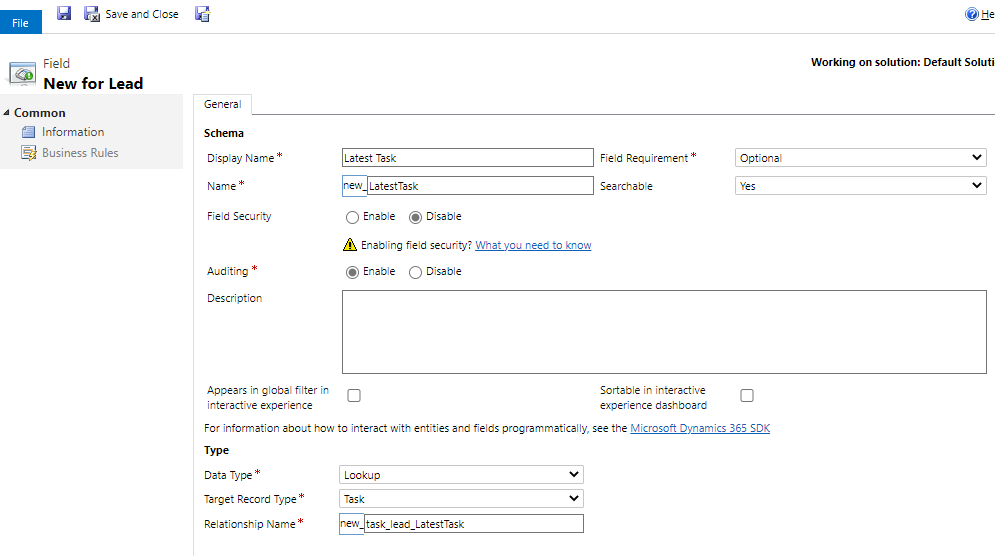
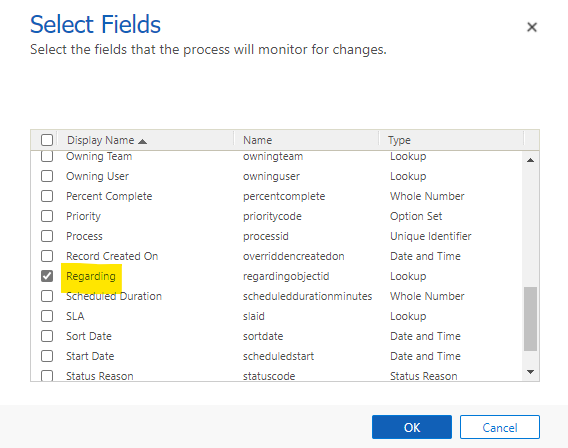
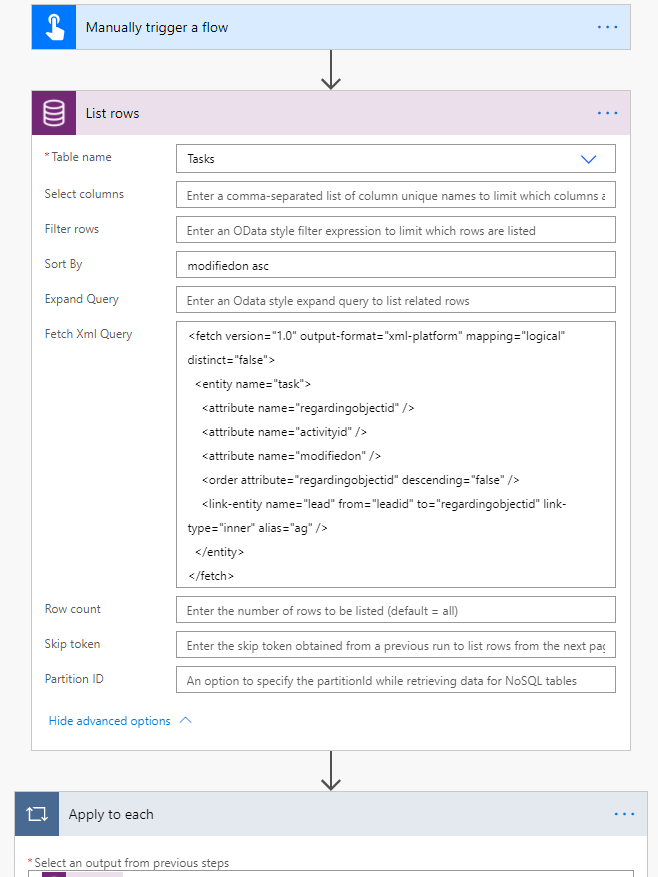
    If so, we can create a Task lookup field for Lead, and create a workflow to automatically update this lookup field when a Task regarding Lead is created, then create a flow to manually update all Lead based on existing Tasks.

    Step 1. Create a Task lookup field for Lead.
    pastedimage1616394210394v1.png

    Step 2. Create a workflow. Activate.
    pastedimage1616394829865v6.png    pastedimage1616394821007v5.png

    pastedimage1616394705229v3.png

    pastedimage1616394787530v4.png

    Step 3. Create an instant cloud flow.
    pastedimage1616396821246v7.png


    pastedimage1616396867464v8.png

    pastedimage1616396885097v9.png

    Run it, if it runs successfully, turn off it or delete it.

  • Sumaira Noor Profile Picture
    1,085 on at

    @Lu and @Wahaj Rashid, many thanks again for the clear steps

    But the problem here is, in one field he want the latest acitivity from timeline, whether it is email/task/phone call or any other activity

    Can you please suggest how i can solve this scenario?

    Thanks in advance!

  • Suggested answer
    LuHao Profile Picture
    40,892 on at

    Hi Sumaira,

    So I think the only solution is to

    1) create a single line of text field 

    2) then create multiple workflows, each for one Activity type, the step is to update the text field with the subject of the Activity.

    3) run a flow to list multiple Activity type records, take the latest record for each Activity type. Then take the activity with the closest modification date from them, update the text field with this modification date.

    If you need screenshots, I will provide them tomorrow.

  • Sumaira Noor Profile Picture
    1,085 on at

    @Lu Many thanks, I'll try the approach you suggested.

    Yes i would like to have screenshots

  • Suggested answer
    Wahaj Rashid Profile Picture
    11,321 on at

    Hi,

    In my answer, I have clarified that you have to repeat the steps for each Activity type.

    That is the reason I have suggested to create 2 fields:

    • Recent Activity Type
    • Recent Activity Subject

    The steps I provided are for Task, you can do the same for other Activities like Email, Phone Call etc.

    I have highlighted the text in my original answer for your reference.

  • Wahaj Rashid Profile Picture
    11,321 on at

    If my answer was helpful, please mark it as verified (click 'Yes' under 'Did this answer your question').

    This should make it easier for the other readers.

Under review

Thank you for your reply! To ensure a great experience for everyone, your content is awaiting approval by our Community Managers. Please check back later.

Helpful resources

Quick Links

Responsible AI policies

As AI tools become more common, we’re introducing a Responsible AI Use…

Neeraj Kumar – Community Spotlight

We are honored to recognize Neeraj Kumar as our Community Spotlight honoree for…

Leaderboard > Microsoft Dynamics 365 | Integration, Dataverse, and general topics

#1
Martin Dráb Profile Picture

Martin Dráb 41 Most Valuable Professional

#2
iampranjal Profile Picture

iampranjal 39

#3
Satyam Prakash Profile Picture

Satyam Prakash 35

Last 30 days Overall leaderboard

Product updates

Dynamics 365 release plans