web
You’re offline. This is a read only version of the page.
close
Skip to main content

Announcements

No record found.

News and Announcements icon
Community site session details

Community site session details

Session Id :
Microsoft Dynamics CRM (Archived)

Error on CRM email router

(0) ShareShare
ReportReport
Posted on by

Hi all,


Two days back Im not sure what changes I made, now CRM email router is showing error when I try to load data of users. I tried google it is all telling to change web.config but unfortunately I was not able to fix it. The error screen is give below..
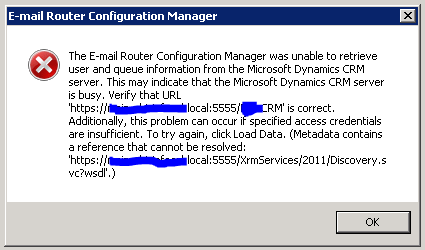
6153.email-router-error.PNG

I tried to browse url specified at the end of the error then Im getting the error which is given below.
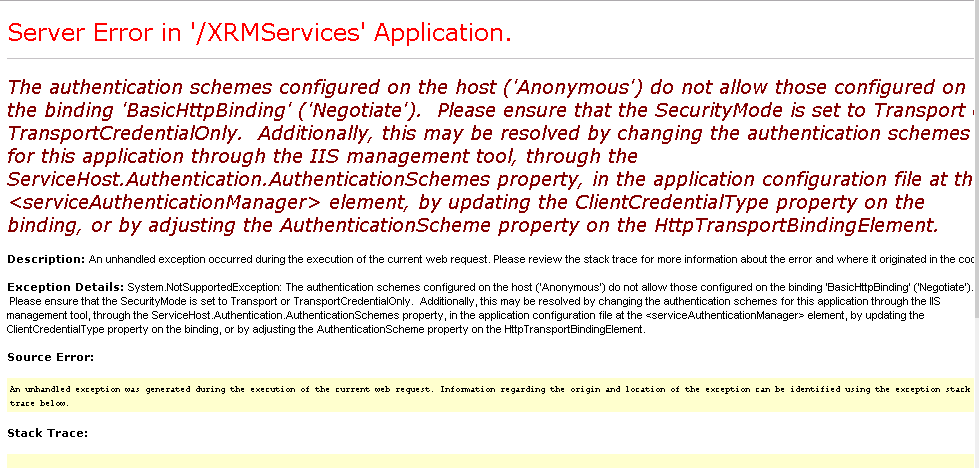
email-router-error2.PNG

One strange thing I noticed in that url is there is no organization name specified after port(5555) and if I put organization name after port Im getting the page with out any error. Screenshot is given below
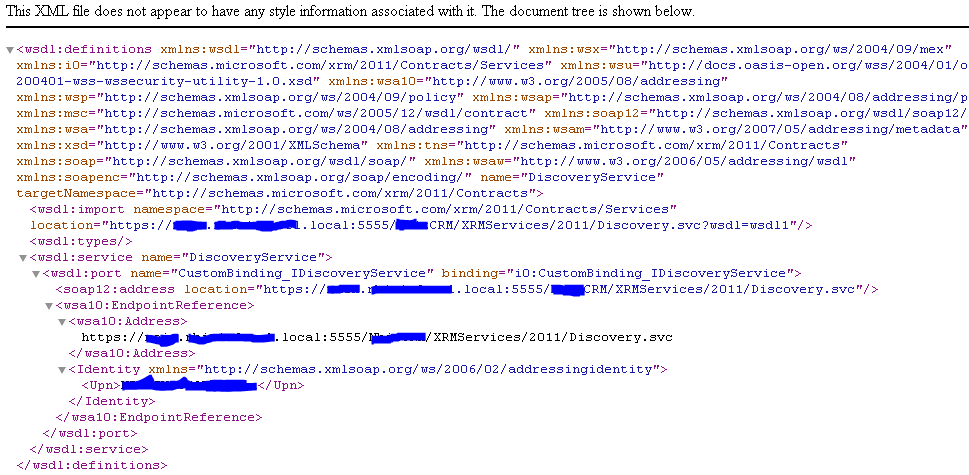
email-router-error3.PNG

Is email router is configured to invalid url? Please help me on this

Thanks


*This post is locked for comments

I have the same question (0)
  • Suggested answer
    Amar Prakash Profile Picture
    565 on at

    It seems your issue is related to IFD. Can you please check with custom code or plugin registration tool to connect with your environment organization service. Please post your error log here. You can also post event viewer error and fiddler log as well. Thanks.

  • Community Member Profile Picture
    on at

    The plugin registration tool is connection to CRM correctly.. I can see the organization in that

    I checked further and I found that the CRM email router services is stopped and I tried to restart it. It is starting correctly but stopping with out any error message. The error report from event viewer is given below

    WebHost failed to process a request.
     Sender Information: System.ServiceModel.ServiceHostingEnvironment+HostingManager/62476613
     Exception: System.ServiceModel.ServiceActivationException: The service '/XRMServices/2011/Discovery.svc' cannot be activated due to an exception during compilation.  The exception message is: The authentication schemes configured on the host ('Anonymous') do not allow those configured on the binding 'BasicHttpBinding' ('Negotiate').  Please ensure that the SecurityMode is set to Transport or TransportCredentialOnly.  Additionally, this may be resolved by changing the authentication schemes for this application through the IIS management tool, through the ServiceHost.Authentication.AuthenticationSchemes property, in the application configuration file at the <serviceAuthenticationManager> element, by updating the ClientCredentialType property on the binding, or by adjusting the AuthenticationScheme property on the HttpTransportBindingElement.. ---> System.NotSupportedException: The authentication schemes configured on the host ('Anonymous') do not allow those configured on the binding 'BasicHttpBinding' ('Negotiate').  Please ensure that the SecurityMode is set to Transport or TransportCredentialOnly.  Additionally, this may be resolved by changing the authentication schemes for this application through the IIS management tool, through the ServiceHost.Authentication.AuthenticationSchemes property, in the application configuration file at the <serviceAuthenticationManager> element, by updating the ClientCredentialType property on the binding, or by adjusting the AuthenticationScheme property on the HttpTransportBindingElement.
       at System.ServiceModel.Channels.HttpTransportBindingElement.UpdateAuthenticationSchemes(BindingContext context)
       at System.ServiceModel.Channels.HttpsTransportBindingElement.BuildChannelListener[TChannel](BindingContext context)
       at System.ServiceModel.Channels.Binding.BuildChannelListener[TChannel](Uri listenUriBaseAddress, String listenUriRelativeAddress, ListenUriMode listenUriMode, BindingParameterCollection parameters)
       at System.ServiceModel.Description.DispatcherBuilder.MaybeCreateListener(Boolean actuallyCreate, Type[] supportedChannels, Binding binding, BindingParameterCollection parameters, Uri listenUriBaseAddress, String listenUriRelativeAddress, ListenUriMode listenUriMode, ServiceThrottle throttle, IChannelListener& result, Boolean supportContextSession)
       at System.ServiceModel.Description.DispatcherBuilder.BuildChannelListener(StuffPerListenUriInfo stuff, ServiceHostBase serviceHost, Uri listenUri, ListenUriMode listenUriMode, Boolean supportContextSession, IChannelListener& result)
       at System.ServiceModel.Description.DispatcherBuilder.InitializeServiceHost(ServiceDescription description, ServiceHostBase serviceHost)
       at System.ServiceModel.ServiceHostBase.InitializeRuntime()
       at System.ServiceModel.ServiceHostBase.OnOpen(TimeSpan timeout)
       at System.ServiceModel.Channels.CommunicationObject.Open(TimeSpan timeout)
       at System.ServiceModel.ServiceHostingEnvironment.HostingManager.ActivateService(ServiceActivationInfo serviceActivationInfo, EventTraceActivity eventTraceActivity)
       at System.ServiceModel.ServiceHostingEnvironment.HostingManager.EnsureServiceAvailable(String normalizedVirtualPath, EventTraceActivity eventTraceActivity)
       --- End of inner exception stack trace ---
       at System.ServiceModel.ServiceHostingEnvironment.HostingManager.EnsureServiceAvailable(String normalizedVirtualPath, EventTraceActivity eventTraceActivity)
       at System.ServiceModel.ServiceHostingEnvironment.EnsureServiceAvailableFast(String relativeVirtualPath, EventTraceActivity eventTraceActivity)
     Process Name: w3wp
     Process ID: 27780

  • Verified answer
    Community Member Profile Picture
    on at

    Hi,

    Thanks for the reply.

    I finally found the solution for this but it was difficult to reach that since error message was something unrelated to the solution. The solution was the permission issue on 2011 folder on XRMSERVICES. I give full permission to IUSR for xrmservices/2011 folder then everything worked perfect.

    Thanks

Under review

Thank you for your reply! To ensure a great experience for everyone, your content is awaiting approval by our Community Managers. Please check back later.

Helpful resources

Quick Links

Introducing the 2026 Season 1 community Super Users

Congratulations to our 2026 Super Stars!

Meet the Microsoft Dynamics 365 Contact Center Champions

We are thrilled to have these Champions in our Community!

Congratulations to the March Top 10 Community Leaders

These are the community rock stars!

Leaderboard > 🔒一 Microsoft Dynamics CRM (Archived)

#1
JS-09031509-0 Profile Picture

JS-09031509-0 3

#2
AS-17030037-0 Profile Picture

AS-17030037-0 2

#2
Mark Eckert Profile Picture

Mark Eckert 2

Last 30 days Overall leaderboard

Featured topics

Product updates

Dynamics 365 release plans
