web
You’re offline. This is a read only version of the page.
close
Skip to main content

Notifications

Announcements

No record found.

Community site session details

Community site session details

Session Id :
Small and medium business | Business Central, N...
Answered

I keep getting Validation Results: The No. Series does not exist. Identification fields and values: Code=’ITEM’ errors

(5) ShareShare
ReportReport
Posted on by 19

This happens whenever I try to add an item number to a new item card in our database, it was working just fine until last Friday, then it started working again after some reindexing (I am not sure who at my organization is responsible for that), and then when I went to try to add an item today it was giving me the same error. I can still create routings and production BOMs, but those tools are a bit useless without items to associate to them. I have asked three other people at my organization and all of their log-ins do not show the same issue, it's just me.

I am not sure if I am doing something wrong or if there is something wrong with our system, any help is appreciated.
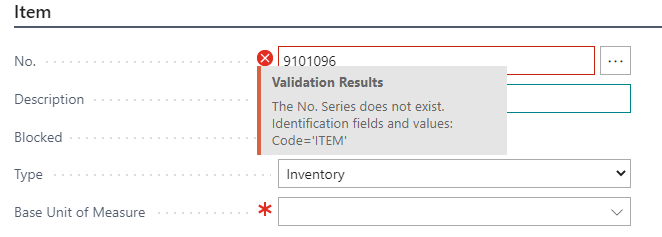
8802.error.PNG

I have the same question (1)
  • Verified answer
    YUN ZHU Profile Picture
    95,329 Super User 2025 Season 2 on at

    Hi, Please check if the setting below exists.

    pastedimage1672273640384v1.png

    pastedimage1672274154376v3.png

    Thanks.

    ZHU

  • Inge M. Bruvik Profile Picture
    1,105 Moderator on at

    I agree with ZHU, check your configuration of no. series for Items.

  • Suggested answer
    HarrisonH Profile Picture
    19 on at

    We think we figured it out: someone was messing with the Starting No. entry and the indexing just broke. Entering in the correct starting number of the series fixes it so far.

    Thank you for responding and pointing me in the right direction, hopefully this is a permanent fix.

  • SC666 Profile Picture
    239 on at
    Question:
     
    Confiture No series to field relationship is one to one right?
     
    What if I have multiple item category code and each category start with a different letter logic. How can I configure this field under inventory setup?
     
    What we used to do is: we kept the inventory setup item no. field blank on the configuration. It was working previously. But this weekend our system upgrade to V27 and it kept showing error when I am creating the item card. What shall I do next? Any suggestion?

Under review

Thank you for your reply! To ensure a great experience for everyone, your content is awaiting approval by our Community Managers. Please check back later.

Helpful resources

Quick Links

Responsible AI policies

As AI tools become more common, we’re introducing a Responsible AI Use…

Neeraj Kumar – Community Spotlight

We are honored to recognize Neeraj Kumar as our Community Spotlight honoree for…

Leaderboard > Small and medium business | Business Central, NAV, RMS

#1
OussamaSabbouh Profile Picture

OussamaSabbouh 3,229

#2
Jainam M. Kothari Profile Picture

Jainam M. Kothari 1,867 Super User 2025 Season 2

#3
YUN ZHU Profile Picture

YUN ZHU 1,153 Super User 2025 Season 2

Last 30 days Overall leaderboard

Featured topics

Product updates

Dynamics 365 release plans
