web
You’re offline. This is a read only version of the page.
close
Skip to main content

Notifications

Announcements

No record found.

Community site session details

Community site session details

Session Id :
Microsoft Dynamics 365 | Integration, Dataverse...
Suggested Answer

Update work order state direct from a Canvas App

(0) ShareShare
ReportReport
Posted on by 10

Hi Everyone,

This is my first attempt to create a Canvas App for the Fin & Ops Asset Management Work Orders

I am Using Virtual Tables in Dataverse and can see all data.

I am trying to Patch the 'mserp_status' field to update the Work Order State but get the Error the Column is not Allowed o be updated. 

I check the Dataverse tables and its read only.

Does anyone have any experience with updating the Work Order State from a Canvas App button?

pastedimage1679487153614v1.png

Thanks

Paul

I have the same question (0)
  • Suggested answer
    Parag Chapre Profile Picture
    12,254 Most Valuable Professional on at

    Hi Paul,

    When the entity is read-only then you cannot update anything.

    Another option is to use Power Apps with Power automate.

    You can create a Power apps with data from VE and use Power automate to update the data using ODATA.

    Please look at my blog post on how I create customer in Dynamics 365 F&O using Power apps and power automate. If you have any questions then reach out to me.

    paragchapre.com/.../

  • Suggested answer
    Shawnsauve Profile Picture
    1,093 on at

    Using virtual tables in Dataverse is a great way to see all the data you need.

    Regarding your issue with updating the 'mserp_status' field, it's possible that the column is not allowed to be updated due to it being read-only in the Dataverse table. It's important to check the table properties to confirm this.

    If the column is read-only, you'll need to find another way to update the Work Order State. One way to do this is to create a custom API or a plugin in Fin & Ops Asset Management that can update the state of the Work Order based on the input you provide.

    Another option is to use a different field that is not read-only and map it to the 'mserp_status' field in Dataverse. This will allow you to update the Work Order State indirectly.

    It's also possible that there may be specific permissions required to update the Work Order State, so it's important to confirm that you have the necessary permissions to make updates.

    Overall, updating the Work Order State from a Canvas App button is definitely possible, but it may require some additional steps and workarounds depending on the limitations of the Dataverse table and the Fin & Ops Asset Management system.

    Good luck with your project!

  • Paul DIlks Profile Picture
    10 on at

    Hi Parag, Thank you so much for your reply, You talk about updating with Power Automate but you don't show in the video how you did this? Do you have something?

    When I try it needs the Object ID but fails each time with the below

    Only 1 of 8 keys provided for lookup, provide keys for dataAreaId,WorkOrderId,WorkOrderLineNumber,ScheduleType,WorkerPersonnelNumber,MaintenanceAssetId,WrkCtrId,ScheduledStartDateTime.

    Have you come across this before?

    Where do I get the Object id?

    Capture.PNG

    Thanks once again

    Paul

  • Parag Chapre Profile Picture
    12,254 Most Valuable Professional on at

    Hi Paul,

    I am making another video on Sales order creation in detailed. This will include the odata post action which writes data in D365 F&O.

  • Paul DIlks Profile Picture
    10 on at

    Ok great I look forward to seeing it

  • Paul DIlks Profile Picture
    10 on at

    Hi Shawn, Thank you very much the time given for your detailed response!

    Yeah I can see the Dataverse table column is read-only while others are Read-Write. So guessed this wasn't the approach.

    My next thought was to us the Fin & Ops Connector within PowerApps but you cant see the data to check if its read-Only or not and the Same Patch or form Update doesn't seem to work either

    My 3rd option is to user power Automate but this requires the Object id but cant find any information on this and how to pass it in via PowerApps.

    I Get this error.

    Only 1 of 8 keys provided for lookup, provide keys for dataAreaId,WorkOrderId,WorkOrderLineNumber,ScheduleType,WorkerPersonnelNumber,MaintenanceAssetId,WrkCtrId,ScheduledStartDateTime.

    Iv tried to satisfy with the fields by doing a Concatenate on all these fields and pass that into the flow then get this error,

    Only 9 of 8 keys provided for lookup, provide keys for dataAreaId,WorkOrderId,WorkOrderLineNumber,ScheduleType,WorkerPersonnelNumber,MaintenanceAssetId,WrkCtrId,ScheduledStartDateTime.

    When I check the flow run I think its taking the ',' in the Date format and thinking its 9 instead of 8
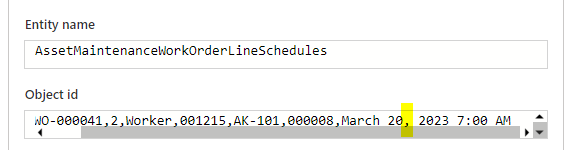
    pastedimage1679577931796v1.png

    I feel I am so close.

    Best regards

    Paul

  • Parag Chapre Profile Picture
    12,254 Most Valuable Professional on at

    Hi Paul,

    Please send me a dm. I will show you how you can use Power Apps and Power Automate together.

Under review

Thank you for your reply! To ensure a great experience for everyone, your content is awaiting approval by our Community Managers. Please check back later.

Helpful resources

Quick Links

Responsible AI policies

As AI tools become more common, we’re introducing a Responsible AI Use…

Neeraj Kumar – Community Spotlight

We are honored to recognize Neeraj Kumar as our Community Spotlight honoree for…

Leaderboard > Microsoft Dynamics 365 | Integration, Dataverse, and general topics

#1
Siv Sagar Profile Picture

Siv Sagar 93 Super User 2025 Season 2

#2
#ManoVerse Profile Picture

#ManoVerse 80

#3
Martin Dráb Profile Picture

Martin Dráb 64 Most Valuable Professional

Last 30 days Overall leaderboard

Product updates

Dynamics 365 release plans
