web
You’re offline. This is a read only version of the page.
close
Skip to main content

Announcements

No record found.

News and Announcements icon
Community site session details

Community site session details

Session Id :
Small and medium business | Business Central, N...
Suggested Answer

E-Mail Setup - Change URL

(0) ShareShare
ReportReport
Posted on by 420

Hello all,

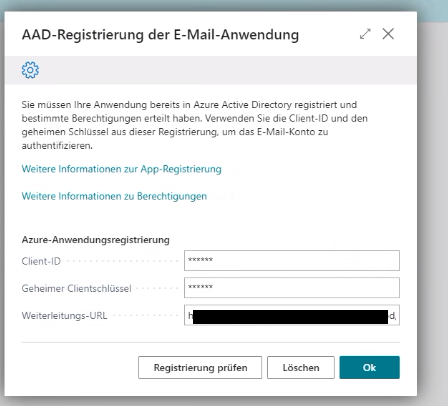
we tried to add a mail account to BC an received the following message:
pastedimage1635171309236v1.png

We inserted the wrong URL and now we can't find a way to change it back. Anyone knows how to change the URL? If we run the assisted setup the system skips this message.

Any help will be appreciated.

Thanks 

Erik

I have the same question (0)
  • Suggested answer
    Andy Sather Profile Picture
    Microsoft Employee on at

    Hello Erik - Can you try to go to the Email Accounts page and then delete the incorrect account there?  When I go to that page I can click the ellipsis on the line of the email and select Delete.

  • Erik KOhler Profile Picture
    420 on at

    Hello Andy,

    we deleted all Email Accounts, but the system still skips the page where we can insert the URL. I found something on MS docs. docs.microsoft.com/.../admin-how-setup-email  

    There should be something called "Email Application AAD Registration", but unfortunetly I can't find this in any of our Business Central environments.

    Thanks

    Erik

  • MGOODFELLOW Profile Picture
    15 on at

    Did you figure this out?  We are struggling with this as well - cannot seem to get Email Application AAD Registration reset up.

  • Suggested answer
    MahGah Profile Picture
    15,593 on at

    Hi

    This is just the theory. Maybe go to Azure then go to App registrations and see if you see the business central app. Then maybe you can edit it there. 

    https://docs.microsoft.com/en-us/azure/active-directory/develop/quickstart-register-app

    1. Sign in to the Azure portal.

    2. If you have access to multiple tenants, use the Directories + subscriptions filter pastedimage1646686730506v1.png in the top menu to switch to the tenant in which you want to register the application.

    3. Search for and select Azure Active Directory.

    4. Under Manage, select App registrations > 

  • Suggested answer
    MahGah Profile Picture
    15,593 on at

    Test this in Sandbox first. 

    The other idea is 

    Create Configuration package 

    Add table 4509 to it. Then export to excel. Then fix the url and upload back. 

    pastedimage1646686935499v1.png

    pastedimage1646686991529v2.png

  • Suggested answer
    MahGah Profile Picture
    15,593 on at

    Or maybe try this link to access app registration again

    businesscentral.dynamics.com/

  • MGOODFELLOW Profile Picture
    15 on at

    Thank you for your help with this.  I still have no idea why Email Application AAD Registration was not visible by typing in the search.  It is still not visible even after I have fixed it up and have it pointing to OAuthLanding instead of the SignIn page (which was my initial problem).

    But using a Configuration Package for table 4509 and going straight to the page allowed us to re-enter the information and now I have successfully set up Current User for an on premise deployment.

Under review

Thank you for your reply! To ensure a great experience for everyone, your content is awaiting approval by our Community Managers. Please check back later.

Helpful resources

Quick Links

Introducing the 2026 Season 1 community Super Users

Congratulations to our 2026 Super Stars!

Congratulations to our 2025 Community Spotlights

Thanks to all of our 2025 Community Spotlight stars!

Leaderboard > Small and medium business | Business Central, NAV, RMS

#1
OussamaSabbouh Profile Picture

OussamaSabbouh 1,926 Super User 2026 Season 1

#2
YUN ZHU Profile Picture

YUN ZHU 1,158 Super User 2026 Season 1

#3
Khushbu Rajvi. Profile Picture

Khushbu Rajvi. 533 Super User 2026 Season 1

Last 30 days Overall leaderboard

Featured topics

Product updates

Dynamics 365 release plans
