web
You’re offline. This is a read only version of the page.
close
Skip to main content

Notifications

Announcements

No record found.

Community site session details

Community site session details

Session Id :
Small and medium business | Business Central, N...
Answered

Error when Selecting Average Costing method for Item with Type service

(0) ShareShare
ReportReport
Posted on by 281

Dears , I am getting error when Selecting the Average Costing method for an Item with Type service 

I wonder what's going on I have 10s of items with Type Service & Costing method is Average 
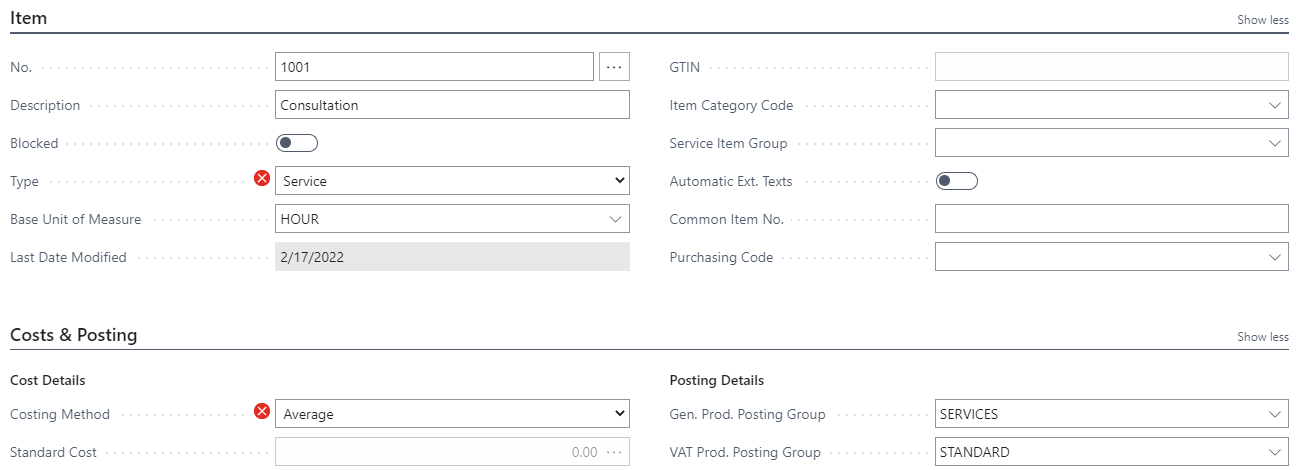
pastedimage1645124387589v2.png

I have a lot of items [Serivce] with Costing method [ Average ]

pastedimage1645124563744v3.png

I have the same question (0)
  • Suggested answer
    MahGah Profile Picture
    15,529 on at

    Hi

    See below article. For Service and non-inventory item Bc "The Service and Non-Inventory types do not support tracking of inventory quantities and values. Only selected item transaction types and features are supported." 

    Basically even if it shows Fifo that because that is the first option and has no other meaning. And for above reason you cannot change it. 

    docs.microsoft.com/.../inventory-about-item-types

  • Suggested answer
    Dallefeld Profile Picture
    211 User Group Leader on at

    Service and inventory Items will track a last direct cost as they are posted through purchase invoices. This does not add value to the inventory but does give you a unit cost.

  • mahmoud_algindy Profile Picture
    281 on at

    Thanks, MahGah

    I've read the same article several times earlier, my concern is:

    why I am able to add an Item with type service & Costing method is Average, and why sometimes I am not able to do the same,

    I created both items in less than a minute for testing purposes, it's very strange for me.

    I am using Config. pkgs as usual in my implementation and I know for many years that when I need to upload Items [Service type] I need to keep the Costing method blank or FIFO if I tried to add average in the Config. pkgs it will retuern  an error.

  • Dallefeld Profile Picture
    211 User Group Leader on at

    That seems crazy since it's not using any costing method....

  • Suggested answer
    MahGah Profile Picture
    15,529 on at

    Hi

    Sorry I missed that part. it is strange that you have service parts with AVG Cost. I have tried to create such an item but had no success. Do you know if they are new item or "migrated" items through Configuration Package?

    I was successfully changed and upload one service item with AVg cost through Configuration Package. Basically if you turn off validation in configuration package you do not receive any error. 

    I hope this help 

    pastedimage1645133223322v1.png

  • mahmoud_algindy Profile Picture
    281 on at

    Hi MahGah

    Thank you & thanks to Kim Dallefeld

    I added the item in the screenshot manually & did not use Conf. pkg or edit in Excel.

    That's why I feel a bug, I know it will not affect the calc. of the cost but my customer is not happy to see that, I can just hide it from the Item card but it's a very bad practice as the user will need it in Inventory Items.

    I hope it will be solved after the minor update 19.4 which has not yet appeared in my tenants.

  • Suggested answer
    MahGah Profile Picture
    15,529 on at

    Thanks Mahmud for update. The strange part is I am in 19.3 and have 19.3 docker but I cannot create Service item with Avg Cost. I hope 19.4 solve this issue.

    Out of curiosity do you have any extension in Item Card or Item related?  

  • Verified answer
    YUN ZHU Profile Picture
    95,597 Super User 2025 Season 2 on at

    Hi, This is restricted in the standard code that if the "Costing Method" is not equal to FIFO, the Type must be equal to Inventory.

    pastedimage1645147582018v1.png

    Hope this will help.

    Thanks.

    ZHU

  • mahmoud_algindy Profile Picture
    281 on at

    Thanks a lot yzhums

    You changed my way now to go deeper and check the code.

    Thanks a lot to all

Under review

Thank you for your reply! To ensure a great experience for everyone, your content is awaiting approval by our Community Managers. Please check back later.

Helpful resources

Quick Links

Responsible AI policies

As AI tools become more common, we’re introducing a Responsible AI Use…

Neeraj Kumar – Community Spotlight

We are honored to recognize Neeraj Kumar as our Community Spotlight honoree for…

Leaderboard > Small and medium business | Business Central, NAV, RMS

#1
OussamaSabbouh Profile Picture

OussamaSabbouh 2,785

#2
Jainam M. Kothari Profile Picture

Jainam M. Kothari 1,007 Super User 2025 Season 2

#3
YUN ZHU Profile Picture

YUN ZHU 948 Super User 2025 Season 2

Last 30 days Overall leaderboard

Featured topics

Product updates

Dynamics 365 release plans
