web
You’re offline. This is a read only version of the page.
close
Skip to main content

Announcements

No record found.

News and Announcements icon
Community site session details

Community site session details

Session Id :
Small and medium business | Business Central, N...
Answered

Unable to archive sales orders due to interaction template language

(0) ShareShare
ReportReport
Posted on by 5

Hello all,

When preparing a sales order to send to a customer, we have always used:

Print/Send > Print Confirmation > radio buttons on for Log Interaction, Archive Document.
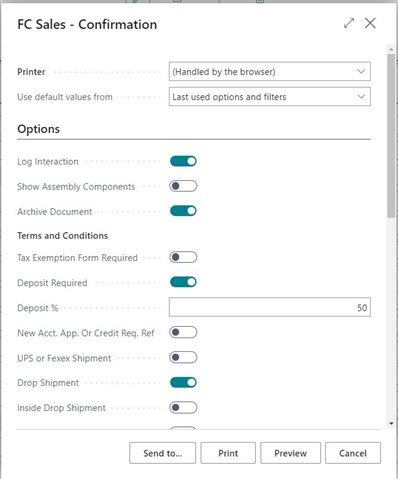
Printsend.JPG_2D00_640x480.jpg_2D00_640x480.jpg

At this point, we are able to print or save as PDF. This will then log an interaction with the sales order number and include an attachment of the sales order to that interaction. Essentially, this is a tool we use to refer back to sales orders if an issues arises with a customer.

We have been unable to use this function for months and we are all frustrated. 

When attempting to do this, an error message is received that reads:
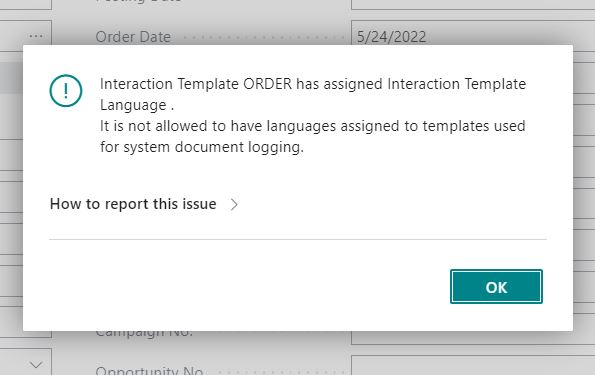
7612.error.JPG

Interaction Template ORDER has assigned Interaction Template Language . It is not allowed to have languages assigned to templates used for system document logging.

I have spent hours upon hours trying to find the root of this problem and fix this. I have exhausted my efforts and our BC/NAV/Microsoft Partner consulting company has told us that there is no issue or fix they can find which, understandably so, is quite anger inducing.
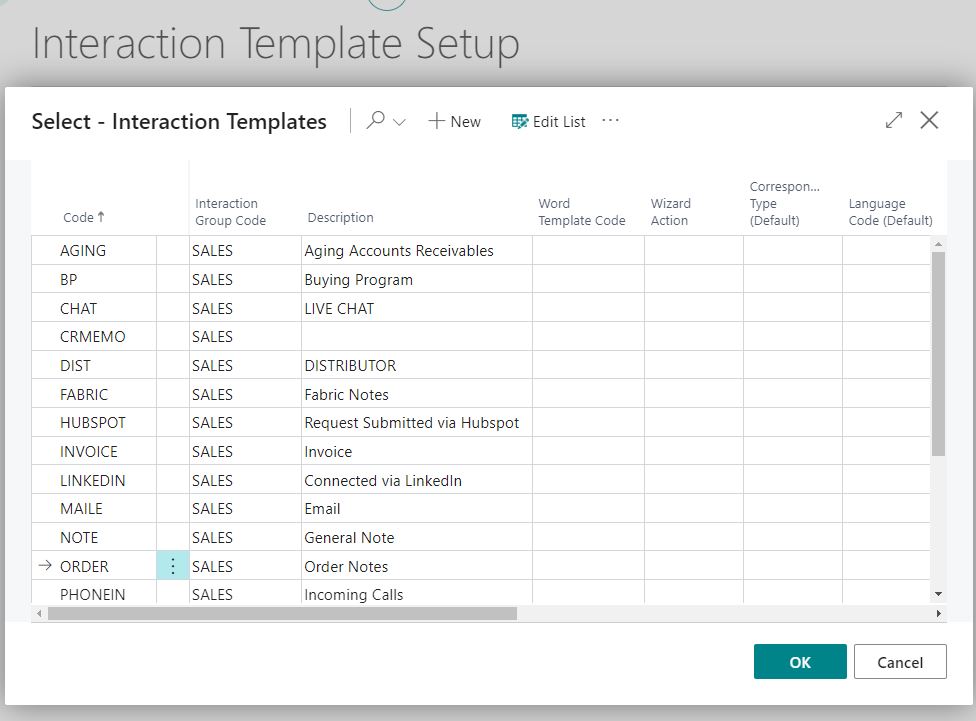
template-set-up.JPG

as you can see, there is no assigned language. 

What am I missing? How can I fix this?

Thanks in advance for any ideas, fixes or help.

I have the same question (0)
  • Suggested answer
    MahGah Profile Picture
    15,613 on at

    Hi

    What is your region of BC? is it SaaS or on-prem? and what version? 

    May be you already tried this but thought to share

    Can you go to Interaction Template then create a new template (for example Order1) then make sure setup match below 

    Then go to Interaction Template Setup and change Order Confirmation to this new template. Then try. 

    If you already tried this please let us know. Thanks 

    pastedimage1653606452864v1.png

    pastedimage1653606491335v2.png

  • FC_andrea Profile Picture
    5 on at

    MahGah, thank you SO much!

    This has solved the issue. I wish I could give you a hug on behalf of myself and my coworkers. You just solved an issue that has pained us for months.

    Again, many thanks to you. Have a great weekend!

  • MahGah Profile Picture
    15,613 on at

    Hi FC_andrea

    I am so glad that solved your problem. I myself wanted to give hug to many members of this community because of their help.

    You are more than welcome and have a great weekend as well.

Under review

Thank you for your reply! To ensure a great experience for everyone, your content is awaiting approval by our Community Managers. Please check back later.

Helpful resources

Quick Links

Introducing the 2026 Season 1 community Super Users

Congratulations to our 2026 Super Stars!

Meet the Microsoft Dynamics 365 Contact Center Champions

We are thrilled to have these Champions in our Community!

Congratulations to the April Top 10 Community Leaders

These are the community rock stars!

Leaderboard > Small and medium business | Business Central, NAV, RMS

#1
OussamaSabbouh Profile Picture

OussamaSabbouh 2,138 Super User 2026 Season 1

#2
YUN ZHU Profile Picture

YUN ZHU 1,279 Super User 2026 Season 1

#3
AndrewThomas81 Profile Picture

AndrewThomas81 1,192

Last 30 days Overall leaderboard

Featured topics

Product updates

Dynamics 365 release plans
