web
You’re offline. This is a read only version of the page.
close
Skip to main content

Notifications

Announcements

No record found.

Community site session details

Community site session details

Session Id :
Microsoft Dynamics CRM (Archived)

Way to change price per unit in Order Product when created from Quote

(0) ShareShare
ReportReport
Posted on by 345

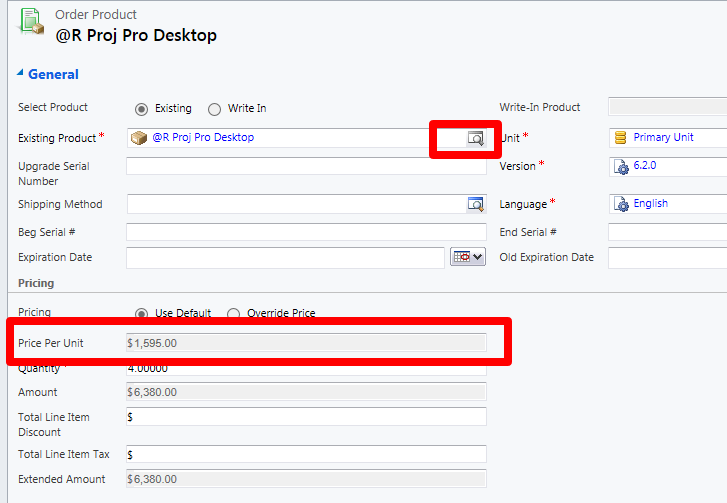
We have a common occurrence that is tripping us up. When an Order is created from a Quote, we sometimes have to change the Price Per Unit of an item after talking with a customer (perhaps to give a discount). CRM locks this in addition to the Order Product Existing Product down, but I'm not sure if a workflow can open this field to be edited? We have been asking sales rep to go back to the Opportunity and start over if the pricing changes. It seems like this would be a common problem that can be solved without having to re-create the Order?

Many thanks,

Rob
*This post is locked for comments

I have the same question (0)
  • Community Member Profile Picture
    on at

    Not sure if this will help

    Setting--> Administration --> Security Roles

    Select the Users role  ie Sales Manager

    Click on the Sales Tab

    Look for Miscellaneous Privileges and Grant the privileges you want to have.

    We use Business Unit.

    _damon

  • rplace Profile Picture
    345 on at

    Thanks for the reply. In this case, I don't think its security settings. I have an Admin role. I think it might be a native field-locking functionality in CRM that I am hoping I can unlock, but it's not as easy as creating a workflow to unlock a closed Order.

  • Community Member Profile Picture
    on at

    I don't think I would change an Order because then your Quote will not reflect the changes made.

    Best way is to cancel the order, (we also delete it) then reopen the Quote and change the price.

    That's my two cents.

    _damon

  • Wayne Walton Profile Picture
    13,730 on at

    Can you not use the line-item discount or total discount lines to take off the amount that the object got discounted?  Seems like you'd have better reporting that way anyway, as you can see how much discounting is getting applied to close orders.

  • Aileen Gusni Profile Picture
    44,524 on at

    Hi Rob,

    Can you change the

    Pricing from 'Use default' to 'Override Price'

    And Select Product from 'Existing' to 'Write In'.

    If yes then I believe the fields you expected will be unlocked.

    If you are using Admin role but still got this problem then it should not be security role issue, if not then you should check the Misc. privilege for Overriding Order Pricing.

    Thanks.

  • rplace Profile Picture
    345 on at

    Unfortunately, everything is locked down. And my Misc. privilege for Overriding Order Pricing is turned on. Real stumper.

  • Aileen Gusni Profile Picture
    44,524 on at

    Hi Rob,

    Have you tried this?

    rc.crm.dynamics.com/.../source_sf_enable_Lock_Pricing.htm

    And

    blogs.msmvps.com/.../order-product-price-locking-in-crm-2013

    Hope this helps! Thanks

  • Suggested answer
    Community Member Profile Picture
    on at

    This happens due to customization. Have you changed the fields or supressed some of the fields in this form?

  • Suggested answer
    wetherington Profile Picture
    on at

    There is a field in the Order table called "Prices Locked" by default (Quote --> Order) this field would be set to "Yes".  You need to select this field to "No" which enables you to edit the order product. 

Under review

Thank you for your reply! To ensure a great experience for everyone, your content is awaiting approval by our Community Managers. Please check back later.

Helpful resources

Quick Links

Responsible AI policies

As AI tools become more common, we’re introducing a Responsible AI Use…

Neeraj Kumar – Community Spotlight

We are honored to recognize Neeraj Kumar as our Community Spotlight honoree for…

Leaderboard > 🔒一 Microsoft Dynamics CRM (Archived)

#1
SA-08121319-0 Profile Picture

SA-08121319-0 4

#1
Calum MacFarlane Profile Picture

Calum MacFarlane 4

#3
Alex Fun Wei Jie Profile Picture

Alex Fun Wei Jie 2

Last 30 days Overall leaderboard

Featured topics

Product updates

Dynamics 365 release plans



