Hi Kilowatto,
I have this requirement before.
Yes, you need your own customization to calculate it, Ben is right.
CRM has a tax field in the Quote or Opportunity Product
You can create a new entity to store global setting to store the 16% rate for tax rate to avoid hard-code.
Then you create a new decimal field to store the percentage (just in case your tax is reduced to 15.5% or increased to 16.5%, or not an exact number), Bruno provided a good link for example and useful for complicated and automatic calculation for the fields.
As I mentioned before, CRM has Tax field before getting the total extended amount, but it is in amount and it is manual input. You can override this manual input replacing it with your own calculation.
You can use your newly created percentage as global setting to calculate the total tax based on the detail amount and add in the Tax, CRM will auto-calculate the total Amount after added this tax.
See this picture below as your clearer picture.
This is assuming 1 Opportunity 1 Product,
It has 17000 value before discount and tax.
Then CRM will auto calculate the total amount of this product to 17400, don't be confused.

It was coming from 17000 (gross amount) - 2000 (discount) + 2400 (Tax) = 17400 (total amount of this product)
Assuming the Tax is 2400 was coming from 15000 (net amount after discount) * 16/100 = 2400
Then for the total by this Opportunity as summary, maybe can give you clearer picture

This is might be what you want is by calculating the 2.400 instead of the user key-in.
But you need to be careful, consult first to your client, what is exactly tax counted from, is that after discount (like CRM does) = 15000 or before discount = 17000
If you see the description of the detail amount in Opportunity from CRM is:
"Shows the sum of all existing and write-in products included on the opportunity, based on the specified price list and quantities."
and the Amount (see back the first picture) in Opportunity Product:
"Shows the total price of the opportunity product, based on the price per unit, volume discount, and quantity."
-> It means that without discount.
And if you see the extended amount in Opportunity in CRM:
"Shows the total amount due for the opportunity product, calculated on the Amount value minus the Manual Discount amount."
And if you seethe description of the Total Amount in Opportunity:

It means the calculation sum up the total amount of each product (net after discount from each product) - bundle discount + freight amount + taxes for the opportunity.
So, the tax in CRM is added in to the total amount after discount.
And the total amount in the Opportunity header is the calculation total of the total product (net) - disc + freight + tax.
Is that correct for the calculation?
And as you now, there are many discount there (discount for each product) and also discount for the bundle package. CRM Tax is defined as total calculated from each product not including the discount for bundle.
Some customer, and my customer for example because they also want to have another discount and net monthly rental calculation by their own rules, they want to the product is taxable only for the total product without discount then later give them additional discount after tax (or after total amount) and some are not using GST rules and still have more than one tax type.
Just bear in mind tax in CRM is defined by each product, if you have additional discount for bundling package, then this value will not be included in tax.
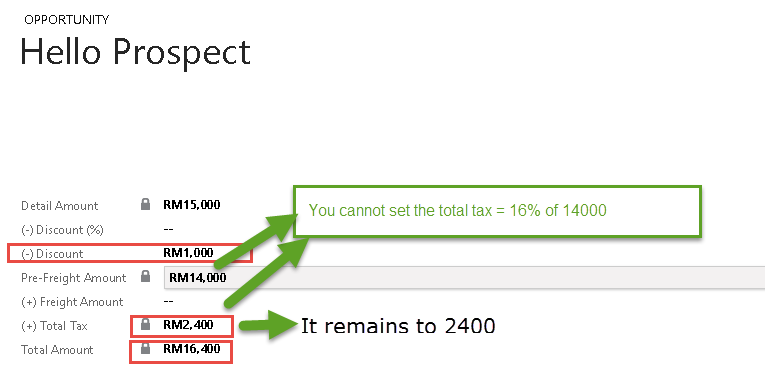
Total Tax is locked and by sum up the total product taxes.
So, consult to your customer first how to calculate the tax (is that after or before discount for each product), is that all of the product are taxable or only some? You might need additional checking in your Product Master (taxable yes/no). Is that correct the total amount calculation from CRM aft discount and tax? and adjust with CRM if it is possible, you can use the existing tax and total amount fields, you handle the tax calculation for each product follow CRM rules and CRM will help you calculate the total amount, if does not fit you can create additional field to store the tax and total amount.
Hope this helps!
Thanks.


