web
You’re offline. This is a read only version of the page.
close
Skip to main content

Announcements

No record found.

News and Announcements icon
Community site session details

Community site session details

Session Id :
Supply chain | Supply Chain Management, Commerce
Suggested Answer

Need to delete a received transfer order

(0) ShareShare
ReportReport
Posted on by

Hello,

Can anyone help me with this issue? 

End-user made a mistake while doing the transfer order, he first shipped the items and then by mistakenly again he added a item but in quantity section added the barcode number. need to remove the line or need to cancel the order.

Due to this we are unable to delete the Transfer Order. While Deleting We are getting "Transfer order line cannot be deleted because the line is not completely received."

Do anyone ever encounter this error or can anybody please suggest a solution?

Note:- The Transfer Order is in "Created" Status
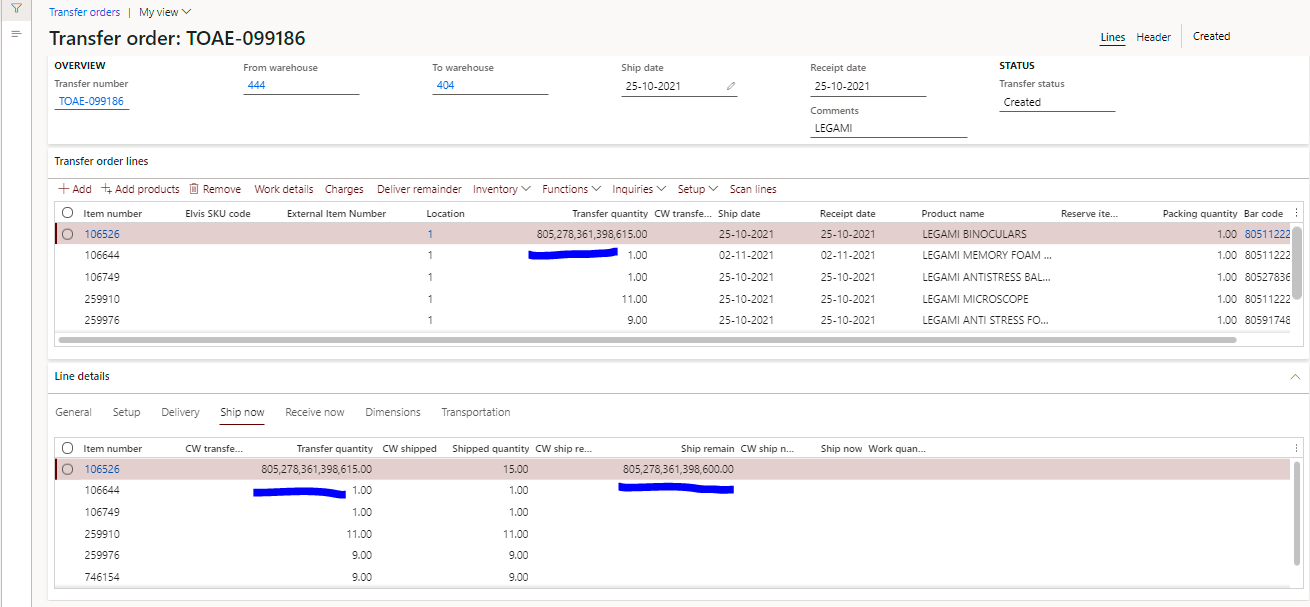
pastedimage1640668959587v1.png

Regards,

Dharma Ranjan Sahu

I have the same question (0)
  • huijij Profile Picture
    19,811 on at

    Hi Dharma,

    Please check if you have any Shipment or receipt related to the transfer order which can be reversed or deleted and then you will be able to delete the transfer order completely.

  • D R Sahu Profile Picture
    on at

    Hello Judy,

    Thank you for your help. But There is no Reservation or picked. I think the problem is something else.

  • Suggested answer
    saurabh bharti Profile Picture
    15,045 Moderator on at

    You can try following :

    1. exploredynamics365.home.blog/.../

    2.Create one more TO from to location to from location

  • D R Sahu Profile Picture
    on at

    Hello Saurabh,

    This is the standard process, these all we tried.

    I this issue what happen means, End user Created a TO. The items are shipped and received. here he made a mistake, in that same TO again he added a item, in the quantity section instead of quantity he entered the barcode number(805278361398600).

    Now, I think due to the system thinks quantity is heavy, the line is not shipping or deleting.

    I need solution for this issue  how we process or cancel this TO.

  • Suggested answer
    Danny Bilodeau Profile Picture
    4,934 Super User 2026 Season 1 on at

    Hi Dharma,

    I managed to reproduce your issue and could not get out of the 'Value was either too large or too small for a Decimal' error when trying to correct the quantity on the line or using teh Delivery Remainder option.  I was able to delete the line but had no other transactions for that line, while you have shipped 15.

    I think you will need to adress this issue to Microsoft support.  

    I suggest moving all the unshipped lines to another TO and exclude this TO from further release to warehouses processes.

  • Suggested answer
    saurabh bharti Profile Picture
    15,045 Moderator on at

    Did you try first option where there is a new feature for TO cancellation?

  • D R Sahu Profile Picture
    on at

    Hello Saurabh,

    Yes, I did tried that option as well. but it didn't workout.

Under review

Thank you for your reply! To ensure a great experience for everyone, your content is awaiting approval by our Community Managers. Please check back later.

Helpful resources

Quick Links

Introducing the 2026 Season 1 community Super Users

Congratulations to our 2026 Super Stars!

Meet the Microsoft Dynamics 365 Contact Center Champions

We are thrilled to have these Champions in our Community!

Congratulations to the March Top 10 Community Leaders

These are the community rock stars!

Leaderboard > Supply chain | Supply Chain Management, Commerce

#1
Mallesh Deshapaga Profile Picture

Mallesh Deshapaga 287

#2
Laurens vd Tang Profile Picture

Laurens vd Tang 212 Super User 2026 Season 1

#3
Syed Haris Shah Profile Picture

Syed Haris Shah 145 Super User 2026 Season 1

Last 30 days Overall leaderboard

Product updates

Dynamics 365 release plans
