web
You’re offline. This is a read only version of the page.
close
Skip to main content

Announcements

No record found.

News and Announcements icon
Community site session details

Community site session details

Session Id :
Small and medium business | Business Central, N...
Suggested Answer

BC 14 CU11 SignalR Queue and CU1 Error

(0) ShareShare
ReportReport
Posted on by 70

Hello Everyone,

Client is using Web Client for BC 14 CU11 on premise version.

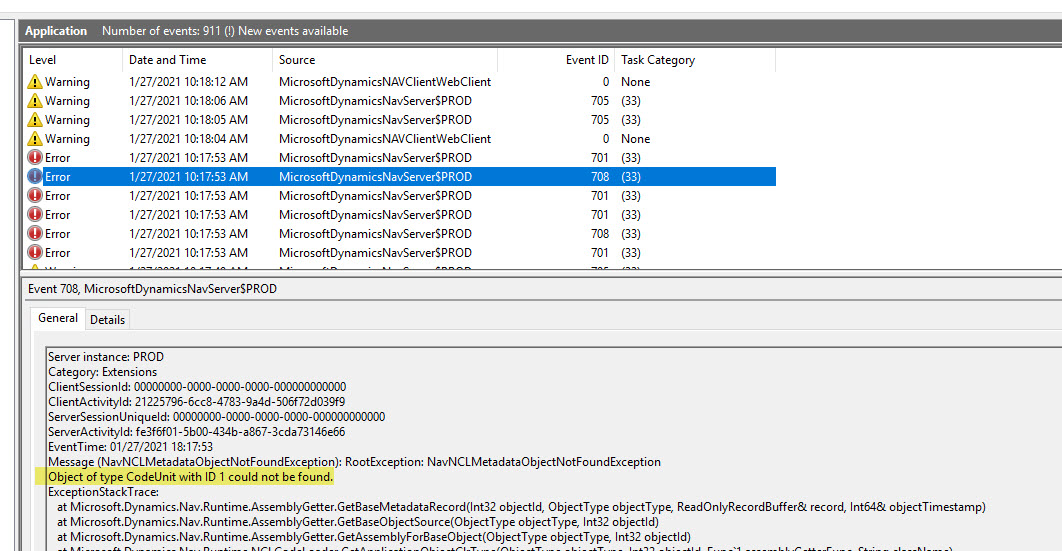
We are getting error of CU 1 in event viewer even though there is not reference for Codeunit 1 in any objects.

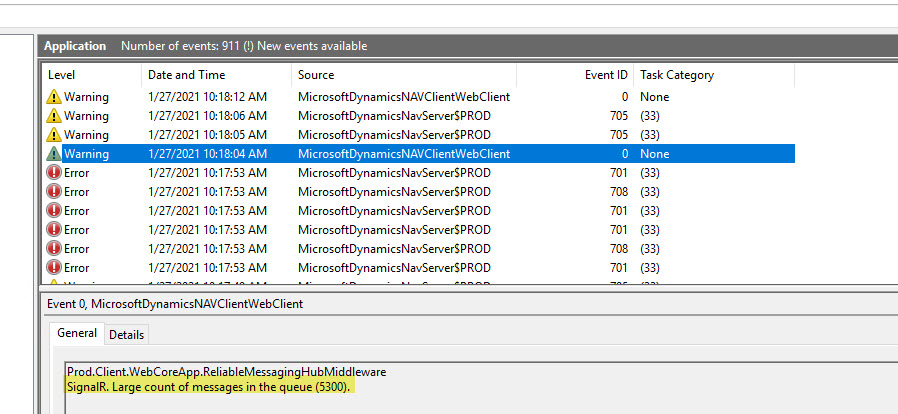
Also, event viewer has "SignalR: Large Count of message in the queue" warning. I have noticed users start to have more errors when this happens.

How can I get ride of this two issue? Any help/suggestion is appreciated.
1_5F00_2021_2D00_01_2D00_27_5F00_13_2D00_19_2D00_19.jpg2_5F00_2021_2D00_01_2D00_27_5F00_13_2D00_19_2D00_31.jpg

I have the same question (0)
  • Dipak Patel Profile Picture
    70 on at

    ApplicationPool QueueLength for Web Client is 1000 but still it shows 5300 Message in Queue. This is affecting RAM of Server and hence, user get slow performance.

  • Suggested answer
    Suresh Kulla Profile Picture
    50,269 Super User 2026 Season 1 on at

    Try to run the sync-navtenant command

  • Dipak Patel Profile Picture
    70 on at

    I have done it but does not make any difference.

    Message Count in SignalR Queue keeps increasing and hence, RAM utilization of server.

  • Suggested answer
    Suresh Kulla Profile Picture
    50,269 Super User 2026 Season 1 on at

    Dipak,

    That is just a warning,  have you tried restarting the services, and which BC version are you running? OnPrem or Saas?

  • Dipak Patel Profile Picture
    70 on at

    Thank you for reply.

    Yes, it is warning. But, 5300 Messages in Queue which occupies high amount of memory which creates issue for users.

    Yes, Server is restarted every day and hence, related Business Central services.

    We are on Business Central 14 Application CU11  Platform CU16 and using Web Client.

    Do you have idea for other error that says CU 1 metadata is not found in event viewer even though there is not reference for Codeunit 1 in any objects.

  • Suggested answer
    Suresh Kulla Profile Picture
    50,269 Super User 2026 Season 1 on at

    Metadata error usually occurs when the objects are not in sync, if you have already run the Sync-NAVTenant command then that is not an issue. Can you login to the client or it is stopping you to login? Do you have any extensions?

  • Dipak Patel Profile Picture
    70 on at

    Yes, I have already Sync-NAVTenant. I am able to login to client and everything works well but it keeps on showing event viewer frequently.

    we have 8-9 Add-on Extension..

    Do yu have any idea about below error? It consumes RAM on server and it gets slower?

    Also, event viewer has "SignalR: Large Count of message in the queue" warning. I have noticed users start to have more errors when this happens.

    3704.1_5F00_2021_2D00_01_2D00_27_5F00_13_2D00_19_2D00_19.jpg

  • JV-05122314-0 Profile Picture
    2 on at
    Hello.
    Has anyone solved this problem?
     
    Thanks.

Under review

Thank you for your reply! To ensure a great experience for everyone, your content is awaiting approval by our Community Managers. Please check back later.

Helpful resources

Quick Links

Introducing the 2026 Season 1 community Super Users

Congratulations to our 2026 Super Stars!

Congratulations to our 2025 Community Spotlights

Thanks to all of our 2025 Community Spotlight stars!

Leaderboard > Small and medium business | Business Central, NAV, RMS

#1
OussamaSabbouh Profile Picture

OussamaSabbouh 1,822 Super User 2026 Season 1

#2
YUN ZHU Profile Picture

YUN ZHU 1,136 Super User 2026 Season 1

#3
Dhiren Nagar Profile Picture

Dhiren Nagar 956 Super User 2026 Season 1

Last 30 days Overall leaderboard

Featured topics

Product updates

Dynamics 365 release plans