web
You’re offline. This is a read only version of the page.
close
Skip to main content

Announcements

Community site session details

Community site session details

Session Id :
Small and medium business | Business Central, N...
Suggested Answer

Error occur while shipping transfer order

(0) ShareShare
ReportReport
Posted on by 231

The Transfer Header does not exists. Identification fields and values No. = "TS-0001". This error occur while shipping the transfer order.

Can any one suggest some answer

Thanks in advance

I have the same question (0)
  • MahGah Profile Picture
    15,565 on at

    Hi

    Can you please share a screenshot of this TO. Both header and lines (to see QTY and Shipped QTY)?

    Thanks

  • yoheswaran Profile Picture
    231 on at

    TOH.pngTOL.png

    Thanks for the reply

    pastedimage1627999635998v1.png

    The error im getting

  • Suggested answer
    MahGah Profile Picture
    15,565 on at

    Hi 

    Thank you. This is kind of strange and I hope some community member can provide more info. But this what I see 

    The error refer to TS-XXXX but TO number is 1030. Can you please go to No Series and look for Transfer and see which No Series start with TS. Also, if Transfer Order starts with TS can you check to see if Manual No has been selected? If not, can you please select that and then try?  I mean the only thing I can see is No in TO number does not match the No Series BC provides and that could cause an issue. 

    Thanks 

    pastedimage1627999859266v1.png

  • yoheswaran Profile Picture
    231 on at

    Thank you, TS - XXX related to transfer shipment , and in No. Series transfer order - enabled the manual Nos also so as the user wish they can enter any number right?

    pastedimage1628000647264v1.png

  • Suggested answer
    MahGah Profile Picture
    15,565 on at

    "enabled the manual Nos also so as the user wish they can enter any number right?" That is correct.

    But this is not an issue here any more since TS number is related to transfer shipment and not transfer order. Somehow when BC wants to create Transfer shipment it cannot link this Transfer order to that Transfer Shipment number and generate one. Let me see if I can replicate this issue in our environment. 

    Do you have an issue with this specific TO or all TO have similar issue? 

    Thanks

  • yoheswaran Profile Picture
    231 on at

    Thanks , in TO for all scenario while shipping im getting the same error. In my point of view the transfer order value is not passing into transfer shipment

  • Suggested answer
    MahGah Profile Picture
    15,565 on at

    Hi

    I was not successful to replicate this issue and even I could not find anything about it. So sorry that I cannot help. Can you open ticket with Microsoft on this? Seems like your statement is true but I do not know how to solve it. 

    These are some random questions mainly to see if it can help you. 

    Do you have any specific customization for TO?

    Does user has a permission to ship transfer order?

    is this a new error after upgrade or installing any new app?

    Do you have all the following setup in Inventory Setup page? 

    Have you setup those parts in both locations? 

    Do you have bin setup in Transfer From location?

    Do you have bin setup in Transfer To location? 

    Thanks 
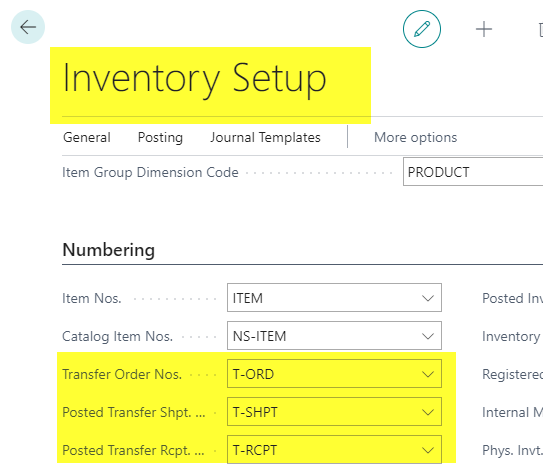
    pastedimage1628007643097v1.png

    Thanks

  • Suggested answer
    Community Member Profile Picture
    on at

    Hello,

    Adding to MahGah reply... If you go to Inventory Setup and check your Transfer Order Nos. Number Series to see what it states is the next Transfer Order No. You are most likely out of sync. The Transfer you show is 1030 and the error is for a number very different. Make sure your Last Transfer Order used in 1029.

    pastedimage1628049093042v1.png

    Thanks,

    Steve

  • seckpin Profile Picture
    35 on at

    Looking at your screenshot of the Transfer Order Header, it looks like there have been customisation or an add-on in your system. This error is likely caused by the customisation/add-on, so none of us could replicate the error in standard BC. You will want to ask your BC partner to take a look.

  • Suggested answer
    KAHUJA Profile Picture
    44 on at

    From the config packages, See if there are transfer lines sitting without any transfer headers. Those needs to be deleted as well.

Under review

Thank you for your reply! To ensure a great experience for everyone, your content is awaiting approval by our Community Managers. Please check back later.

Helpful resources

Quick Links

Introducing the 2026 Season 1 community Super Users

Congratulations to our 2026 Super Stars!

Congratulations to our 2025 Community Spotlights

Thanks to all of our 2025 Community Spotlight stars!

Leaderboard > Small and medium business | Business Central, NAV, RMS

#1
OussamaSabbouh Profile Picture

OussamaSabbouh 2,282 Super User 2026 Season 1

#2
YUN ZHU Profile Picture

YUN ZHU 1,212 Super User 2026 Season 1

#3
Dhiren Nagar Profile Picture

Dhiren Nagar 1,123 Super User 2026 Season 1

Last 30 days Overall leaderboard

Featured topics

Product updates

Dynamics 365 release plans


