web
You’re offline. This is a read only version of the page.
close
Skip to main content

Announcements

No record found.

News and Announcements icon
Community site session details

Community site session details

Session Id :
Small and medium business | Business Central, N...
Suggested Answer

Question : Bin Type

(0) ShareShare
ReportReport
Posted on by 44

Hi all,

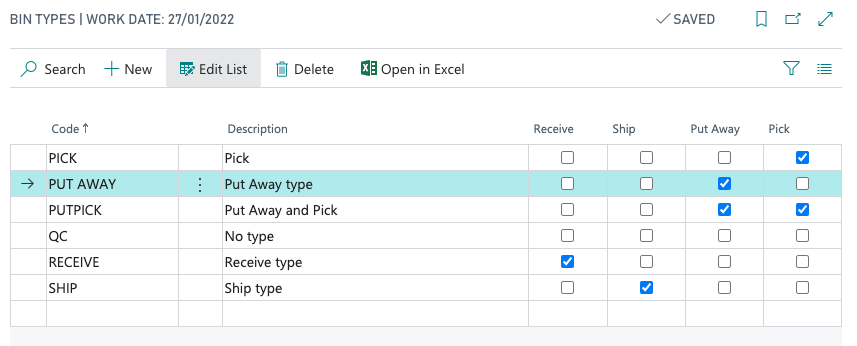
I was just wondering what the purpose of the Bin Type really is. I 've tried assigning a Bin Type = PUTAWAY to a Bin, and tested what functions will the system allow me to perform. I tried registering a Warehouse Pick from a PUT AWAY bin in Cronus, and it was registered successfully.  

Here are the steps performed:

1. Created a Purchase Order for ITEM001 with Qty = 10.

2. Posted a Warehouse Receipt for all the items.

3. Registered a Warehouse Put-away. Bin selected has bin type = PUT AWAY.
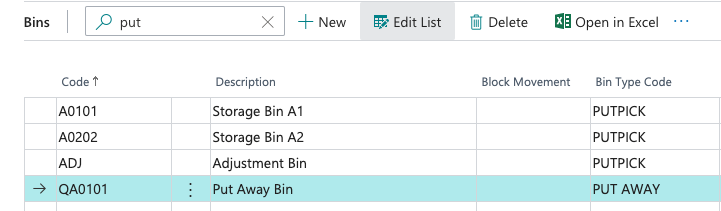
pastedimage1605859806393v3.png

pastedimage1605859922000v4.png

4. Created a Sales Order for the item that's sitting in the PUT AWAY bin.

5. Created a Warehouse Shipment, and from there created a Warehouse Pick. System did not allow me to create a Warehouse Pick, see prompt below:
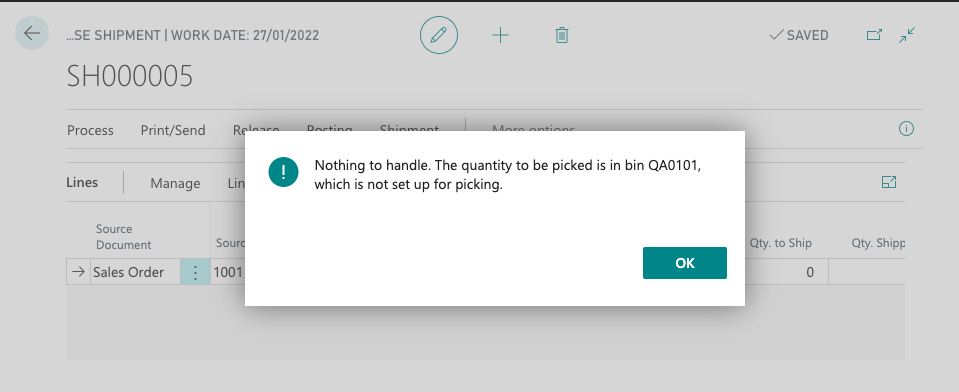
pastedimage1605859359169v1.png

6. What I did next was I created a warehouse movement and transferred half of the qty of ITEM001 to a PUTPICK bin. So now, for ITEM001 I have 10 Qty. 5 in the PUT AWAY bin, and 5 in the PUT PICK bin.

7. I went back to the Warehouse Shipment and created a Warehouse PIck. Note that the pick activity was successfully created though it's telling me that one of my bins is not set up for picking.
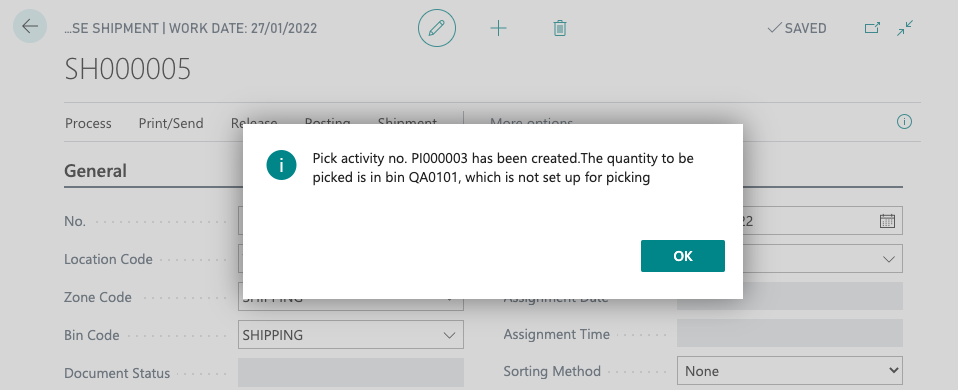
pastedimage1605859502575v2.png

8. In the Warehouse PIck, the system suggested to get it from the PUT PICK bin. What I did was I changed it in the Picking document so that system would pick from my PUT AWAY bin. I was expecting that system will not allow me to register the pick since I am getting it from a PUT AWAY bin.

9. Warehouse Pick document was successfully registered. The Warehouse Shipment was posted successfully too.

I tried the reverse process for a Bin Type = PICK. System allows me to do a Warehouse Put-away Process in the PICK bin.

Am I missing something here? Is this really how this should work? Appreciate your help. 

Thank you.

I have the same question (0)
  • Suggested answer
    Bilal Haider Profile Picture
    485 on at

    Hi,

    I really appreciate how you tried to run different scenarios to understand functionality. You are not missing anything. Based on Bin Types system gives you suggestion but you can always override the suggestion. And this is what you are showing above that you are overriding system suggestion and successfully posting the document.

    As per Microsoft:

    The bin type determines only how a bin is used when processing the flow of items through the warehouse. You can always override the suggestions for any warehouse document, and you can move items in or out of any bin by performing a warehouse movement.

    for more details: https://docs.microsoft.com/en-us/dynamics-nav-app/warehouse-how-to-set-up-bin-types#:~:text=There%20are%20eight%20bin%20types,you%20to%20record%20inventory%20discrepancies.

    Hopefully this will help you. Otherwise write if you still have some query.

    Mark this answer as verified if you are satisfied.

    Regards,

    Bilal

  • cheng02 Profile Picture
    44 on at

    Hi Bilal,

    Thank you for your response! This is highly appreciated. I was looking for a way to limit the function of a specific Bin to only warehouse movements and warehouse put-away. Seems like Bin Types will not address this scenario. Thanks again! :)

Under review

Thank you for your reply! To ensure a great experience for everyone, your content is awaiting approval by our Community Managers. Please check back later.

Helpful resources

Quick Links

Introducing the 2026 Season 1 community Super Users

Congratulations to our 2026 Super Stars!

Meet the Microsoft Dynamics 365 Contact Center Champions

We are thrilled to have these Champions in our Community!

Congratulations to the April Top 10 Community Leaders

These are the community rock stars!

Leaderboard > Small and medium business | Business Central, NAV, RMS

#1
OussamaSabbouh Profile Picture

OussamaSabbouh 2,086 Super User 2026 Season 1

#2
YUN ZHU Profile Picture

YUN ZHU 1,290 Super User 2026 Season 1

#3
AndrewThomas81 Profile Picture

AndrewThomas81 1,218

Last 30 days Overall leaderboard

Featured topics

Product updates

Dynamics 365 release plans