web
You’re offline. This is a read only version of the page.
close
Skip to main content

Announcements

No record found.

News and Announcements icon
Community site session details

Community site session details

Session Id :
Small and medium business | Business Central, N...
Suggested Answer

Planning Worksheet Problems!

(1) ShareShare
ReportReport
Posted on by 254

Hello everyone,

I hope you're doing well.

I’ve been working with the 'Calculate Regenerative Plan' in Business Central and have already defined the necessary SKUs. When I run the plan without any filters, I expect to see all material requirements and MPS; however, it doesn't generate some items as anticipated. Based on the released production order, BOM and the current inventory in the location, system should generate a shortage plan!
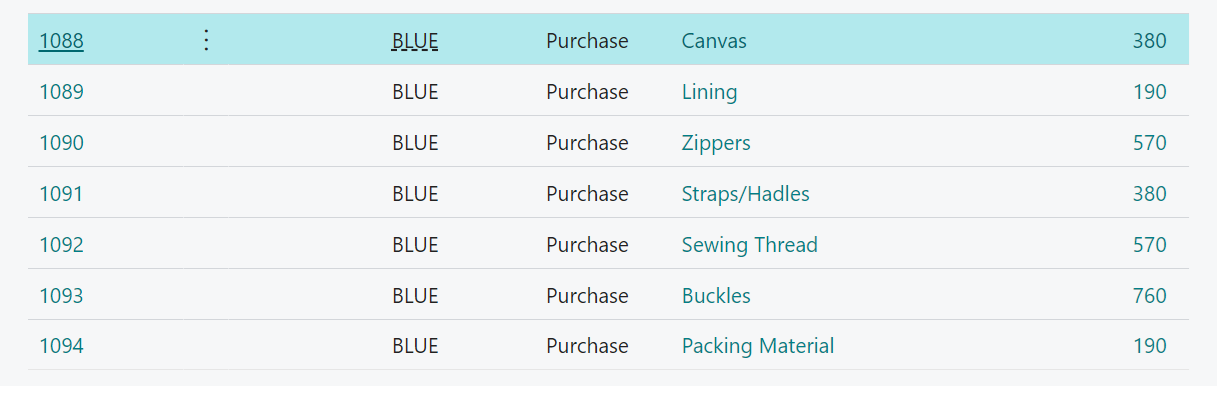
But without filtering, the planning engine cannot generate the above items. (The date in planning covers released production order date range!)

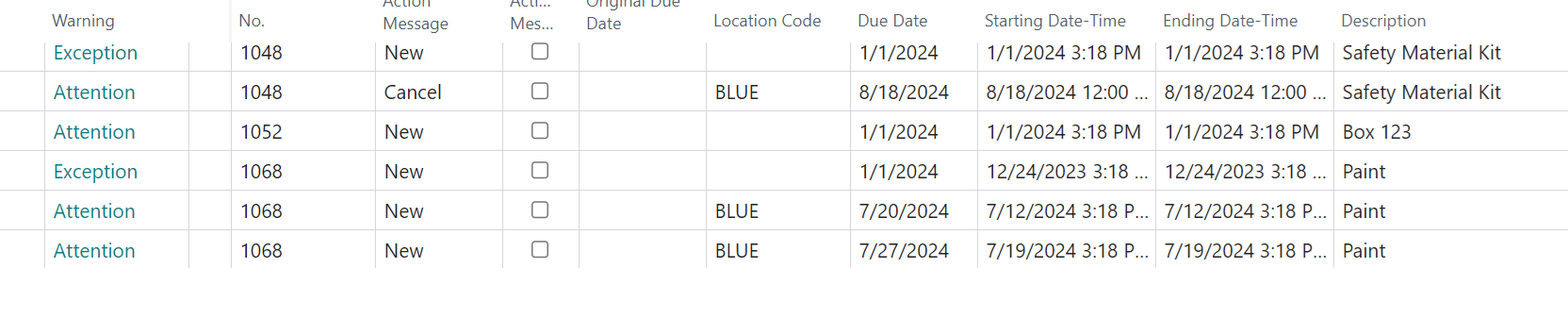
here is the result without filter! The above items cannot be generated!!
 

Interestingly, when I apply filters for specific items, the system generates the filtered items correctly—except for one. When I filter for this particular item alone, the system does generate the shortage, which makes the behavior seem inconsistent.

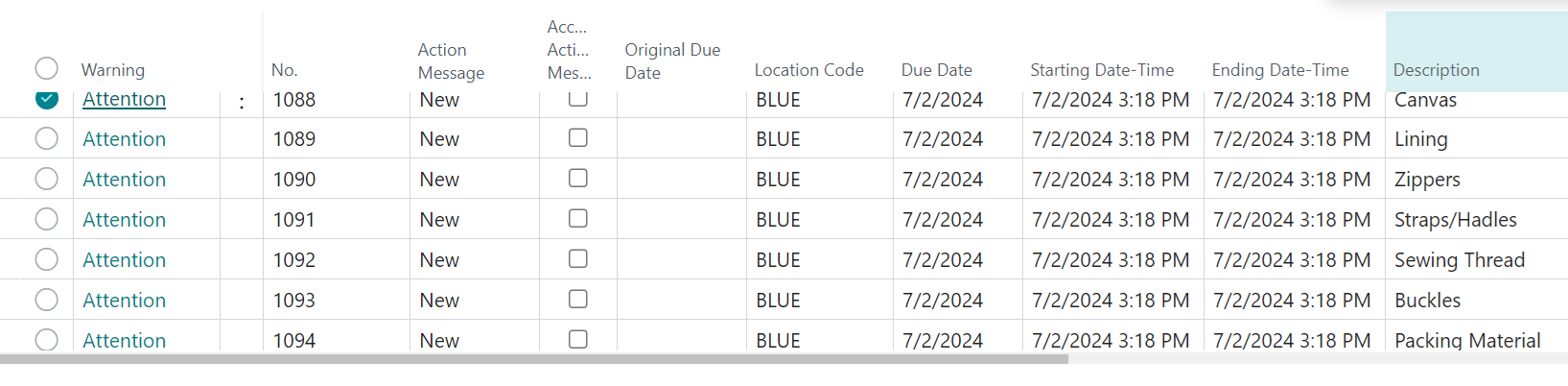
 

When I use filter, the system can generate but without cannot!!

I am using Business Central on the cloud, and this seems unusual, possibly a bug. Has anyone else encountered this issue or have suggestions on what might be happening?

Thank you in advance for your help!

Best regards,


I have the same question (0)
  • Jun Wang Profile Picture
    8,210 Moderator on at
    The description of the issue is quite general. Planning worksheet looks at parameters set up from different places. BC also looks at supply and demands. If you provide one item as example, and explain the setups, expected behaviors, and actual behavior, experts might be able to offer more specific insights/solutions. 
  • CU07101338-0 Profile Picture
    254 on at
    Hi,
    I've added some more details with my question. 
    Thanks in advance!
     
  • Gerardo Rentería García Profile Picture
    25,979 Most Valuable Professional on at
  • Suggested answer
    Khushbu Rajvi. Profile Picture
    22,283 Super User 2026 Season 1 on at
    You're experiencing an issue with the 'Calculate Regenerative Plan' in Business Central, where certain material requirements and shortages are not generated without filters, but work correctly when filters are applied. To address this, check the planning parameters, item setups, and released production orders for accuracy, and ensure inventory levels are correct.
  • Suggested answer
    Ben Baxter Profile Picture
    6,989 Super User 2026 Season 1 on at
    First, ensure "Dynamic Low-Level Code" is enabled in your Manufacturing Setup.  Next, run the "Calculate Low-Level Code" function.  Finally, re-run your planning without filters and see if you get the desired results.
     
    I can't be sure this will address your issue, but without having access to the data this would be the first thing to check.  If your Items have the wrong level assigned they will not pick up all demand during planning, but it would work when doing a single item plan (as all other demand is in place at that time).
     
    Hopefully this helps resolve your issue.  If not, reach out to your Business Central partner who can review the data to troubleshoot your issue.  99.9% of planning issues are data related.
     
    Best Regards,
    Ben Baxter
    Accent Software Inc
  • Suggested answer
    Valentin Castravet Profile Picture
    32,390 Super User 2026 Season 1 on at
    It would help us if you provided pictures of your item/sku set up.
     

Under review

Thank you for your reply! To ensure a great experience for everyone, your content is awaiting approval by our Community Managers. Please check back later.

Helpful resources

Quick Links

Introducing the 2026 Season 1 community Super Users

Congratulations to our 2026 Super Stars!

Meet the Microsoft Dynamics 365 Contact Center Champions

We are thrilled to have these Champions in our Community!

Congratulations to the March Top 10 Community Leaders

These are the community rock stars!

Leaderboard > Small and medium business | Business Central, NAV, RMS

#1
OussamaSabbouh Profile Picture

OussamaSabbouh 1,937 Super User 2026 Season 1

#2
YUN ZHU Profile Picture

YUN ZHU 1,031 Super User 2026 Season 1

#3
Khushbu Rajvi. Profile Picture

Khushbu Rajvi. 700 Super User 2026 Season 1

Last 30 days Overall leaderboard

Featured topics

Product updates

Dynamics 365 release plans
