web
You’re offline. This is a read only version of the page.
close
Skip to main content

Announcements

No record found.

News and Announcements icon
Community site session details

Community site session details

Session Id :
Microsoft Dynamics CRM (Archived)

Add (+) button missing for sub-grid Dynamics 365 9.0v

(0) ShareShare
ReportReport
Posted on by 401

Hello guys,

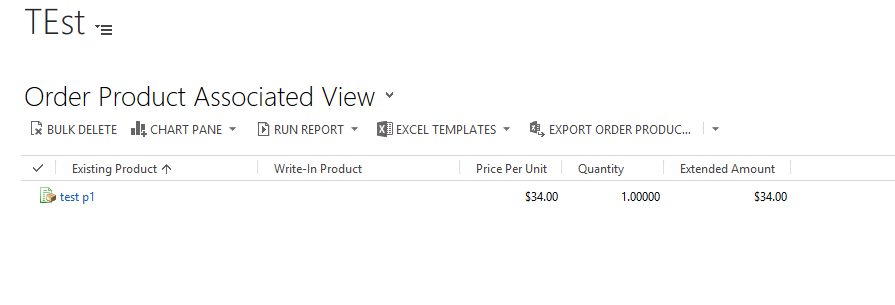
The add button of sub-grid is missing for order product entity. I have added an order product entity sub-grid on custom entity main form, but the add (+) button is missing. Even the associated view doesn't show the add button. 

Sub-grid screenshot
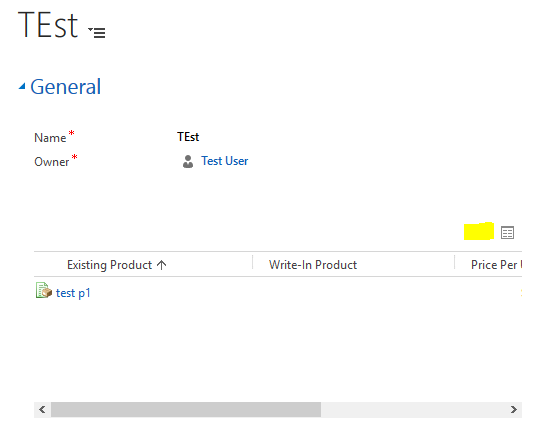
0245.Subgrid.PNG

Associated View screenshot

AssociatedGrid.PNG

Kindly please suggest how to get the add button.?

Dynamics CRM Version: 9.0

Thanks

Nitin

*This post is locked for comments

I have the same question (0)
  • Suggested answer
    Alex Fun Wei Jie Profile Picture
    33,628 on at

    Hi,

    are you test it using admin role? if No, try to use admin role to test it and see if the button is available.

    If you are using admin role and the button is available. Most likely you do not have the enough privilege.

  • ntn32 Profile Picture
    401 on at

    Hi,

    Yes i m testing this using admin role user, but still its not showing. :(

  • Alex Fun Wei Jie Profile Picture
    33,628 on at

    Hi

    are you able to create the record outside of parent entity?

  • ntn32 Profile Picture
    401 on at

    Yes,

    I m able to create order and order product and everything is working fine, just the sub-grid is giving trouble.

  • Alex Fun Wei Jie Profile Picture
    33,628 on at

    Hi,

    Recently, anyone from your company applied enable rule on subgrid button?

  • Suggested answer
    gdas Profile Picture
    50,091 Moderator on at

    Hi Nitin,

    Is there any ribbon rule applied for this ? You can check in ribbon for that entity in sub grid area whether it's showing or not by default.

  • Suggested answer
    Community Member Profile Picture
    on at

    Hi,

    Have you checked in IE11?

    Thank you

  • Suggested answer
    Alex Fun Wei Jie Profile Picture
    33,628 on at

    Hi Nitin,

    I finally understand your problem, this is the default behavior. You cant add order product from a custom entity.

    8311.15.png

    if you wan to try to change this behavior, perhaps you can open the order product and change the enable/display rule via RibbonWorkbench . Please make a backup for this.


    8311.15.png

  • Verified answer
    Alex Fun Wei Jie Profile Picture
    33,628 on at

    Hi,

    I've tried to disable the display rule, and the + is appear.

    conclusion, you have to modify the existing display rule, and most probably with next update, the CRM system will override back. So think twice.

    3833.16.png

  • ntn32 Profile Picture
    401 on at

    Thank you for the solution.

    Agree, with the next rollup, changes will be rolled back.

    So not preferred for production instance.

Under review

Thank you for your reply! To ensure a great experience for everyone, your content is awaiting approval by our Community Managers. Please check back later.

Helpful resources

Quick Links

Introducing the 2026 Season 1 community Super Users

Congratulations to our 2026 Super Stars!

Meet the Microsoft Dynamics 365 Contact Center Champions

We are thrilled to have these Champions in our Community!

Congratulations to the April Top 10 Community Leaders

These are the community rock stars!

Leaderboard > 🔒一 Microsoft Dynamics CRM (Archived)

Last 30 days Overall leaderboard

Featured topics

Product updates

Dynamics 365 release plans