web
You’re offline. This is a read only version of the page.
close
Skip to main content

Notifications

Announcements

No record found.

Community site session details

Community site session details

Session Id :
Microsoft Dynamics CRM (Archived)

Resource Types filter is missing values in Schedule Board

(0) ShareShare
ReportReport
Posted on by

Hi folks,

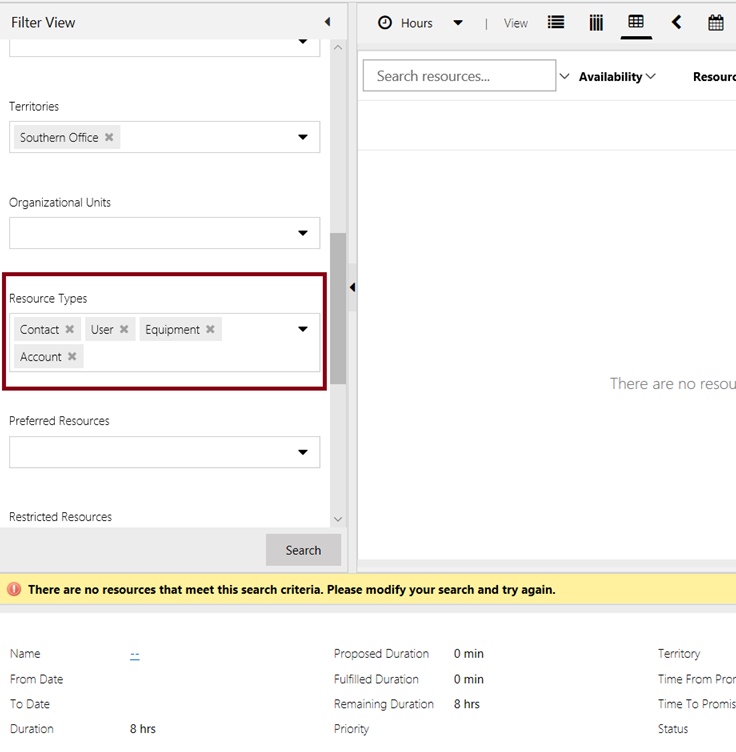
After click Book button on a Bookable Resource, it will show the Schedule Board. The problem is that I do not see all of the Resource Types in the filters:

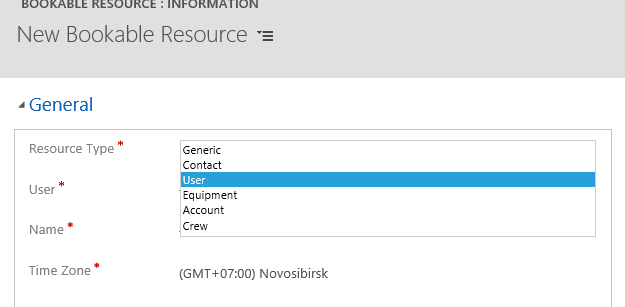
The list should have Generic, Contact, User, Equipment, Account and Group.

Some other orgs have the full list but mine does not have the full list. Is there any setting for these values or is it related to the version of Project Service?

Any suggestion is really appreciated!
schedule1.PNGschedule2.PNG

*This post is locked for comments

I have the same question (0)
  • Verified answer
    Thomas David Dayman Profile Picture
    11,323 on at

    Follow these to add more filters to schedule board:

    community.dynamics.com/.../287499

    www.cloudfronts.com/generic-type-bookable-resource-schedule-board-d365-field-service

  • Suggested answer
    Community Member Profile Picture
    on at

    Excellent, this is exactly I am looking for. Thank you Thomas.

Under review

Thank you for your reply! To ensure a great experience for everyone, your content is awaiting approval by our Community Managers. Please check back later.

Helpful resources

Quick Links

Responsible AI policies

As AI tools become more common, we’re introducing a Responsible AI Use…

Neeraj Kumar – Community Spotlight

We are honored to recognize Neeraj Kumar as our Community Spotlight honoree for…

Leaderboard > 🔒一 Microsoft Dynamics CRM (Archived)

#1
SA-08121319-0 Profile Picture

SA-08121319-0 4

#1
Calum MacFarlane Profile Picture

Calum MacFarlane 4

#3
Alex Fun Wei Jie Profile Picture

Alex Fun Wei Jie 2

Last 30 days Overall leaderboard

Featured topics

Product updates

Dynamics 365 release plans