web
You’re offline. This is a read only version of the page.
close
Skip to main content

Announcements

No record found.

News and Announcements icon
Community site session details

Community site session details

Session Id :
Microsoft Dynamics CRM (Archived)

Price List Items section not visible in the Price List Form

(0) ShareShare
ReportReport
Posted on by

Hi.

Fairly new user of Dynamics 365 here, so be indulgent please. 

I'm trying to configure our product catalog, but the only section that I am able to see in the Price List form is the "General" one. If I attempt to edit the form, I can see that the Price List Items are under the "Common" section, but I can't seem to find how to add it to the actual form. Any help would be greatly appreciated.

Here is what I'm able to see at the moment :
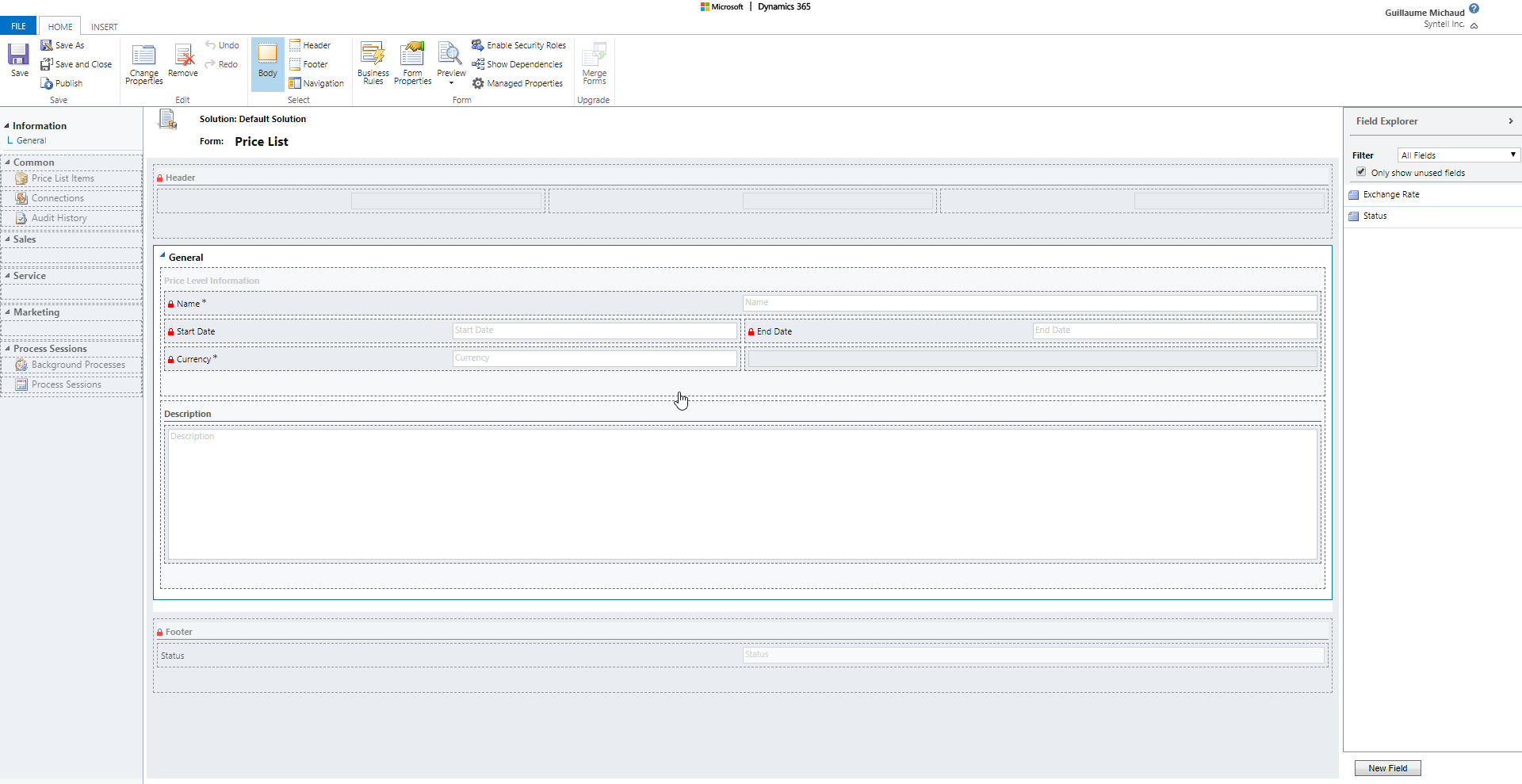
chrome_5F00_2018_2D00_03_2D00_02_5F00_11_2D00_06_2D00_38.png

Thanks in advance.

*This post is locked for comments

I have the same question (0)
  • a33ik Profile Picture
    84,331 Most Valuable Professional on at

    Hello,

    Try to add a subgrid - it's on "Insert" tab of form.

  • G. Michaud Profile Picture
    on at

    Sadly, I already tried different Insert options and was still unable to find a way to be able to drag the actual Price List Items entity on the form. Even when I select the navigation tab, all it does is put the different sections on the left of the screen shot in white. None of the actual fields become available on the right of the page for dragging.

  • a33ik Profile Picture
    84,331 Most Valuable Professional on at

    You will not get any fields available. Because this is related entity. You can only add a grid. That's it.

  • G. Michaud Profile Picture
    on at

    Again, this doesn't seem to do the trick. I can select a product from my list of product, but I am still unable to assign it a specific price for this price list. Am I supposed by default to see the Price List Items section on the Price List form? All the videos and the documentations that I consulted never mentioned anything about this difficulty that I am experiencing at the moment. I just want to be able to assign different pricing for the same product on various price lists. Am I assuming that this is the way to go wrongly?

Under review

Thank you for your reply! To ensure a great experience for everyone, your content is awaiting approval by our Community Managers. Please check back later.

Helpful resources

Quick Links

Introducing the 2026 Season 1 community Super Users

Congratulations to our 2026 Super Stars!

Congratulations to our 2025 Community Spotlights

Thanks to all of our 2025 Community Spotlight stars!

Leaderboard > 🔒一 Microsoft Dynamics CRM (Archived)

#1
Varsha deshpande Profile Picture

Varsha deshpande 5

#2
NeerajPawar Profile Picture

NeerajPawar 2

#2
jlattimer Profile Picture

jlattimer 2

Last 30 days Overall leaderboard

Featured topics

Product updates

Dynamics 365 release plans
