web
You’re offline. This is a read only version of the page.
close
Skip to main content

Announcements

No record found.

News and Announcements icon
Community site session details

Community site session details

Session Id :
Small and medium business | Business Central, N...
Suggested Answer

EventSubscriber has warning [AA0072]

(0) ShareShare
ReportReport
Posted on by 256

Hi All,

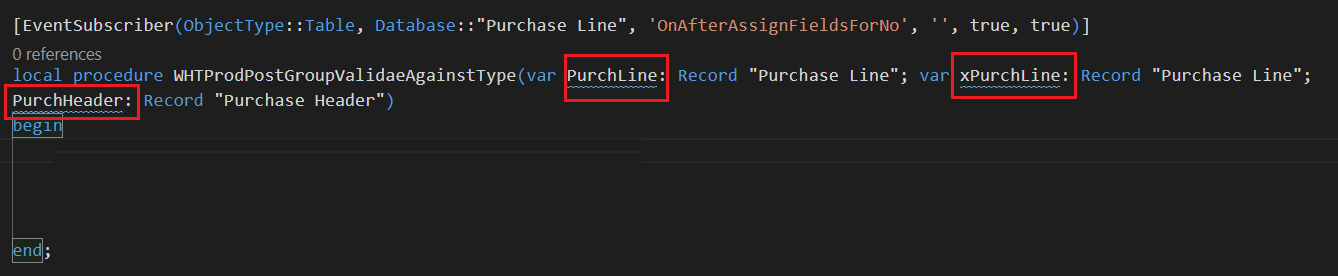
I have subscribed Event ie. "OnAfterAssignFieldsForNo" on "Purchase Line". see below Image.
AA0072.png

It. Show the Warining ie. The name of PurchLine is not valid. The name of variables and parameters must be suffixed with the type or object name. [AA0072].

Please suggest How to solve this error.

Thanks in Advanced.

I have the same question (0)
  • Suggested answer
    Marco Mels Profile Picture
    Microsoft Employee on at

    Hello,

    We currently do not have dedicated Dev support via the Dynamics 365 Business Central forums, but I wanted to provide you some additional resources to assist.  If you need assistance with debugging or coding I would recommend discussing this on one of our communities.

    www.yammer.com/dynamicsnavdev

    dynamicsuser.net/.../developers

    I will open this up to the community in case they have something to add.

    Thanks.

  • Daniel Rimmelzwaan Profile Picture
    3,485 on at

    That error is about the variable's name. Yours are called 'PurchLine' and 'xPurchLine', and this rule does not like that abbreviation. Change it to 'PurchaseLine' and 'xPurchaseLine' and the error should go away. It's one of the dumbest rules that they have. I don't agree with this convention, so I added AA0072 to my ruleset. They may make it mandatory at some point though, so maybe the easiest thing to do is just "fix" the variable names.

  • NeoMatrix Profile Picture
    256 on at

    Thanks for your reply. If have changed the name "PurchaseLine" instead of  "PurchLine". in the EventSubscriber. but It shows the error  "The member referenced by event subscriber 'WHTProdPostGroupValidaeAgainstType' parameter 'PurchaseLine' is not found.". So How to solve this warning.?

  • Daniel Rimmelzwaan Profile Picture
    3,485 on at

    Oh sorry my bad, I didn't notice that it's an event subscriber. Nothing you can do about that, because you have to use the parameter names that are defined in the event publisher.

    You will only be able to fix that if you can change the publisher itself.

Under review

Thank you for your reply! To ensure a great experience for everyone, your content is awaiting approval by our Community Managers. Please check back later.

Helpful resources

Quick Links

Introducing the 2026 Season 1 community Super Users

Congratulations to our 2026 Super Stars!

Meet the Microsoft Dynamics 365 Contact Center Champions

We are thrilled to have these Champions in our Community!

Congratulations to the March Top 10 Community Leaders

These are the community rock stars!

Leaderboard > Small and medium business | Business Central, NAV, RMS

#1
OussamaSabbouh Profile Picture

OussamaSabbouh 1,993 Super User 2026 Season 1

#2
YUN ZHU Profile Picture

YUN ZHU 1,116 Super User 2026 Season 1

#3
Khushbu Rajvi. Profile Picture

Khushbu Rajvi. 557 Super User 2026 Season 1

Last 30 days Overall leaderboard

Featured topics

Product updates

Dynamics 365 release plans
