web
You’re offline. This is a read only version of the page.
close
Skip to main content

Announcements

No record found.

News and Announcements icon
Community site session details

Community site session details

Session Id :
Microsoft Dynamics 365 | Integration, Dataverse...
Answered

Specify what grids are editable

(0) ShareShare
ReportReport
Posted on by 10

Hi,

I have activated the "Editable Grid" function on my opportunity entity but I only want specific views/grids to be editable.  Can anyone point me in the right direction as currently all views are editable.

Thanks

I have the same question (0)
  • protc Profile Picture
    Microsoft Employee on at

    Hi Martin,

    Thank you for your query.

    To add the Editable grid in a Subgrid on the entity form please find the steps here,

    docs.microsoft.com/.../make-grids-lists-editable-custom-control

    docs.microsoft.com/.../use-editable-grids-dynamics-365

  • Martin_Bell Profile Picture
    10 on at

    Thanks for your reply.

    Its not a SubGrid I am trying to edit.  I want to edit info in specific system views not all of them

    Thanks

  • Verified answer
    Linn Zaw Win Profile Picture
    3,407 on at

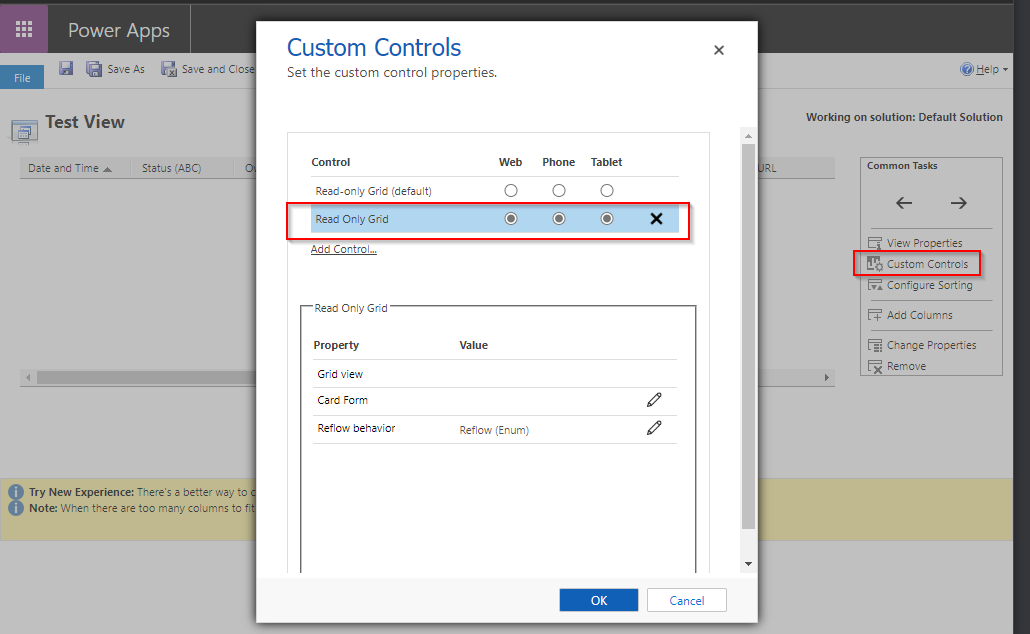
    If you only want specific views/grids to be editable, you will need to add Read-only Grid custom control for the views that you do not want to be editable. (yeah, I know it is a bit confusing)

    1. Add the Editable Grid custom control at the entity level (which you already have done for Opportunity entity)

    pastedimage1592477926574v1.png

    2. Open each and every view that you do not want to show editable grid. Click on Custom Controls and add "Read Only Grid"
    PS: You cannot do it the other way round because there is no Editable grid control available at the view level. Hope it helps.
    pastedimage1592478034737v3.png

    pastedimage1592477991765v2.png

  • Suggested answer
    Martin_Bell Profile Picture
    10 on at

    Thanks Linn - Perfect answer.  Its a bit long-winded but does the job!

Under review

Thank you for your reply! To ensure a great experience for everyone, your content is awaiting approval by our Community Managers. Please check back later.

Helpful resources

Quick Links

Introducing the 2026 Season 1 community Super Users

Congratulations to our 2026 Super Stars!

Meet the Microsoft Dynamics 365 Contact Center Champions

We are thrilled to have these Champions in our Community!

Congratulations to the March Top 10 Community Leaders

These are the community rock stars!

Leaderboard > Microsoft Dynamics 365 | Integration, Dataverse, and general topics

#1
11manish Profile Picture

11manish 176

#2
ManoVerse Profile Picture

ManoVerse 56 Super User 2026 Season 1

#3
Niki Patel Profile Picture

Niki Patel 42

Last 30 days Overall leaderboard

Product updates

Dynamics 365 release plans



