web
You’re offline. This is a read only version of the page.
close
Skip to main content

Announcements

No record found.

News and Announcements icon
Community site session details

Community site session details

Session Id :
Small and medium business | Business Central, N...
Answered

completed company

(0) ShareShare
ReportReport
Posted on by 2
Validation Results

You cannot enable the assisted company setup for an already active company.

I have the same question (0)
  • Dallefeld Profile Picture
    225 User Group Leader on at

    What is your question?

  • No. Series Profile Picture
    2 on at

    What should i do to complete the company?

  • Dallefeld Profile Picture
    225 User Group Leader on at

    Are you just wanting to see the Status show completed? Or is there something else?

  • No. Series Profile Picture
    2 on at

    I want to see it completed. I don't know why it is not completed.

  • Suggested answer
    Vaishnavi J Profile Picture
    3,094 on at

    Hi,

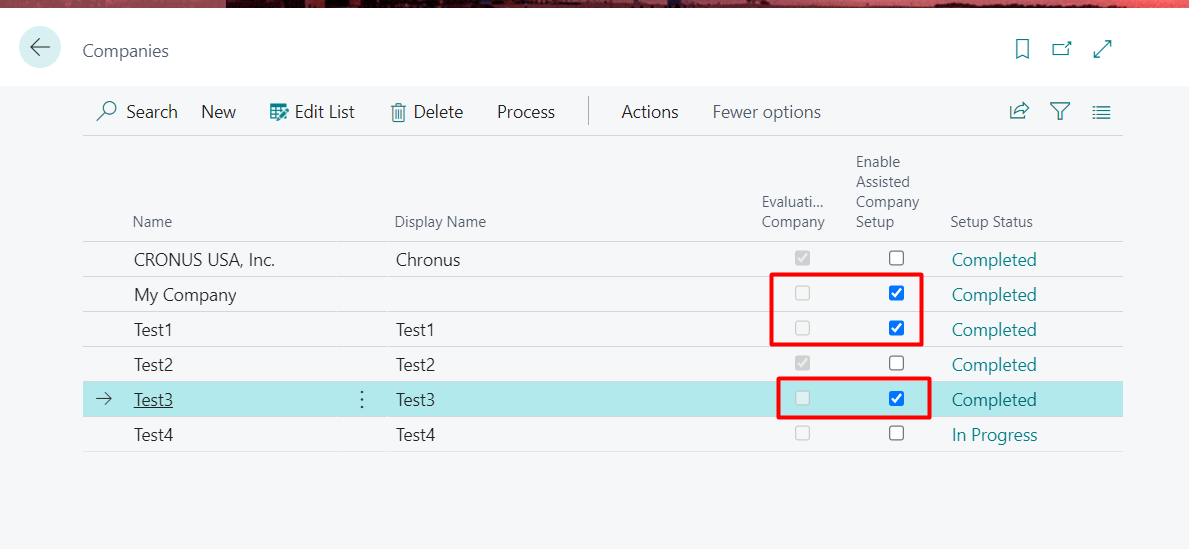
    Are you trying to check mark Enable Assisted Company Setup field in companies page?

    if yes this field is used to give you assisted company setup feature which will ensures that all the required setups are completed and the users can start using the system.

    Please note: You cannot turn it on for the company whose Evaluation company is checked because it will throw you the validation error.

    pastedimage1647277063054v1.png

    Also without Evaluation company check marked for the companies you can mark Enable Assisted setup.
    pastedimage1647277133655v2.png

    If my answer was helpful to you, please verify it so that other users know it worked. Thank you very much

  • Suggested answer
    Dallefeld Profile Picture
    225 User Group Leader on at

    Setup Status only moves to Completed is you use the Assisted Setup. If you company is up and running, however, it got there. this status is unimportant.

Under review

Thank you for your reply! To ensure a great experience for everyone, your content is awaiting approval by our Community Managers. Please check back later.

Helpful resources

Quick Links

Introducing the 2026 Season 1 community Super Users

Congratulations to our 2026 Super Stars!

Congratulations to our 2025 Community Spotlights

Thanks to all of our 2025 Community Spotlight stars!

Leaderboard > Small and medium business | Business Central, NAV, RMS

#1
OussamaSabbouh Profile Picture

OussamaSabbouh 1,965 Super User 2026 Season 1

#2
YUN ZHU Profile Picture

YUN ZHU 1,125 Super User 2026 Season 1

#3
Dhiren Nagar Profile Picture

Dhiren Nagar 961 Super User 2026 Season 1

Last 30 days Overall leaderboard

Featured topics

Product updates

Dynamics 365 release plans
