web
You’re offline. This is a read only version of the page.
close
Skip to main content

Announcements

No record found.

News and Announcements icon
Community site session details

Community site session details

Session Id :
Microsoft Dynamics 365 | Integration, Dataverse...
Suggested Answer

Dynamics 365 "Failed to Generate Excel" error

(0) ShareShare
ReportReport
Posted on by 10

Hello, colleagues.

I get an error of import and export data in CRM.

When I try to save some view or a result of advanced find in Excel, I get the next message:

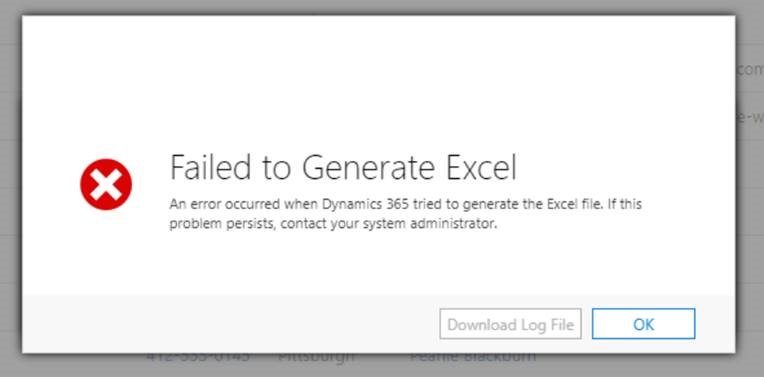
«Failed to Generate Excel. An error occurred when Dynamics 365 tried to generate the Excel file. If this problem persists, contact your system administrator».

It happens permanently about 1 time per week. When it appears, it affects all the 3 CRM instances on the shared server at once. After IIS reset it disappears, but later appears again.

When the error appears, we also cannot do out-of-the-box import from a file: the next message appears (something like, by memory): «Error. Repeat this action again. If this problem persists, address the MS Dynamics 365 Community or MS Dynamics 365 administrator…».

And, it is not that well-known error, when there are two columns with the same name in your view (checked)).

CRM version is Microsoft Dynamics 365 9.0 On-premise.

Could you please be so kind to let me know how to find the reason of the error or how to customize CRM server to get rid of it?Failed-to-Generate-Excel.jpg
I have the same question (0)
  • AriaConsulting Profile Picture
    4 on at

    Hi Alex,

    Do you have any columns in the view that have a lot of text in them?

  • Suggested answer
    Community Member Profile Picture
    on at

    Hi Alex,

    Check that you don't have two columns with the same display name, as this usually causes issues.

    If so, changing the display label for one of the fields so that display labels become unique in the view.

    (+) Failed to Generate Excel: An error occurred - Microsoft Dynamics CRM Community

    Regards,

    Leah Ju

    Please mark as verified if the answer is helpful. Welcome to join hot discussions in Dynamics 365 Forums.

  • Alex Bobov Profile Picture
    10 on at

    Hi Lorne,

    Nope(, it occurs if even I have the only 1 record with 1 string field of 10 symbols length in the view.

  • Alex Bobov Profile Picture
    10 on at

    Hi Leah,

    With my sorry no, I have no columns named with the same display name. Even more, the error occurs if I have only 1 record with only 1 column in the view I export (I checked). I saw that known error with doubled column names, but here is not this case...

  • AriaConsulting Profile Picture
    4 on at

    In this case then, you need to file a ticket with MS support.  Start with D365 support, but it could end up with Office support.  Really depends on what they can find.

  • Suggested answer
    CU04061257-0 Profile Picture
    on at
    I was getting same error and the posted suggestions did not apply to me.  I was able to fix this issue by restarting the IIS services.  After restarting IIS, the problem was resolved.  Dynamics 365 on prem

Under review

Thank you for your reply! To ensure a great experience for everyone, your content is awaiting approval by our Community Managers. Please check back later.

Helpful resources

Quick Links

Introducing the 2026 Season 1 community Super Users

Congratulations to our 2026 Super Stars!

Meet the Microsoft Dynamics 365 Contact Center Champions

We are thrilled to have these Champions in our Community!

Congratulations to the March Top 10 Community Leaders

These are the community rock stars!

Leaderboard > Microsoft Dynamics 365 | Integration, Dataverse, and general topics

#1
11manish Profile Picture

11manish 172

#2
ManoVerse Profile Picture

ManoVerse 58 Super User 2026 Season 1

#3
Niki Patel Profile Picture

Niki Patel 42

Last 30 days Overall leaderboard

Product updates

Dynamics 365 release plans
