web
You’re offline. This is a read only version of the page.
close
Skip to main content

Notifications

Announcements

No record found.

Community site session details

Community site session details

Session Id :
Microsoft Dynamics RMS (Archived)

How to change Quickbooks Company File Location

(0) ShareShare
ReportReport
Posted on by

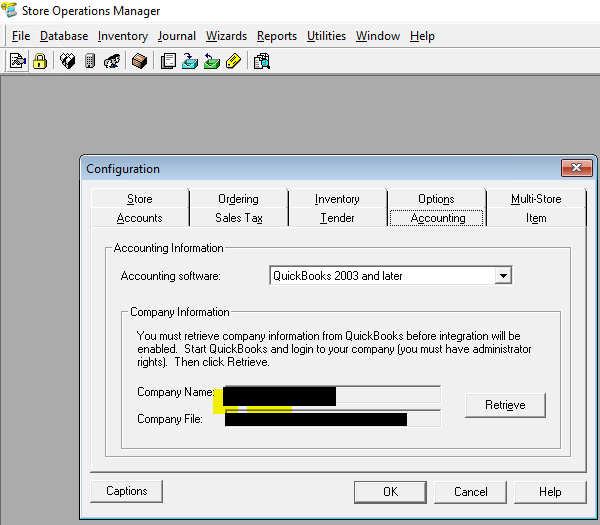
I just recently moved our Quickbooks company file from a users C: drive to a shared network folder.  Store Operations Manager is still looking for it on the C: drive.  I am unable to change the location in the Company Information under the Accounting tab in Configuration.  I have no experience with RMS.  How can I change this please?  
5810.RMS.png

*This post is locked for comments

I have the same question (0)
  • Suggested answer
    Community Member Profile Picture
    on at

    There isn't a built in way to change this once RMS is setup to synch.  

    You will have to edit the registry entry.

    run the regedit.exe app

    Goto (for 64bit OS)

    HKEY_LOCAL_MACHINE\SOFTWARE\Wow6432Node\Microsoft\Retail Management System\Store Operations\Accounting\QuickBooks

    or Goto (for 32bit OS)

    HKEY_LOCAL_MACHINE\SOFTWARE\Microsoft\Retail Management System\Store Operations\Accounting\QuickBooks

    Edit the DWord Value for "Filename".  (basically just double click the entry "Filename")

    Save

    Or you could simply delete the Filename entry and re-setup in RMS.

    Best of luck.

  • Community Member Profile Picture
    on at

    Thanks for your reply.  I looked for that registry entry but it didn't exist.  I reinstalled RMS on a PC and it had that info already in there and I couldn't change it. Is it possible that it might be "baked in" to the installer I have?

Under review

Thank you for your reply! To ensure a great experience for everyone, your content is awaiting approval by our Community Managers. Please check back later.

Helpful resources

Quick Links

Responsible AI policies

As AI tools become more common, we’re introducing a Responsible AI Use…

Neeraj Kumar – Community Spotlight

We are honored to recognize Neeraj Kumar as our Community Spotlight honoree for…

Leaderboard > 🔒一 Microsoft Dynamics RMS (Archived)

Last 30 days Overall leaderboard

Featured topics

Product updates

Dynamics 365 release plans
