web
You’re offline. This is a read only version of the page.
close
Skip to main content

Announcements

No record found.

News and Announcements icon
Community site session details

Community site session details

Session Id :
Small and medium business | Business Central, N...
Answered

How to add new filters to an account schedule report

(0) ShareShare
ReportReport
Posted on by

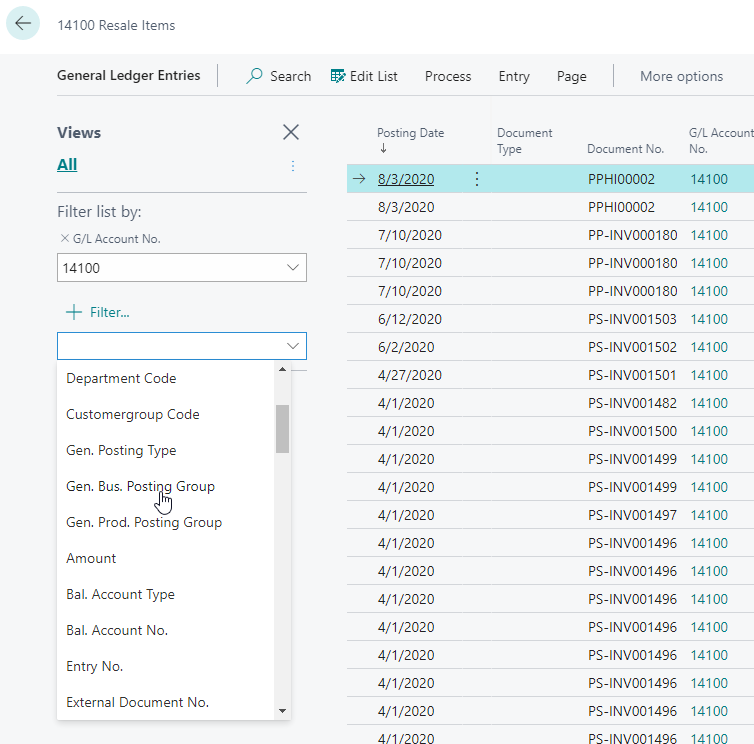
Account schedules and its rows are prepared using chart of accounts and relevant g/l entries. When it comes to viewing ledger entries, we have opportunity to add many filters. However, when any account schedule report is run there are limited filters are available. What's best way to add a few of the filters shown on list of g/l entries (for example, gen. bus. posting group, area code, gen. prod. posting group etc.) on account schedule report as well?
pastedimage1613510481305v1.png

Thanks in advance for your help and feedback!!

I have the same question (0)
  • Verified answer
    Alessandro Vannini 1 Profile Picture
    Microsoft Employee on at

    Hello Mbharodia

    when we talk about report the filter you can use are manged in the code of the report itself

    As you can see in the page we have the capability to add all the filter, but for report is not the same

    If in the code there isn't any code related to a specific filter even if you will add it it will not work

    If in the report you are trying to run the filter is not working you need to customize the report

    Hope this help

  • mbharodia Profile Picture
    on at

    Hi Alessandro

    So this verifies that account schedules need to be customized if more filters are needed like any other report. Thanks a lot for the updates.

Under review

Thank you for your reply! To ensure a great experience for everyone, your content is awaiting approval by our Community Managers. Please check back later.

Helpful resources

Quick Links

Introducing the 2026 Season 1 community Super Users

Congratulations to our 2026 Super Stars!

Congratulations to our 2025 Community Spotlights

Thanks to all of our 2025 Community Spotlight stars!

Leaderboard > Small and medium business | Business Central, NAV, RMS

#1
OussamaSabbouh Profile Picture

OussamaSabbouh 2,091 Super User 2026 Season 1

#2
YUN ZHU Profile Picture

YUN ZHU 1,032 Super User 2026 Season 1

#3
Dhiren Nagar Profile Picture

Dhiren Nagar 946 Super User 2026 Season 1

Last 30 days Overall leaderboard

Featured topics

Product updates

Dynamics 365 release plans
