Hi Everyone-
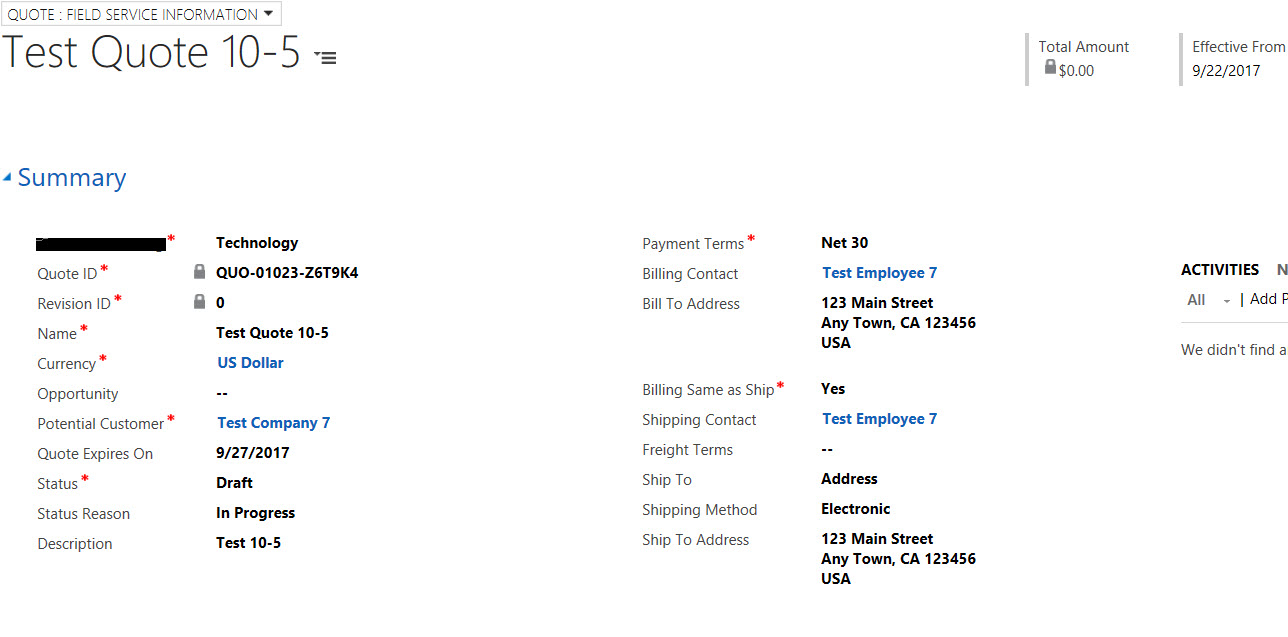
I have customized the Quote entity by adding a few fields, business process rules, and workflows. Below is a screen shot of our Quote entity. The first business process added populates the address from the contact entity for the Billing Contact to fill in Bill to Address field. The second business process does the same for Shipping Contact. The workflow is for the "Billing same as Ship" field. When marked "Yes" it copies the Billing info into the shipping fields. This all occurs after we save the form. When we go to activate the Quote we get the error, "Business Process Error The Entity cannon be updated because it is read-only." When we deactivate our business processes and workflow, the quote entity works fine. We are able to activate the quote, make revisions ect. However, it doesn't have the populated information we want on the quote. How do we enable these business processes and have the ability to activate and revise the quote? Thank you in advance!
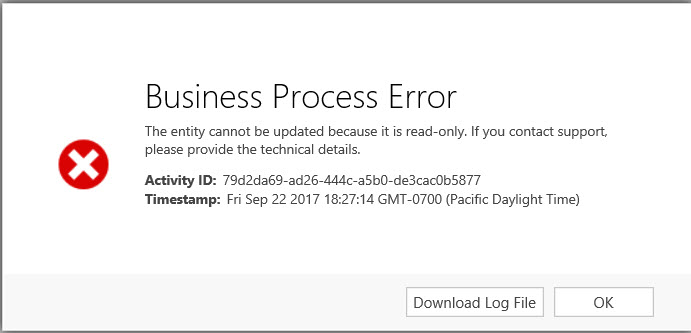
Error Detail
<s:Envelope xmlns:s="schemas.xmlsoap.org/.../envelope"><s:Body><s:Fault><faultcode>s:Client</faultcode><faultstring xmlns:xml="www.w3.org/.../namespace" xml:lang="en-US">The entity cannot be updated because it is read-only.</faultstring><detail><OrganizationServiceFault xmlns="schemas.microsoft.com/.../Contracts" xmlns:i="www.w3.org/.../XMLSchema-instance"><ActivityId>79d2da69-ad26-444c-a5b0-de3cac0b5877</ActivityId><ErrorCode>-2147220891</ErrorCode><ErrorDetails xmlns:a="schemas.datacontract.org/.../System.Collections.Generic"><KeyValuePairOfstringanyType><a:key>OperationStatus</a:key><a:value i:type="b:int" xmlns:b="www.w3.org/.../XMLSchema">0</a:value></KeyValuePairOfstringanyType><KeyValuePairOfstringanyType><a:key>SubErrorCode</a:key><a:value i:type="b:int" xmlns:b="www.w3.org/.../XMLSchema">-2146233088</a:value></KeyValuePairOfstringanyType></ErrorDetails><Message>The entity cannot be updated because it is read-only.</Message><Timestamp>2017-09-23T01:27:14.4695591Z</Timestamp><ExceptionRetriable>false</ExceptionRetriable><ExceptionSource i:nil="true" /><InnerFault><ActivityId>79d2da69-ad26-444c-a5b0-de3cac0b5877</ActivityId><ErrorCode>-2147220891</ErrorCode><ErrorDetails xmlns:a="schemas.datacontract.org/.../System.Collections.Generic"><KeyValuePairOfstringanyType><a:key>OperationStatus</a:key><a:value i:type="b:int" xmlns:b="www.w3.org/.../XMLSchema">0</a:value></KeyValuePairOfstringanyType><KeyValuePairOfstringanyType><a:key>SubErrorCode</a:key><a:value i:type="b:int" xmlns:b="www.w3.org/.../XMLSchema">-2146233088</a:value></KeyValuePairOfstringanyType></ErrorDetails><Message>The entity cannot be updated because it is read-only.</Message><Timestamp>2017-09-23T01:27:14.4695591Z</Timestamp><ExceptionRetriable>false</ExceptionRetriable><ExceptionSource i:nil="true" /><InnerFault><ActivityId>79d2da69-ad26-444c-a5b0-de3cac0b5877</ActivityId><ErrorCode>-2147220891</ErrorCode><ErrorDetails xmlns:a="schemas.datacontract.org/.../System.Collections.Generic"><KeyValuePairOfstringanyType><a:key>OperationStatus</a:key><a:value i:type="b:int" xmlns:b="www.w3.org/.../XMLSchema">0</a:value></KeyValuePairOfstringanyType><KeyValuePairOfstringanyType><a:key>SubErrorCode</a:key><a:value i:type="b:int" xmlns:b="www.w3.org/.../XMLSchema">-2146233088</a:value></KeyValuePairOfstringanyType></ErrorDetails><Message>The entity cannot be updated because it is read-only.</Message><Timestamp>2017-09-23T01:27:14.4695591Z</Timestamp><ExceptionRetriable>false</ExceptionRetriable><ExceptionSource i:nil="true" /><InnerFault i:nil="true" /><OriginalException i:nil="true" /><TraceText i:nil="true" /></InnerFault><OriginalException i:nil="true" /><TraceText i:nil="true" /></InnerFault><OriginalException i:nil="true" /><TraceText>
[Microsoft.Crm.ObjectModel: Microsoft.Crm.ObjectModel.SyncWorkflowExecutionPlugin]
[9d799aa0-129f-e711-8126-c4346bacba84: ]
Starting sync workflow 'Quote, Billing Contact Pop Address', Id: 7b799aa0-129f-e711-8126-c4346bacba84
Entering UpdateStep1_step:
Sync workflow 'Quote, Billing Contact Pop Address' terminated with error 'The entity cannot be updated because it is read-only.'
</TraceText></OrganizationServiceFault></detail></s:Fault></s:Body></s:Envelope>
*This post is locked for comments
I have the same question (0)


