web
You’re offline. This is a read only version of the page.
close
Skip to main content

Notifications

Announcements

No record found.

Community site session details

Community site session details

Session Id :
Microsoft Dynamics CRM (Archived)

Web Resource and Function Name on Advanced Find Columns

(1) ShareShare
ReportReport
Posted on by 162

On CRM 2016 I just noticed on Advanced Find, when editing Column Properties there's an option for Web Resource and Function Name. Please see screenshot.

Just wondering the purpose of this - is there any documentation on how to utilize this? Thanks in advance.
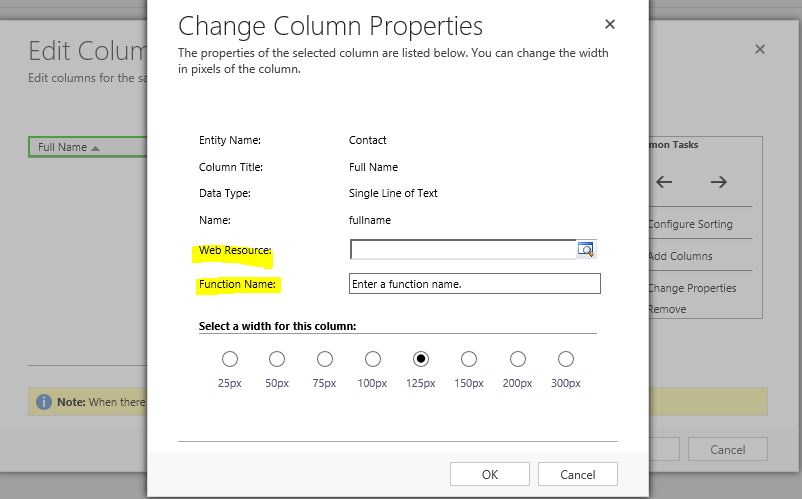
change-column-properties.JPG

*This post is locked for comments

I have the same question (0)
  • Suggested answer
    Adrian Begovich Profile Picture
    1,027 Moderator on at

    Hi triangular,

    This feature is for linking JavaScript to a column in a view. This article shows an example of the feature.

  • Verified answer
    gdas Profile Picture
    50,091 Moderator on at

    Hi ,

    This feature was introduced in the December 2016 update for Dynamics 365 (online and on-premises). Adding custom icons with tooltip is supported only for the read-only grids; this feature isn't supported for the editable grids.

    msdn.microsoft.com/.../gg328457.aspx

    community.dynamics.com/.../adding-icons-and-tooltips-to-grid-column-in-dynamics-365

    Hope this helps.

  • Verified answer
    Nithya Gopinath Profile Picture
    17,078 on at

    Hi,

    This functionality is used to show icons in the entity view based on some optionset value.

    See: www.linkedin.com/.../add-icons-view-columns-dynamics-crm-365-ahmad-sammour

    Hope this helps.

  • Verified answer
    Johnny Gong Profile Picture
    6,482 Moderator on at

    Hi triangular,

    The web resource is where to upload the js file to realize the customization function. You could refer to the following videoS to know more about the step by step taking advantage of Web Resources.

    www.youtube.com/watch

    www.youtube.com/watch

    BR

    Johnnyg

Under review

Thank you for your reply! To ensure a great experience for everyone, your content is awaiting approval by our Community Managers. Please check back later.

Helpful resources

Quick Links

Responsible AI policies

As AI tools become more common, we’re introducing a Responsible AI Use…

Neeraj Kumar – Community Spotlight

We are honored to recognize Neeraj Kumar as our Community Spotlight honoree for…

Leaderboard > 🔒一 Microsoft Dynamics CRM (Archived)

#1
SA-08121319-0 Profile Picture

SA-08121319-0 4

#1
Calum MacFarlane Profile Picture

Calum MacFarlane 4

#3
Alex Fun Wei Jie Profile Picture

Alex Fun Wei Jie 2

Last 30 days Overall leaderboard

Featured topics

Product updates

Dynamics 365 release plans
