web
You’re offline. This is a read only version of the page.
close
Skip to main content

Announcements

No record found.

News and Announcements icon
Community site session details

Community site session details

Session Id :
Supply chain | Supply Chain Management, Commerce
Suggested Answer

Import Ship now quantity in Transfer order by Excel add-in

(0) ShareShare
ReportReport
Posted on by

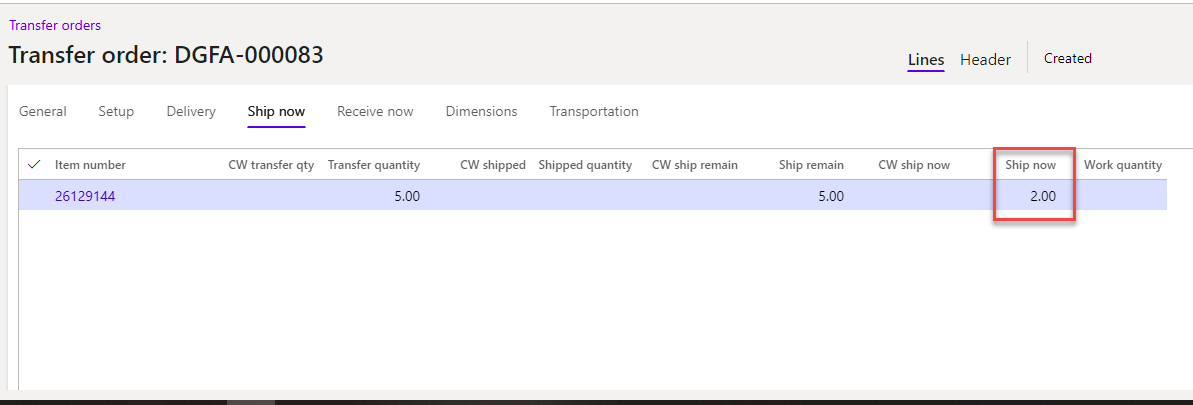
I have a Transfer order (TO) to transfer more than 100 items from Distribution center to a store, so I used Excel add-in to import them. At the step Ship TO (Shipment), in the case that the quantity of items is shipped lower than the Transfer order quantity, because there are many number of items, I intend to use the Ship now field to solve this. But I get a problem that I cannot import the Ship now field because It doesn't have in Transfer order lines table which is loaded via Excel add-in. So I stuck with this. Everybody know how to do it, please support me. Thank you so much.
pastedimage1604937513967v1.png

I have the same question (0)
  • Suggested answer
    André Arnaud de Calavon Profile Picture
    304,932 Super User 2026 Season 1 on at

    Hi Finn,

    There are actually fields for Ship now and Receive now. Check the fields SHIPNOWQUANTITY and RECEIVENOWQUANTITY.

  • Community Member Profile Picture
    on at

    Hi André,

    When I opened excel add-in, I tried finding those fields in InventTransferOrderLineEntity but it doesn't have, so I cannot import them.

    Could you give me in detail about how to load those fields in Excel add-in?

    Thank you so much ^_^

    pastedimage1605027086555v2.png

  • Suggested answer
    André Arnaud de Calavon Profile Picture
    304,932 Super User 2026 Season 1 on at

    Hi Finn,

    You are correct. These fields are set to be private in the Data entity design. That is causing the issue.  Not sure about the reason. They are also not available using the data management import projects.

    You can try to extend or copy the data entity and make changes to use these fields. It would require some development skills.

  • Community Member Profile Picture
    on at

    I tried and succeeded. Thank you a lot

Under review

Thank you for your reply! To ensure a great experience for everyone, your content is awaiting approval by our Community Managers. Please check back later.

Helpful resources

Quick Links

Introducing the 2026 Season 1 community Super Users

Congratulations to our 2026 Super Stars!

Meet the Microsoft Dynamics 365 Contact Center Champions

We are thrilled to have these Champions in our Community!

Congratulations to the April Top 10 Community Leaders

These are the community rock stars!

Leaderboard > Supply chain | Supply Chain Management, Commerce

#1
André Arnaud de Calavon Profile Picture

André Arnaud de Cal... 122 Super User 2026 Season 1

#2
Laurens vd Tang Profile Picture

Laurens vd Tang 94 Super User 2026 Season 1

#3
Zain Mehmood Profile Picture

Zain Mehmood 89 Most Valuable Professional

Last 30 days Overall leaderboard

Product updates

Dynamics 365 release plans
