web
You’re offline. This is a read only version of the page.
close
Skip to main content

Notifications

Announcements

No record found.

Community site session details

Community site session details

Session Id :
Microsoft Dynamics 365 | Integration, Dataverse...
Answered

How to get related entities using Flow

(0) ShareShare
ReportReport
Posted on by 90

Hello,

Im trying to use Flow to get related entities, im using the expand query to get at a few related entities.

I've been following this short example on this blog https://dynamicsbackpage.wordpress.com/2019/12/27/using-expand-query-in-power-automate-with-cds/

I am unable to get my related entities to show up in the dynamic content pane.

Here is my expand query

parentaccountid($select=name,accountnumber),parentcontactid($select=businesscard),owningbusinessunit($select=businessunitid)
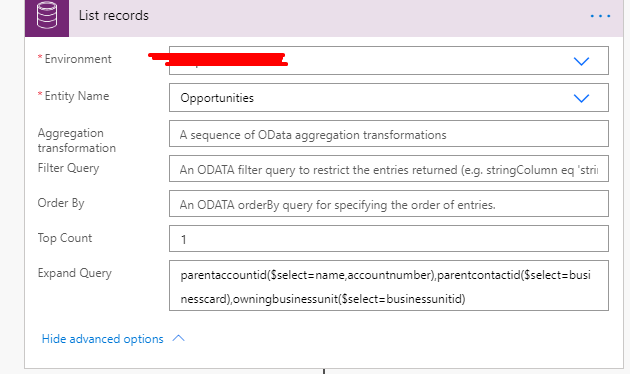
pastedimage1592574326981v1.png

when i search for account number i dont see it in the dynamic content pane
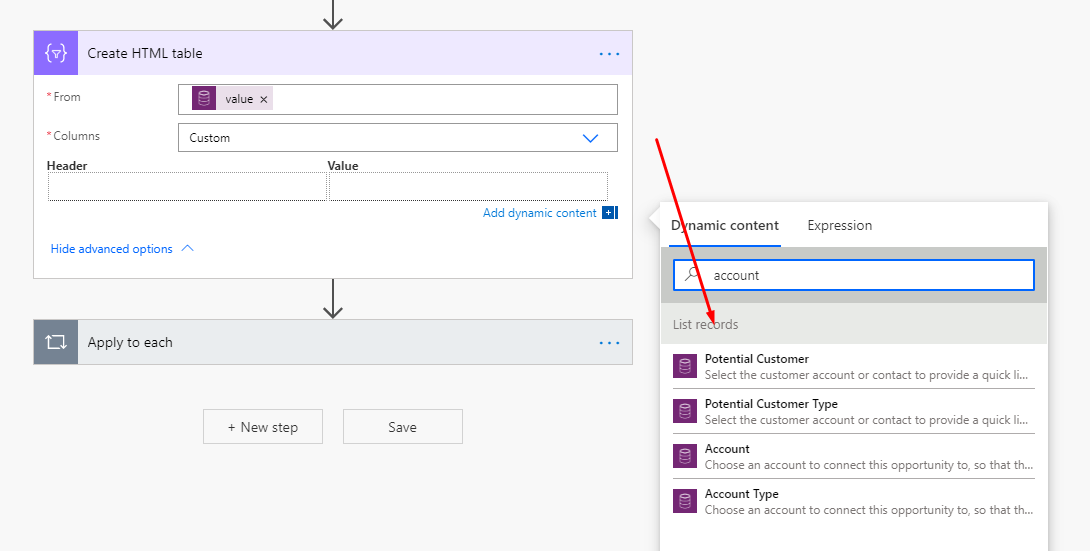
pastedimage1592574152682v2.png

Would someone be able to help?

Thanks!

I have the same question (0)
  • Verified answer
    Linn Zaw Win Profile Picture
    3,407 on at

    You are using the different CDS connector. You are supposed to use the Common Data Service (current environment) connector to see the related entities to show up in the dynamic content pane.

    pastedimage1592619657265v1.png

    This is the comparison of the dynamic content from the standard CDS connector and the CDS (current environment) connector with the expand query for parent account number.

    pastedimage1592619790696v2.png

    For any reason, if you need to use the standard CDS connector (e.g. cross-environment access), use the Parse JSON action to get the dynamic value from JSON object. You can find out more details in my blog.

    http://linnzawwin.blogspot.com/2019/12/power-automate-list-records-use-expand.html

  • Ainsley Profile Picture
    90 on at

    Thanks for the help! This approached worked for me when I was trying a many to one relationship. But when tried the expand query on a one to many relationship i dont see of the columns, would you know how i can see them?

  • Verified answer
    Linn Zaw Win Profile Picture
    3,407 on at

    For one to many relationships, you will need to use Parse JSON action.

    http://linnzawwin.blogspot.com/2019/12/power-automate-list-records-use-expand.html#getsampledata

    In the example below,

    contact_customer_accounts($select=fullname)

    1. List the Account Records with related Contacts (using the following expand query above)
    2. Parse JSON
    3. Loop the Account list from JSON body
    4. Loop the Contact list for each account
    5. Get the Full Name of the child Contact records of the Account

    pastedimage1592860141768v1.png

Under review

Thank you for your reply! To ensure a great experience for everyone, your content is awaiting approval by our Community Managers. Please check back later.

Helpful resources

Quick Links

Responsible AI policies

As AI tools become more common, we’re introducing a Responsible AI Use…

Neeraj Kumar – Community Spotlight

We are honored to recognize Neeraj Kumar as our Community Spotlight honoree for…

Leaderboard > Microsoft Dynamics 365 | Integration, Dataverse, and general topics

#1
Siv Sagar Profile Picture

Siv Sagar 93 Super User 2025 Season 2

#2
#ManoVerse Profile Picture

#ManoVerse 76

#3
Martin Dráb Profile Picture

Martin Dráb 66 Most Valuable Professional

Last 30 days Overall leaderboard

Product updates

Dynamics 365 release plans
