web
You’re offline. This is a read only version of the page.
close
Skip to main content

Announcements

No record found.

News and Announcements icon
Community site session details

Community site session details

Session Id :
Microsoft Dynamics CRM (Archived)

Using CRM contact when opening new email from another application

(0) ShareShare
ReportReport
Posted on by 100

Dear all,

one of our CRM users found out following problem with Microsoft CRM Outlook plug-in.

When I open a new email using New Email in Outlook ribbon I can open CRM address book (I click on Address book button in a new message window ribbon and then I switch to ORGANISATION - Contacts address book).

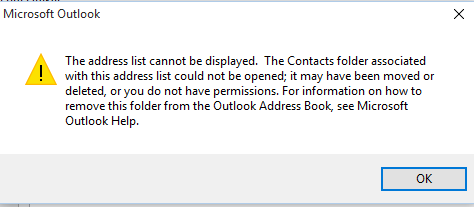
But when I open the new email window from another application (for example from Microsoft Excel via File -> Share -> Email -> Send as Attachment) then the CRM address books are not accessible. I see the following error message. Also the Check name button does not provide CRM contacts.

Could you please help me with this problem?

Many thanks.
5582.Capture2.PNG

*This post is locked for comments

I have the same question (0)
  • Hugo Silva Profile Picture
    1,374 on at

    Hi jiri.pesik,

    First was any update on CRM and that user din`t update the Outlook client?

    If nothing was changed try to do the following:

    Option 1

    1- Try to reconfigure the CRM Outlook client

    www.microsoft.com/.../set-up-crm-for-outlook.aspx

    Option 2

    1- On the outlook move all the contact`s to other new folder as backup

    2- Delete all of them in the existing folder

    3- Close Outlook and then try to sync again with CRM

    Option 3

    1- Re-install the CRM outlook client and install all again.

    I hope this helps,

  • Verified answer
    jiri.pesik Profile Picture
    100 on at

    Dear Hugo,

    thank you for your reply. We found out that there is no problem with contacts synchronization. CRM address books are not accessible in modal window even if they are synchronized well.

    We finally got to the following workaround: User has to add contact to his own Outlook address book. Than he is able to send them attachments directly from Excel and other applications.

    Maybe somebody will find this information useful.

    Best regards,

    Jiří

Under review

Thank you for your reply! To ensure a great experience for everyone, your content is awaiting approval by our Community Managers. Please check back later.

Helpful resources

Quick Links

Introducing the 2026 Season 1 community Super Users

Congratulations to our 2026 Super Stars!

Meet the Microsoft Dynamics 365 Contact Center Champions

We are thrilled to have these Champions in our Community!

Congratulations to the March Top 10 Community Leaders

These are the community rock stars!

Leaderboard > 🔒一 Microsoft Dynamics CRM (Archived)

#1
JS-09031509-0 Profile Picture

JS-09031509-0 3

#2
AS-17030037-0 Profile Picture

AS-17030037-0 2

#2
Mark Eckert Profile Picture

Mark Eckert 2

Last 30 days Overall leaderboard

Featured topics

Product updates

Dynamics 365 release plans
