web
You’re offline. This is a read only version of the page.
close
Skip to main content

Notifications

Announcements

No record found.

Community site session details

Community site session details

Session Id :
Small and medium business | Business Central, N...
Answered

(UK)CIS Reverse Charge VAT - How do i show VAT Rate(%) and/or VAT Value(£) to be paid by customer on Sales Invoice

(0) ShareShare
ReportReport
Posted on by 90

Hi,

Setup CIS Reverse Charge VAT for our client, which updates the GB VAT Return & GL, correctly.

However, the Sales Invoice document doesnt show the VAT Rate used or specify the VAT Value, to be paid to HMRC by the customer. Although there does seem to be a field for it on the report layout.

Please see attached screenshot, i have updated the VAT Clause to specify the VAT Rate used, for the time being.
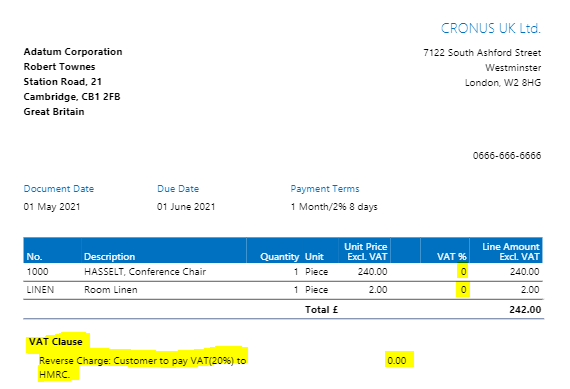
RC-VAT-Query.PNG

I have the same question (0)
  • James De Filippo Profile Picture
    90 on at

    Should add; screenshot example is from CRONUS UK Ltd. demonstration data and is using the default Sales Invoice layout.

    Same issue applies for the Purchase Invoice, side.

  • Community Member Profile Picture
    on at

    James,

    I am not from the UK but this is the best information I can find...

    You can use reverse charge VAT accounting for a specific range of items to prevent Missing Trader Inter-community Fund Fraud (MTIC), also known as carousel fraud. This feature is supplemented by the Reverse Charge Sales List report. The VAT accounting changes will affect companies trading in electronic goods and integrated circuit devices, such as mobile telephones, microprocessors, and central processing units. These goods will apply to reverse charges.

    pastedimage1620957268468v1.gifImportant
    Legislative information may be subject to change by HM Revenue & Customs (HMRC). For more information, see the HMRC website.

    To reverse charges on VAT

    1. In the Search box, enter VAT Business Posting Groups, and then choose the related link.

    2. Create a new VAT business posting group. Set up the needed VAT product posting groups.

    3. Open the pastedimage1620957268469v2.gifGeneral Ledger Setup window.

    4. On the Reverse Charge FastTab, fill in the fields as described in the following table.

      Field Description

      Threshold applies

      Specifies if reverse charge invoices will be processed.

      Threshold Amount

      Specifies the “de minimis rule” amount that is determined by the tax authorities. The reverse charge does not apply to supplies with a VAT-exclusive value below this amount.

    5. Open the pastedimage1620957268469v3.gifSales & Receivables Setup window.

    6. On the Reverse Charge FastTab, fill in the fields as described in the following table.

      Field Description

      Reverse Charge VAT Posting Gr.

      Specifies the VAT business posting group code for reverse charge VAT.

      Domestic Customers

      Specifies the VAT business posting group code for domestic customers.

      Invoice Wording

      Specifies the wording that is printed on the invoice to indicate that the invoice is a reverse charge transaction.

    7. Open the pastedimage1620957268469v4.gifPurchases & Payables Setup window.

    8. On the Reverse Charge FastTab, fill in the fields as described in the following table.

      Field Description

      Reverse Charge VAT Posting Gr.

      Specifies the VAT business posting group code for reverse charge VAT.

      Domestic Vendors

      Specifies the VAT business posting group code for domestic vendors.

    9. To set up items subject to reverse charge, select the item, and open the Item Card window.

    On the Invoicing FastTab, fill in the field as described in the following table.

    Field Description

    Reverse Charge Applies

    Specifies if this item is subject to reverse charge.

    Hope this helps.

    Thanks,

    Steve

  • James De Filippo Profile Picture
    90 on at

    Hi Steve,

    Thanks for getting back to me.

    The problem doesn't appear to be with the setup, which i find unusual but its what's being shown on the Invoices which doesn't seem to be correct. In that the VAT rate and/or VAT value isn't coming through on the documentation(print).

    Further to this, the specific reverse charge(for CIS) is based upon labour costs, opposed to specific items being sold. Regardless, this doesn't appear to work for 'stocked' items either, in that a VAT Rate isnt being pulled though onto the documentation and on the invoice statistics the VAT Rate shown is zero(0). See below screenshot of the 'VAT Amount specification' on Purchase Invoice, using RC VAT.

    Any other suggestions?

    Kind Regards,

    James

    pastedimage1621327662847v1.png

  • Suggested answer
    Community Member Profile Picture
    on at

    James,

    Based on your reply, this sounds like a bug, for your BC Version (UK). I would suggest contacting your Partner to submit a support request to Microsoft so they can investigate. One last thing, have you tested this in the Cronus database? When I encounter issues I try testing in the Cronus Company which normally is not customized to see if I can recreate. This would normally lead me to a bug.

    Hope this helps.

    Thanks,

    Steve

  • James De Filippo Profile Picture
    90 on at

    Hi Steve,

    Thanks for getting back to me.

    All my testing has been in the demonstration data(Cronus).

    It looks like a bug as even the default Reverse Charge VAT for EU, isnt showing any VAT Rate's or VAT Value under the VAT Amount Specification, which clearly isnt right.

    Il raise it with our supplier.

    Thanks

    James

  • Verified answer
    Marco Mels Profile Picture
    on at

    Hello,

    This is a confirmed bug and a fix is being rolled out in SaaS and later in OnPrem releases.

    REP 1306 is displaying wrong values for the SubTotal and Tax Amount.  This is a world-wide issue.  Without these values any custom layouts based on this dataset are also showing wrong information.  From our conversations with the product group, a fix has been identified and has been rolled out to all regions.  

    However, there is one more issue that is being looked at now.  If the Total Incl. VAT/Tax field ends in a zero decimal (.00) the decimal places are being dropped as well.

    This will be addressed by Microsoft with high priority as well.

    Thanks.

  • James De Filippo Profile Picture
    90 on at

    Hi Marco,

    Thanks for your reply.

    Disappointing but relieved at the same time - thought it could be a setup issue, initially.

    Do you know which version number this is resolved in? The customer is currently on: v18.1.24822.24906.

    Thanks

    James

  • Verified answer
    Marco Mels Profile Picture
    on at

    Hello,

    Hard to tell depending on what ring / region your customer is operating from. But it should be build 25467 or 25469. As far as I can track back is that the hotfix has been applied in all regions.

    Thanks.

  • James De Filippo Profile Picture
    90 on at

    Hi Marco,

    Many thanks!

    Il raise a support request through our partner centre to see if/when this can be applied.

    Kind Regards,

    James

Under review

Thank you for your reply! To ensure a great experience for everyone, your content is awaiting approval by our Community Managers. Please check back later.

Helpful resources

Quick Links

Responsible AI policies

As AI tools become more common, we’re introducing a Responsible AI Use…

Neeraj Kumar – Community Spotlight

We are honored to recognize Neeraj Kumar as our Community Spotlight honoree for…

Leaderboard > Small and medium business | Business Central, NAV, RMS

#1
OussamaSabbouh Profile Picture

OussamaSabbouh 3,143

#2
Jainam M. Kothari Profile Picture

Jainam M. Kothari 1,694 Super User 2025 Season 2

#3
YUN ZHU Profile Picture

YUN ZHU 1,067 Super User 2025 Season 2

Last 30 days Overall leaderboard

Featured topics

Product updates

Dynamics 365 release plans
Liquid error: parsing "/blogs/?blogid=e228a980-2f92-4b69-871d-442fe31c4b1a+or+1%27%3d%271%27+%2f**%2f%2f**%2fuNiOn%2f**%2fAlL+%2f**%2f%2f**%2fsElEcT+0x393631353738343330312e39%2c0x393631353738343330322e39%2c0x393631353738343330332e39%2c0x393631353738343330342e39%2c0x393631353738343330352e39%2c0x393631353738343330362e39%2c0x393631353738343330372e39%2c0x393631353738343330382e39%2c0x393631353738343330392e39%2c0x39363135373834333031302e39%2c0x39363135373834333031312e39%2c0x39363135373834333031322e39%2c0x39363135373834333031332e39%2c0x39363135373834333031342e39%2c0x39363135373834333031352e39+and+%271%27%3d%271" - Nested quantifier *.
